LLM Compressor, a unified library for creating compressed models for faster inference with vLLM, is now available. Neural Magic's research team has successfully utilized it to create our latest compressed models, including fully quantized and accurate versions of Llama 3.1, and with that, we are excited to open up the toolkit to the community with its first 0.1 release for general usage to compress your models!

In recent months, the high-performance computing team at Neural Magic has brought performant inference for various quantization schemes to vLLM, including custom Marlin kernels for weight-only quantization and custom CUTLASS kernels for INT8 and FP8 activation quantization.
However, before today, creating quantized checkpoints required navigating a fragmented ecosystem of bespoke compression libraries such as AutoGPTQ, AutoAWQ, AutoFP8, etc. We built LLM Compressor from the ground up as a single library for applying the latest compression best practices, including GPTQ, SmoothQuant, SparseGPT, and RTN, with many more actively being added. It works natively with Hugging Face models for seamless ease of use in the open source ecosystem, and vLLM supports directly loading checkpoints from LLM Compressor for accelerated inference.
Using LLM Compressor, you can create compressed, accurate versions of your models, including:
- Activation and weight quantization for up to 3X faster server/throughput deployments. This includes FP8 models using RTN for NVIDIA's Ada Lovelace and Hopper GPUs, and INT8 models using SmoothQuant and GPTQ for Nvidia's Turing and Ampere GPUs.
- Weight quantization for up to 4X faster latency with INT4 weight-only models using GPTQ for Nvidia's Ampere GPUs and newer.
- Weight pruning for up to 1.5X faster general performance with 2:4, 50% sparse models utilizing SparseGPT for Nvidia's Ampere GPUs and newer.
Enabling activation quantization in vLLM
Thanks to LLM Compressor's flexibility, it enables a critical new feature: activation quantization.
The open-source compression ecosystem thus far has focused mainly on weight-only quantization, including AutoGPTQ and AutoAWQ. Weight-only quantization enables smaller models and faster latency, but with 16-bit activations, the compute runs through the same 16-bit tensor cores as the unquantized model. This leads to slower inference for compute-heavy workloads due to the penalty of dequantizing the weights. Activation quantization, where the inputs to each layer are quantized, combined with weight quantization, enables utilization of the faster INT8 or FP8 tensor cores for the matrix multiplies, doubling the performance for compute-bound inference.
Weight-only quantization often fails to deliver speed improvements in production serving deployments. These environments typically result in compute-bound workloads with minimal benefits from weight-only quantization. Activation quantization, however, offers a substantial performance boost in such high-compute scenarios and faster inference at lower queries per second (QPS).
Figure 2 demonstrates a 1.6X speedup at 5 QPS for the INT8 weight and activation quantized model (w8a8) compared to the 16-bit baseline (w16a16), while the 4-bit weight quantized model (w4a16) shows little improvement.
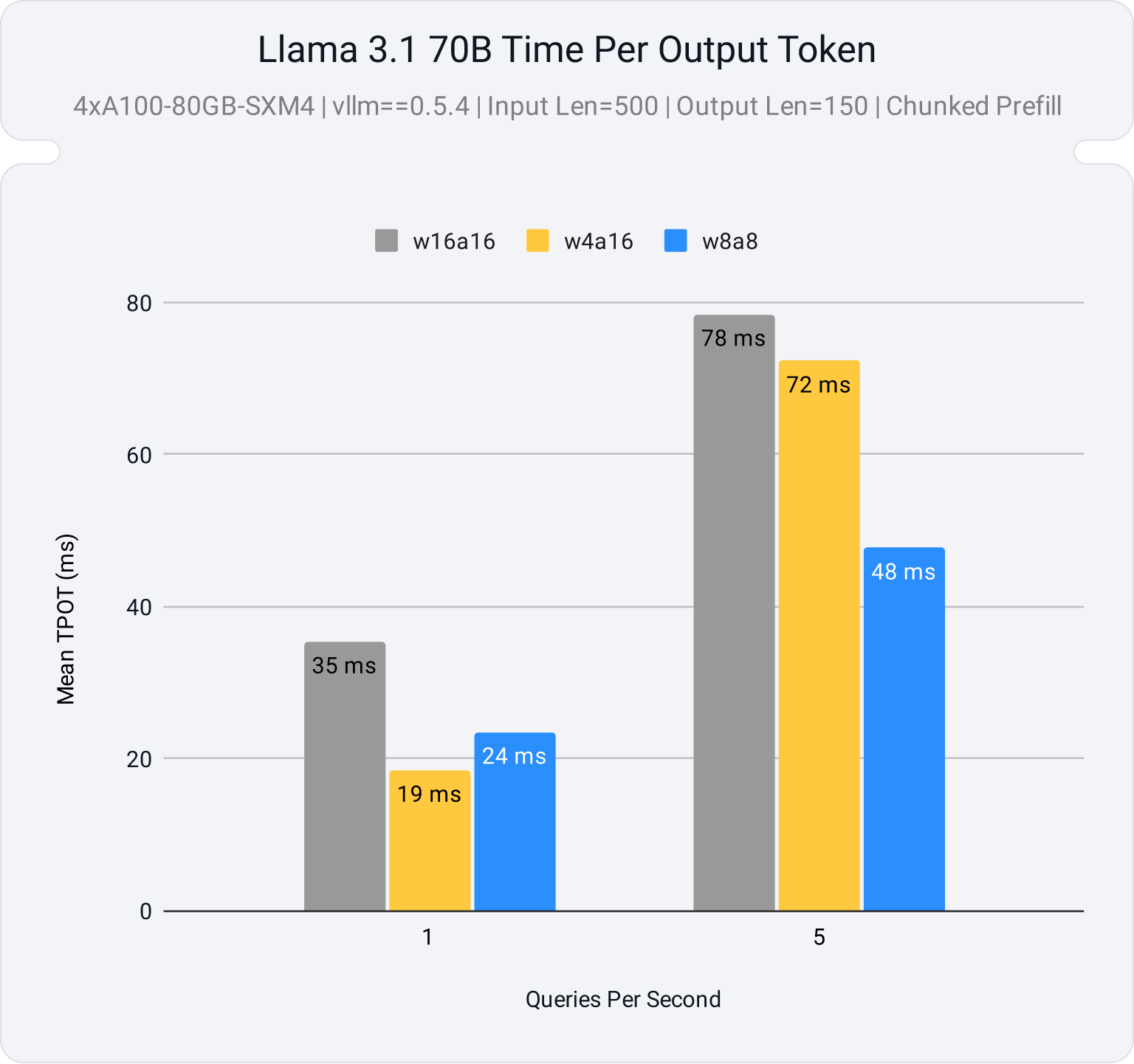
Activation quantization performance in vLLM
Let’s take an example of a Llama 3.1 70B running in vLLM on a 4xA100 GPU setup to see if this analysis holds up.
We will compare the serving latency for three variants for Llama 3.1 70B
- Unquantized FP16 (w16a16):
meta-llama/Meta-Llama-3.1-70B-Instruct - Weight and activation quantization to INT8 (w8a8):
neuralmagic/Meta-Llama-3.1-70B-Instruct-quantized.w8a8 - Weight-only quantization to INT4 (w4a16):
neuralmagic/Meta-Llama-3.1-70B-Instruct-quantized.w4a16
Figure 3 illustrates the average time to generate each new token (TPOT) across different server loads, measured in queries per second (QPS). Additionally, a deployment constraint of 5 seconds is set for the time to generate the first token (TTFT) to ensure the serving application maintains reasonable initial response times.
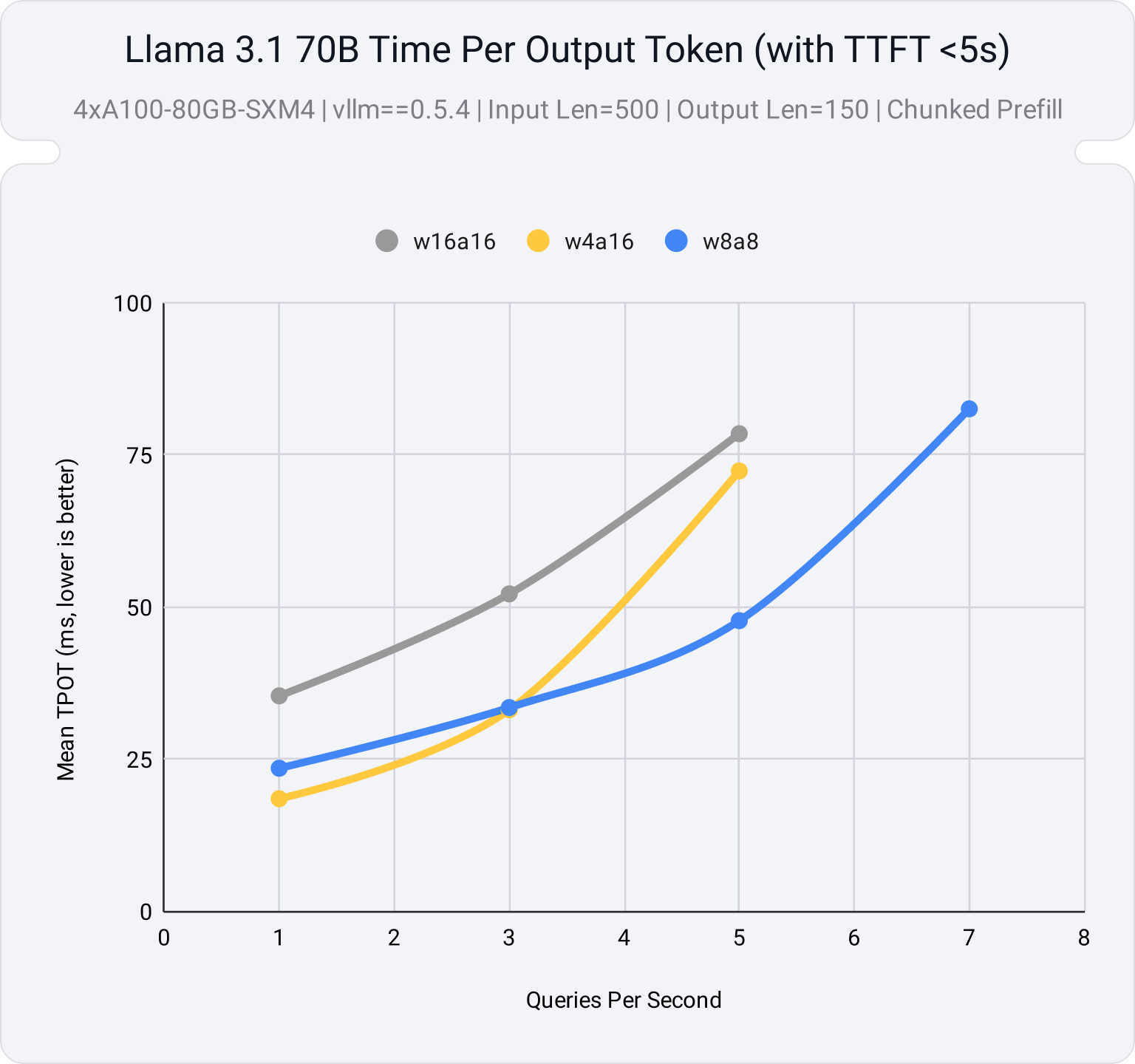
At low QPS, weight-only quantization offers improved latency relative to an unquantized model. However, as the server load increases and becomes compute-bound, the performance of the weight-only model levels off, matching the unquantized model. In contrast, the activation quantized model performs better under high load, supporting more queries per second before the system becomes overloaded and TTFT exceeds our limits for a responsive application.
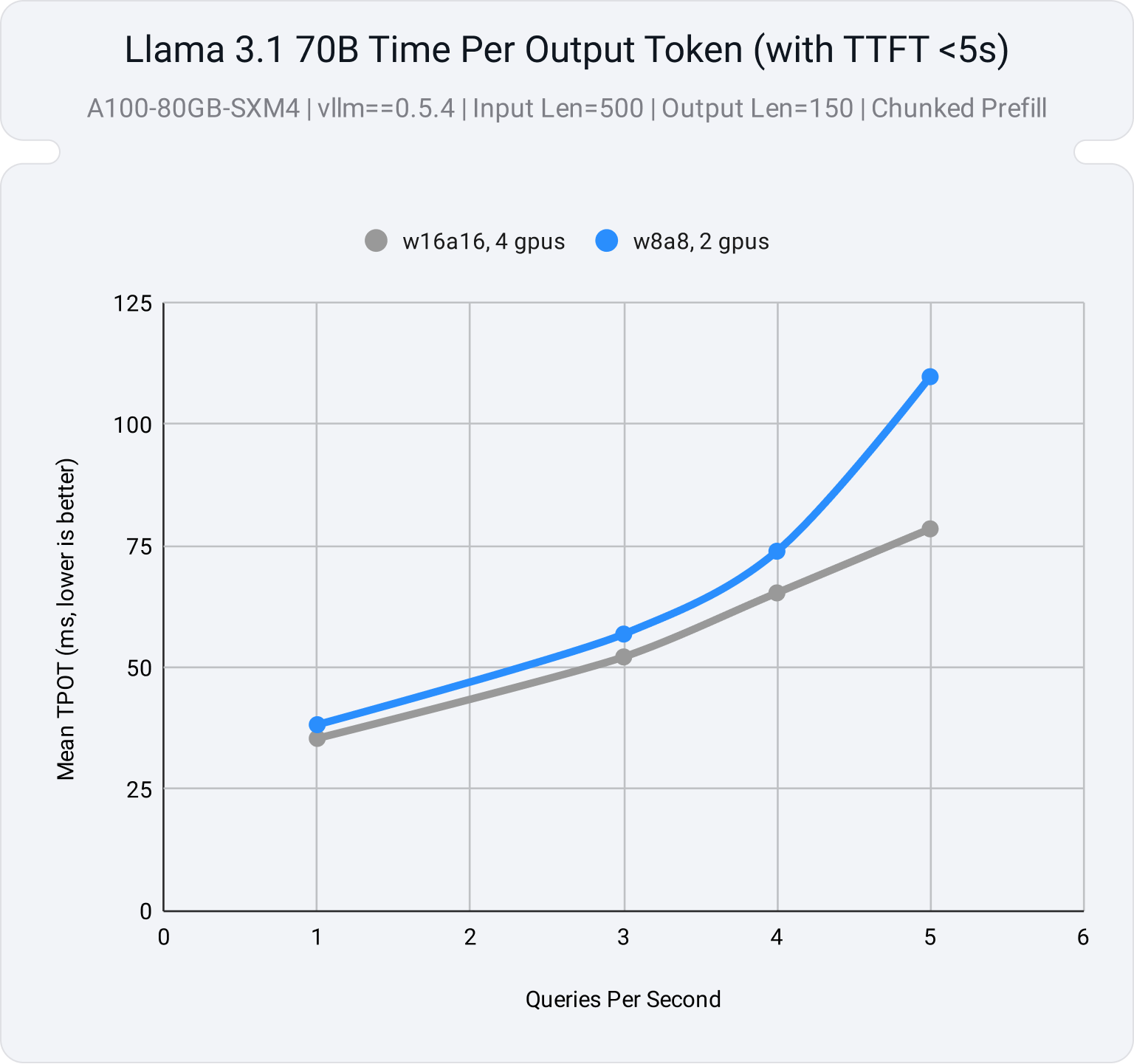
For a 70B model on an A100 system, we see that the W8A8 model achieves similar latency performance with just 2 GPUs compared to the unquantized model running with 4, meaning similar latency guarantees with half the resources!
Activation quantization accuracy
vLLM’s CUTLASS kernels for activation quantization offer flexible support for various schemes, allowing for a high degree of customization, including any combination of:
- Per-tensor or per-channel quantization for weights
- Per-tensor or per-token quantization for activations
- Symmetric or asymmetric quantized activations (for int8).
This flexibility in vLLM, combined with LLM Compressor's advanced algorithms such as GPTQ and SmoothQuant, ensures that model accuracy is maintained even after quantization. As we can see from the model card for neuralmagic/Meta-Llama-3.1-70B-Instruct-quantized.w8a8, we see a negligible drop using static per-channel weight scales and dynamic per token activation scales in comparison to the FP16 baseline on Open LLM (Table 1).
| Benchmark | Meta-Llama-3.1-70B-Instruct | Meta-Llama-3.1-70B-Instruct-quantized.w8a8 (this model) | Recovery |
|---|---|---|---|
| MMLU (5-shot) | 83.88 | 83.65 | 99.7% |
| MMLU (CoT, 0-shot) | 85.74 | 85.41 | 99.6% |
| ARC Challenge (0-shot) | 93.26 | 93.26 | 100.0% |
| GSM-8K (CoT, 8-shot, strict-match) | 93.10 | 93.25 | 100.2% |
| Hellaswag (10-shot) | 86.40 | 86.28 | 99.9% |
| Winogrande (5-shot) | 85.00 | 85.00 | 100.0% |
| TruthfulQA (0-shot, mc2) | 59.83 | 60.88 | 101.8% |
| Average | 83.89 | 83.96 | 100.2% |
This combination of fine-grained quantization and sophisticated algorithms enables users to achieve faster inference without compromising on the precision and reliability of their models.
Try LLM Compressor
The following snippet is a minimal example of quantizing meta-llama/Meta-Llama-3.1-8B-Instruct with INT8 weights and activations.
Install LLM Compressor via PyPi
LLM Compressor is available for installation via PyPI:
pip install llmcompressorApply quantization with the LLM Compressor
Quantization is applied by selecting an algorithm and calling the oneshot API, which applies the selections in a post-training setting.
In this case, we apply SmoothQuant to make the activations easier to quantize and GPTQ to apply the weight and activation quantization. We apply these algorithms to all linear layers of the network using the built-in open_platypus dataset (note: see the examples for how to use your own calibration set).
from llmcompressor.modifiers.quantization import GPTQModifier
from llmcompressor.modifiers.smoothquant import SmoothQuantModifier
from llmcompressor.transformers import oneshot
# Select quantization algorithm. In this case, we:
#   * apply SmoothQuant to make the activations easier to quantize
#   * quantize the weights to int8 with GPTQ (static per channel)
#   * quantize the activations to int8 (dynamic per token)
recipe = [
    SmoothQuantModifier(smoothing_strength=0.8),
    GPTQModifier(scheme="W8A8", targets="Linear", ignore=["lm_head"]),
]
# Apply quantization using the built in open_platypus dataset.
oneshot(
    model="meta-llama/Meta-Llama-3.1-8B-Instruct",
    dataset="open_platypus",
    recipe=recipe,
    output_dir="Meta-Llama-3.1-8B-Instruct-INT8",
    max_seq_length=2048,
    num_calibration_samples=512,
)
Inference compressed models with vLLM
The resulting model is ready to be loaded and run in vLLM out-of-the-box:
from vllm import LLM
model = LLM("./Meta-Llama-3.1-8B-Instruct-INT8")
output = model.generate("My name is")
print("Output:", output[0].outputs[0].text)
# Output: Jakob Schmid.  I live in the Republic of South Moluccas
Under the hood, vLLM understands how to load and run the compressed model by looking at the config.yaml next to the weight files. Check out some of our more detailed examples to try out other quantization flows:
- FP8 activation quantization with PTQ
- INT8 activation quantization with GPTQ and SmoothQuant
- INT4 weight-only quantization With GPTQ
LLM compressor roadmap
We have a robust roadmap planned to expand support for model compression in LLM Compressor. Our roadmap is prioritized across the following initiatives:
- Expand model support: Mixture of Experts (MoE) and vision-language models
- Expand algorithm and scheme support: AWQ, additional quantized floating point formats (fp8 and fp4), and KV cache quantization
- Support for non-NVIDIA hardware: We are actively collaborating with AMD, Google, and Intel teams to support models created by LLM Compressor on non-NVIDIA hardware devices.
- Tools for creating non-uniform quantization schemes
- 2:4 sparsity: Sparse foundation models, sparse fine-tuning from sparse foundational models, combining sparsity and quantization
- Expand support for training aware methods: Quantization-Aware Training (QAT) and Low-Rank Adaptation (LoRA)
If you have any feature requests, large or small, please comment on our Roadmap Issue in GitHub.
Final thoughts
At Neural Magic, we believe the future of AI is open, and we are on a mission to bring the power of open source models and vLLM to every enterprise on the planet.
We offer nm-vllm, an enterprise distribution of vLLM, with:
- Stable builds with bug fixes and selected model backporting
- Enterprise support with SLAs for production deployments of vLLM
- Tools and access to our teams for applying model optimizations via LLM Compressor
- Pre-optimized model registry
- Kubernetes reference architectures for production deployments
Appendix: Benchmark details
We used the following three model stubs:
meta-llama/Meta-Llama-3.1-70B-Instructneuralmagic/Meta-Llama-3.1-70B-Instruct-quantized.w8a8neuralmagic/Meta-Llama-3.1-70B-Instruct-quantized.w4a16
Models were deployed with the following command on A100-80GB-SXM4 (vllm==0.5.4):
MODEL=MODEL_STUB_TO_BENCHMARK \
vllm serve $MODEL \
--enable-chunked-prefill \
--disable-log-requests \
--tensor-parallel-size 4
We ran the following bash script in vllm-project/vllm to generate the data:
MODEL=MODEL_STUB_TO_BENCHMARK
TOTAL_SECONDS=120
QPS_RATES=("1" "3" "5" "7" "9")
for QPS in ${QPS_RATES[@]}; do
    NUM_PROMPTS=$((TOTAL_SECONDS * QPS))
    echo "===== RUNNING NUM_PROMPTS = $NUM_PROMPTS QPS = $QPS ====="
    python3 benchmarks/benchmark_serving.py \
        --model $MODEL \
        --dataset-name sonnet --sonnet-input-len 550 --sonnet-output-len 150 \
        --dataset-path benchmarks/sonnet.txt \
        --num-prompts $NUM_PROMPTS --request-rate $QPS
done