Page
Provision self-service API keys for external REST APIs
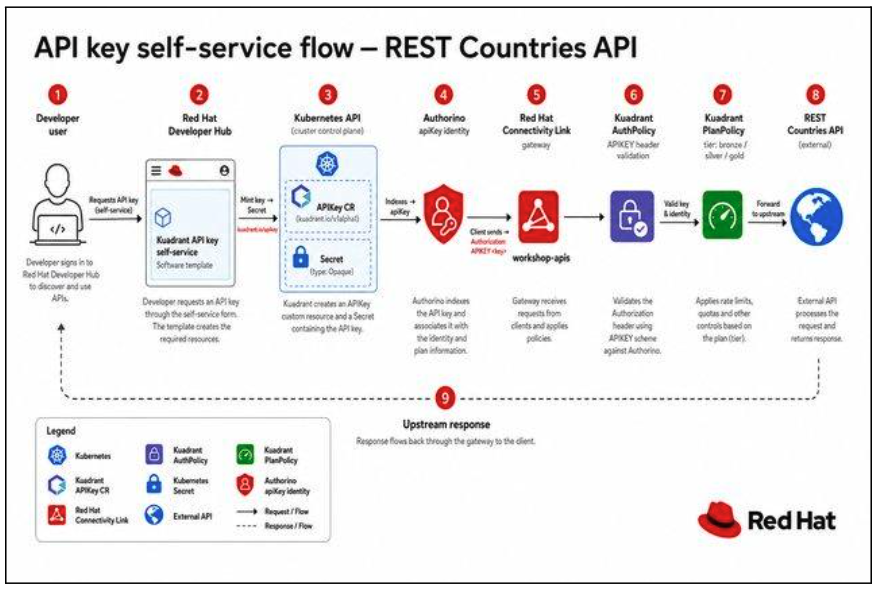
With Developer Hub and Connectivity Link installed, you can bring third-party REST endpoints behind a Kuadrant gateway and let developers request their own API keys. This lesson uses the public REST Countries API (countriesnow.space) as a stand-in for any external SaaS or existing service. Traffic enters through workshop-apis.<apps-domain>, and the AuthPolicy validates authorization. The APIKEY, and the PlanPolicy enforces bronze, silver, or gold rate limits.
Prerequisites:
- Complete the Install the hub-only stack with multi-cloud GitOps lesson.
- Developer Hub and the
workshop-apis-gatewayare reachable.
In this lesson, you will:
- Expose an external FQDN with Gateway API HTTPRoute and APIProduct.
- Configure AuthPolicy for API key authentication and PlanPolicy for tiered limits.
- Provision keys through the Developer Hub self-service template.
- Validate keys from Swagger UI and
curl.
Architecture overview
As illustrated in Figure 1 below, the API key path from Developer Hub goes through Authorino and the workshop-apis Gateway to the external REST Countries API. The Developer Hub creates an API key custom resource (CR) and labels it a Secret. Authorino indexes the key, and the client sends Authorization: APIKEY through the Gateway.
Component | Role |
|---|---|
Developer Hub | Self-service template and OpenAPI catalog |
APIProduct | Links HTTPRoute to a published product |
AuthPolicy | Validates Authorization: APIKEY header |
PlanPolicy | Rate limits by plan tier: bronze, silver, or gold |
Authorino | Loads API key secrets at startup |
Gateway workshop-apis-gateway | Hostname workshop-apis.<domain> |
Upstream | countriesnow.space (external REST API) |
Expose the external API with Gateway API
The REST Countries API is a public service on the internet (countriesnow.space), not a workload inside the cluster. An HTTPRoute on the workshop-apis Gateway publishes it at workshop-apis.<apps-domain> /countries/*. Clients call that cluster hostname, and the Gateway proxies the request to the external API so Connectivity Link can authenticate and rate-limit it.
Instead of a Kubernetes ExternalName service, which can introduce DNS quirks in some meshes, use a spec.backendRef object by using kind: Hostname in the networking.istio.io group with a URLRewrite filter. For example:
apiVersion: gateway.networking.k8s.io/v1
kind: HTTPRoute
metadata:
  name: workshop-restcountries
  namespace: workshop-kuadrant-apis
spec:
  parentRefs:
  - name: workshop-apis-gateway
  rules:
  - matches:
    - path:
        type: PathPrefix
        value: /countries
    filters:
    - type: URLRewrite
      urlRewrite:
        hostname: countriesnow.space
        path:
          type: ReplacePrefixMatch
          replacePrefixMatch: /api/v0.1/countries
    backendRefs:
    - group: networking.istio.io
      kind: Hostname
      name: countriesnow.space
      port: 443
An APIProduct custom resource registers the CustomResource (CR) so the Developer Hub can discover it:
apiVersion: devportal.kuadrant.io/v1alpha1
kind: APIProduct
metadata:
  name: workshop-restcountries
  namespace: workshop-kuadrant-apis
spec:
  httpRouteRef:
    name: workshop-restcountries
  publishStatus: Published
  approvalMode: automatic
The AI Computer Vision Helm charts declare these resources, which Argo CD reconciled when you applied the Pattern CR in the Install the hub-only stack with multi-cloud GitOps lesson.
Configure AuthPolicy for API keys
Kuadrant policies attach to routes rather than workloads, so you secure this external API the same way you would an internal microservice. The AuthPolicy targets the workshop-restcountries HTTPRoute and validates API keys from the cluster secrets labeled kuadrant.io/apikey: "true". For example:
apiVersion: kuadrant.io/v1
kind: AuthPolicy
metadata:
  name: workshop-restcountries-auth
  namespace: workshop-kuadrant-apis
spec:
  targetRef:
    kind: HTTPRoute
    name: workshop-restcountries
  when:
  - predicate: request.method != "OPTIONS"
  rules:
    authentication:
      api-key-users:
        apiKey:
          allNamespaces: true
          selector:
            matchLabels:
              kuadrant.io/apikey: "true"
              devportal.kuadrant.io/apikey-namespace: workshop-kuadrant-apis
        credentials:
          authorizationHeader:
            prefix: APIKEY
The spec.when section exempts Cross-Origin Resource Sharing (CORS) preflight requests from authentication. Browsers cannot attach an API key to preflight requests.
Apply PlanPolicy for tiered limits
Protect the external API from abuse with a PlanPolicy rather than a standalone RateLimitPolicy. The Kuadrant Backstage plugin discovers bronze, silver, and gold tiers directly in Developer Hub:
apiVersion: extensions.kuadrant.io/v1alpha1
kind: PlanPolicy
metadata:
  name: workshop-restcountries-plans
spec:
  targetRef:
    kind: HTTPRoute
    name: workshop-restcountries
  plans:
  - tier: bronze
    predicate: |
      has(auth.identity) && auth.identity.metadata.annotations["secret.kuadrant.io/plan-id"] == "bronze"
    limits:
    - rates:
      - limit: 5
        window: 1m
  - tier: silver
    predicate: |
      has(auth.identity) && auth.identity.metadata.annotations["secret.kuadrant.io/plan-id"] == "silver"
    limits:
    - rates:
      - limit: 15
        window: 1m
  - tier: gold
    predicate: |
      has(auth.identity) && auth.identity.metadata.annotations["secret.kuadrant.io/plan-id"] == "gold"
    limits:
    - rates:
      - limit: 60
        window: 1m
Each key stores its tier in the secret annotation secret.kuadrant.io/plan-id.
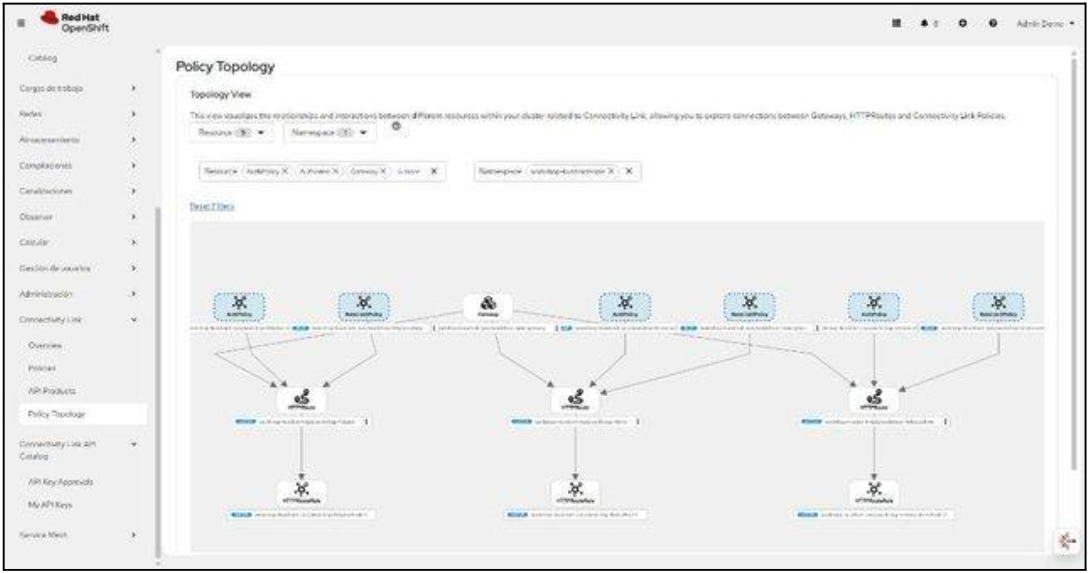
Figure 2 shows the OpenShift Connectivity Link Policy Topology for workshop-apis-gateway and the workshop-restcountries HTTPRoute.
Provision keys from Developer Hub
Red Hat® Connectivity Link 1.4.1 might not install the developer-portal-controller that normally approves APIKEY resources. The pattern ships a software template that replicates the controller lifecycle:
- Resolve
APIProductfrom the catalog entity. - Create
APIKeyCR with generateName. - Create Secret with labels Authorino expects;
key value = APIKey.metadata.uid. - Patch
APIKeystatus toApproved.
Figure 3 shows the Developer Hub Self-service catalog with the Kuadrant API key self-service template.
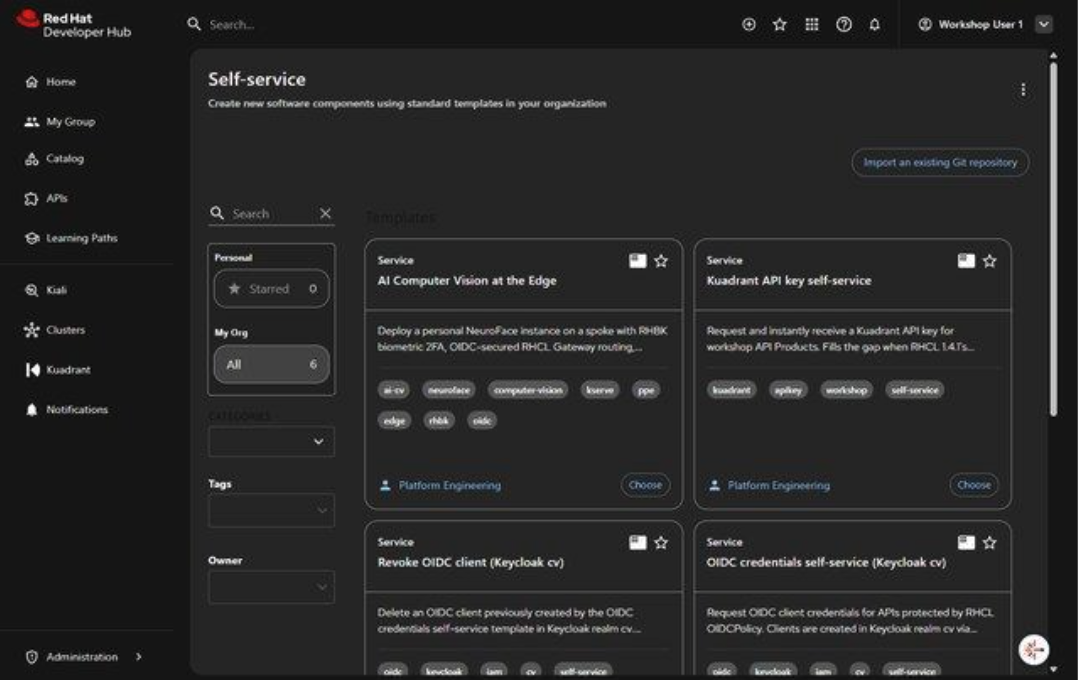
Figure 4 shows the API key request form with target API, requester, and plan tier fields.
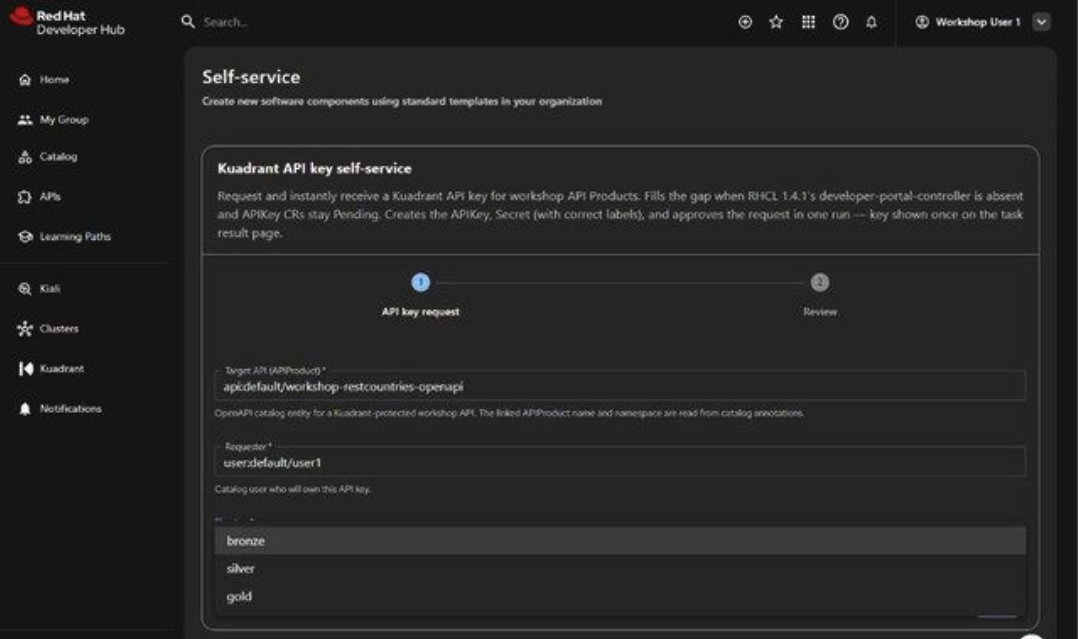
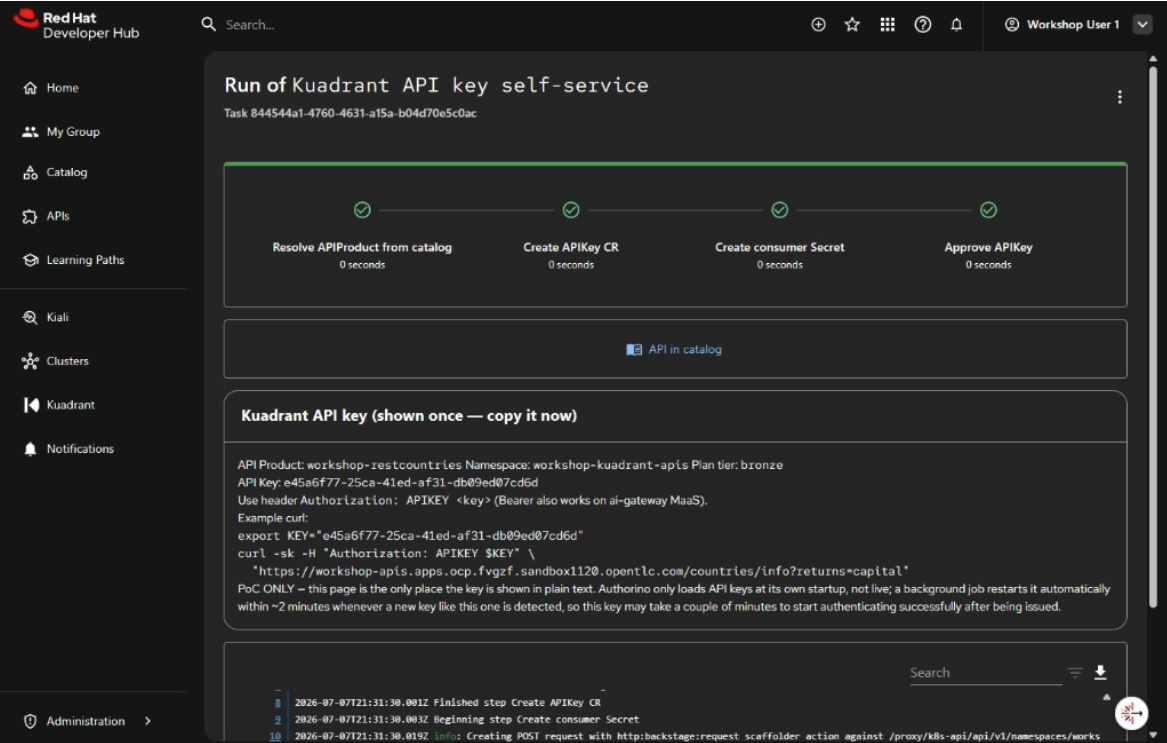
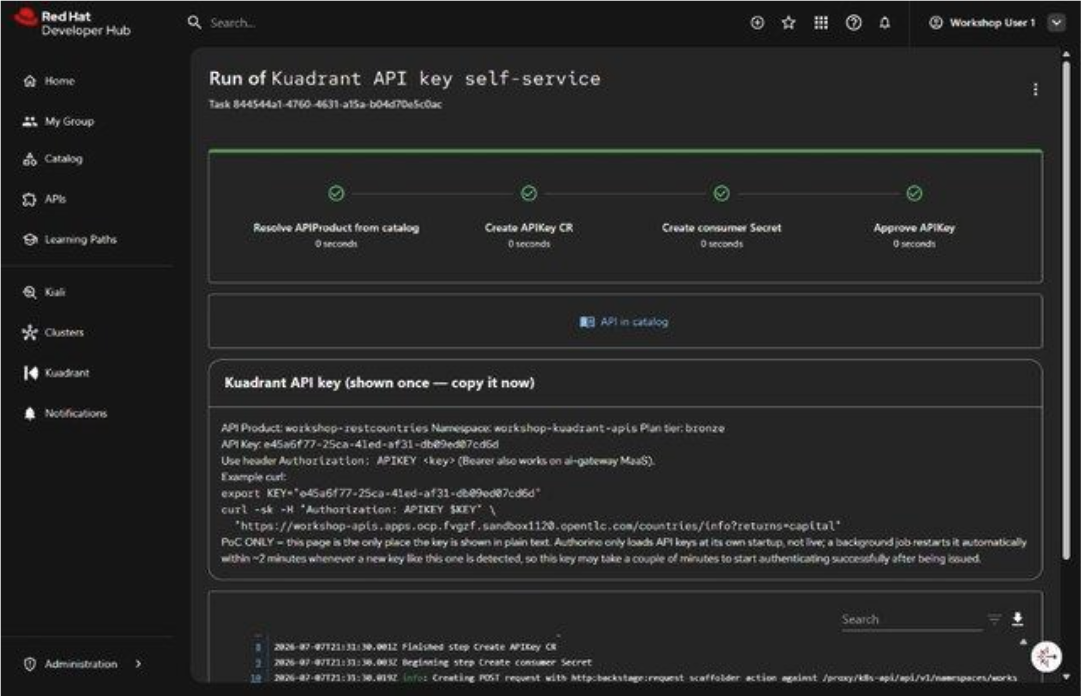
Figure 5 shows the one-time scaffolder task result with the issued API key and curl example.
Authorino secret indexing
Authorino loads API key secrets when its pod starts. New secrets created while Authorino is running are not picked up immediately. The pattern includes a Cron job that restarts Authorino when a newer key secret appears, which can take up to two minutes to restart.
Test from Swagger and curl
Figure 6 shows a successful Swagger Try it out response for GET /codes with an API key.
From the terminal:
export CLUSTER_DOMAIN="apps.<your-cluster-domain>"
export KEY="<api-key-from-template>"

curl -sk -H "Authorization: APIKEY ${KEY}" \
 "https://workshop-apis.${CLUSTER_DOMAIN}/countries/info?returns=capital"
Expected truncated output:
{"error":false,"msg":"capital fetched","data":{"name":"Argentina","capital":"Buenos Aires"}}
Without a key:
curl -sk -w "\nHTTP %{http_code}\n" \
"https://workshop-apis.${CLUSTER_DOMAIN}/countries/info?returns=capital"
Treat the step as successful only if the request with an API key returns the JSON payload, and the request without a key returns HTTP 401 message.
Production considerations
Before implementing patterns in your production environment, consider the following:
PoC pattern | Recommendation |
|---|---|
Scaffolder shows key once | DevPortal controller or enterprise API portal |
Key value = APIKEY UID | Controller-managed random key material |
Authorino restart CronJob | Evaluate upstream fix; use short-lived key rotation |
secure: false on k8s-api proxy | Proper cluster CA trust in Backstage |
You can extend the self-service template with Vault delivery, ServiceNow approval gates, or Slack notifications by using custom Scaffolder actions. For Software Templates and how they call actions, see Standardize project development with software templates in the Red Hat Developer Hub documentation.

