Page
Protect AI inference APIs with OpenID Connect AuthPolicy
API-only inference endpoints accept Bearer tokens instead of interactive login redirects. This lesson protects the Computer Vision API (neuroface-cv) with Kuadrant AuthPolicy JSON Web Token (JWT) validation and lets developers provision OpenID Connect (OIDC) clients from Developer Hub. On the hub-only install from Lesson 1, inference runs locally on the hub. Traffic flows through neuroface-gateway to the neuroface-cv back end without Skupper or spoke clusters.
Prerequisites:
- Completion of these lessons:
- Keycloak realm cv imported and Developer Hub reachable.
- The neuroface-cv HTTPRoute and gateway are healthy.
In this lesson, you will:
- Understand why AuthPolicy with JWT beats
OIDCPolicyfor API-only workloads. - Provision OIDC clients from a Developer Hub software template.
- Apply
AuthPolicyJWT validation and plan-basedRateLimitPolicy. - Validate tokens from Swagger Try it out and
curl. - Revoke OIDC clients through a companion self-service template.
Why AuthPolicy instead of OIDCPolicy
This table gives you scenarios and why to use AuthPolicy instead of an OIDCPolicy.
Scenario | Policy | Why |
|---|---|---|
Web application with login redirect | OIDCPolicy | User completes interactive login; Gateway stores session cookies |
Programmatic API / Swagger client credentials | AuthPolicy with JWT | Client sends Authorization: Bearer; no redirect required |
The AI Computer Vision API is an inference endpoint. Clients obtain a JWT from Keycloak and send it on every request. An OIDCPolicy redirect breaks Swagger UI and machine-to-machine callers. Figure 1 illustrates the OIDC client credentials path from Developer Hub and Keycloak through AuthPolicy to the Computer Vision API.
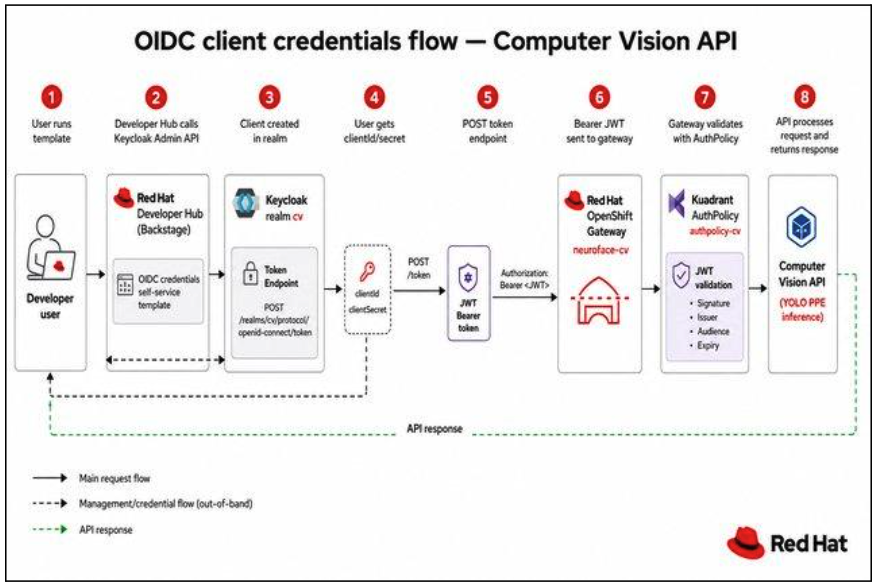
A developer runs the self-service template in Developer Hub, receives client credentials from Keycloak realm cv, obtains a JWT, and calls the Computer Vision API through a gateway protected by AuthPolicy.
A hub-only traffic path looks something like this:
Client (Swagger / curl)
 → neuroface-cv.<apps-domain>
 → Gateway neuroface-gateway
 → HTTPRoute neuroface-cv-lb
 → AuthPolicy authpolicy-cv (JWT validation)
 → RateLimitPolicy neuroface-cv-ratelimit (plan tier)
 → Backend neuroface-cv (YOLO PPE on hub)
The AuthPolicy belongs on that Gateway hop because this API is machine-to-machine. Clients already have a JWT from Keycloak and send it as Authorization: Bearer. The AuthPolicy validates that token before the request reaches neuroface-cv, so Swagger and curl work without a login redirect. An OIDCPolicy would send those callers through interactive login and break this path. The you only look once (YOLO) service stays focused on inference; identity is enforced at the gateway.
Review Keycloak realm cv
You do not configure this realm by hand in this lesson. The Pattern custom resource from the install lesson already imported realm cv through the Keycloak Operator. A backstage-provisioner confidential service account lets Developer Hub create and delete OIDC clients through the Admin REST API. Vault stores the provisioner secret, and External Secrets Operator synchronizes it into Keycloak and Developer Hub as KEYCLOAK_PROVISIONER_BASIC_AUTH, so credentials stay out of Git-tracked ConfigMaps.
Provision OIDC clients from Developer Hub
Figure 2 shows the OIDC credentials self-service form for Keycloak realm cv. You can specify your target API, set a client label, select the Client credentials (M2M) as the grant type, and select the plan tier, such as Free.
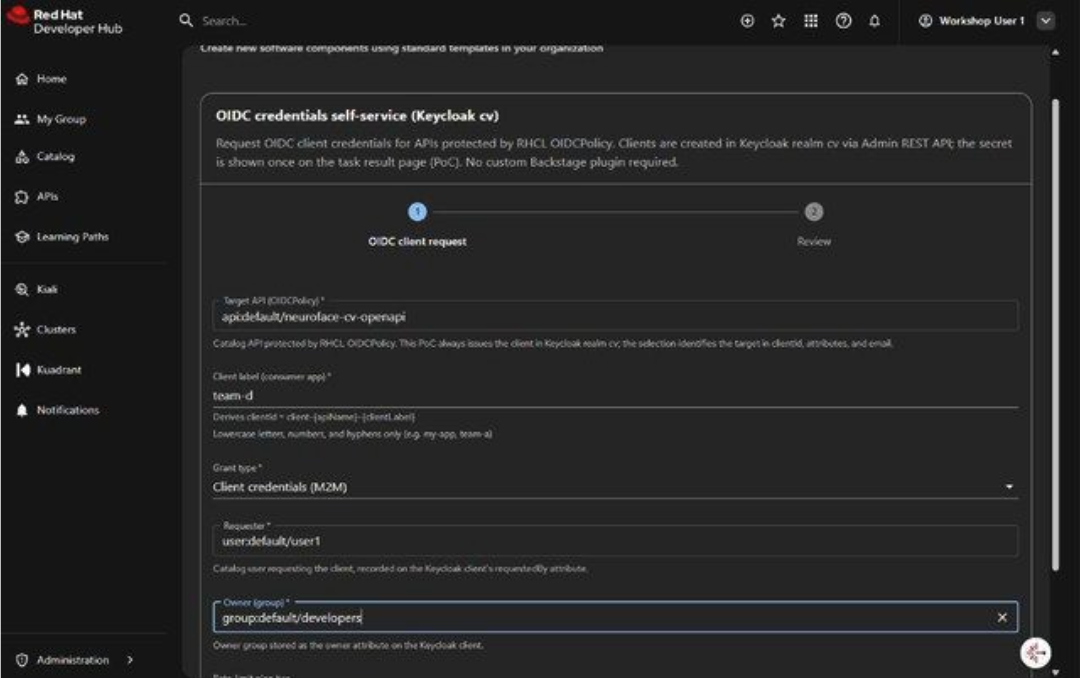
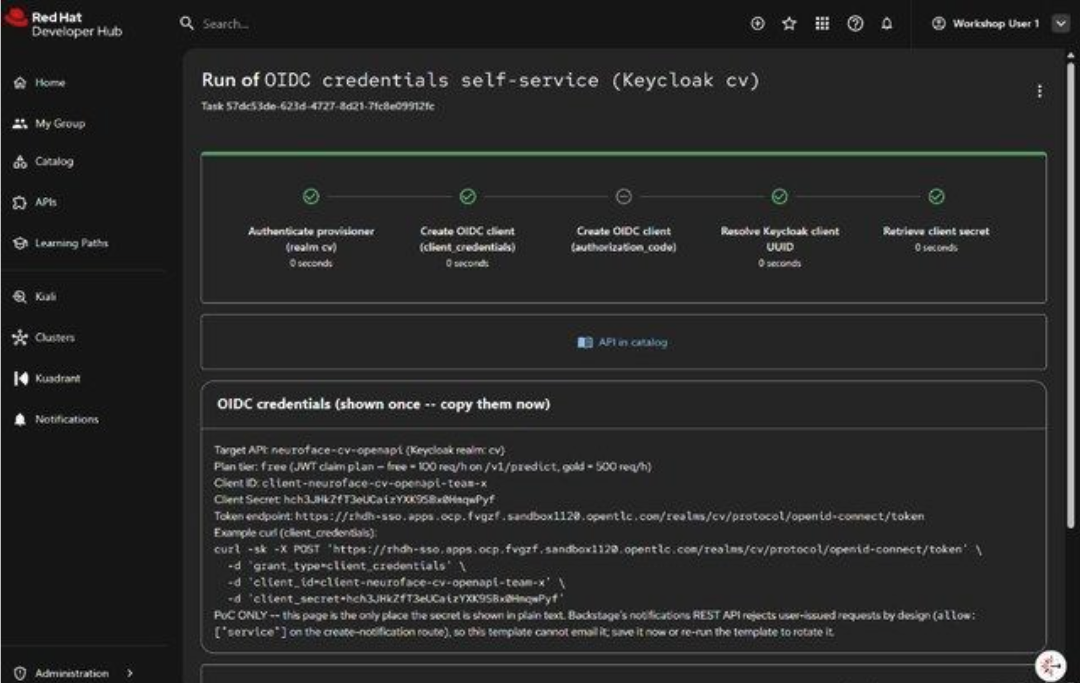
Figure 3 shows the one-time scaffolder task result with client ID, secret, and token endpoint. Copy these OIDC credentials, as these are shown only once.
Apply AuthPolicy for JWT validation
For realm cv, the chart sets redirectAuth: false, which renders an AuthPolicy instead of an OIDCPolicy. Here is an example of the AuthPolicy Custom Resource (CR) file:
apiVersion: kuadrant.io/v1
kind: AuthPolicy
metadata:
  name: authpolicy-cv
  namespace: neuroface-gateway-system
spec:
  targetRef:
    group: gateway.networking.k8s.io
    kind: HTTPRoute
    name: neuroface-cv-lb
  when:
  - predicate: request.method != "OPTIONS"
  rules:
    authentication:
      jwt-users:
        jwt:
          issuerUrl: "https://keycloak.<apps-domain>/realms/cv"
    response:
      success:
        headers:
          x-auth-client-id:
            plain:
              expression: "has(auth.identity.client_id) ? auth.identity.client_id : auth.identity.azp"
The issuerUrl must match the issuer claim token in Keycloak exactly. Keycloak's canonical hostname is keycloak.<apps-domain>.
The spec.when section exempts OPTIONS from JWT validation so Cross-Origin Resource Sharing (CORS) preflight can succeed. If Swagger Try it out still fails after HTTPRoute CORS headers and this AuthPolicy exemption, then see the next lesson, Use the Swagger Try It Out feature for Connectivity Link with EnvoyFilter for more details.
Rate limit by JWT plan claim
The self-service template injects a plan claim into each client's tokens. A RateLimitPolicy on the same HTTPRoute enforces tier limits on /v1/predict:
apiVersion: kuadrant.io/v1
kind: RateLimitPolicy
metadata:
  name: neuroface-cv-ratelimit
spec:
  targetRef:
    kind: HTTPRoute
    name: neuroface-cv-lb
  limits:
    predict-free:
      when:
      - predicate: 'request.path.matches("^/v1/predict")'
      - predicate: 'has(auth.identity) && has(auth.identity.plan) && auth.identity.plan == "free"'
      counters:
      - expression: auth.identity.sub
      rates:
      - limit: 100
        window: 1h
    predict-gold:
      when:
      - predicate: 'request.path.matches("^/v1/predict")'
      - predicate: 'has(auth.identity) && has(auth.identity.plan) && auth.identity.plan == "gold"'
      counters:
      - expression: auth.identity.sub
      rates:
      - limit: 500
        window: 1h
Test from Swagger and curl
Next, it is time to test out the policy being implemented correctly. Figure 4 shows an unauthenticated Swagger Try it out on GET /health returning HTTP 401.
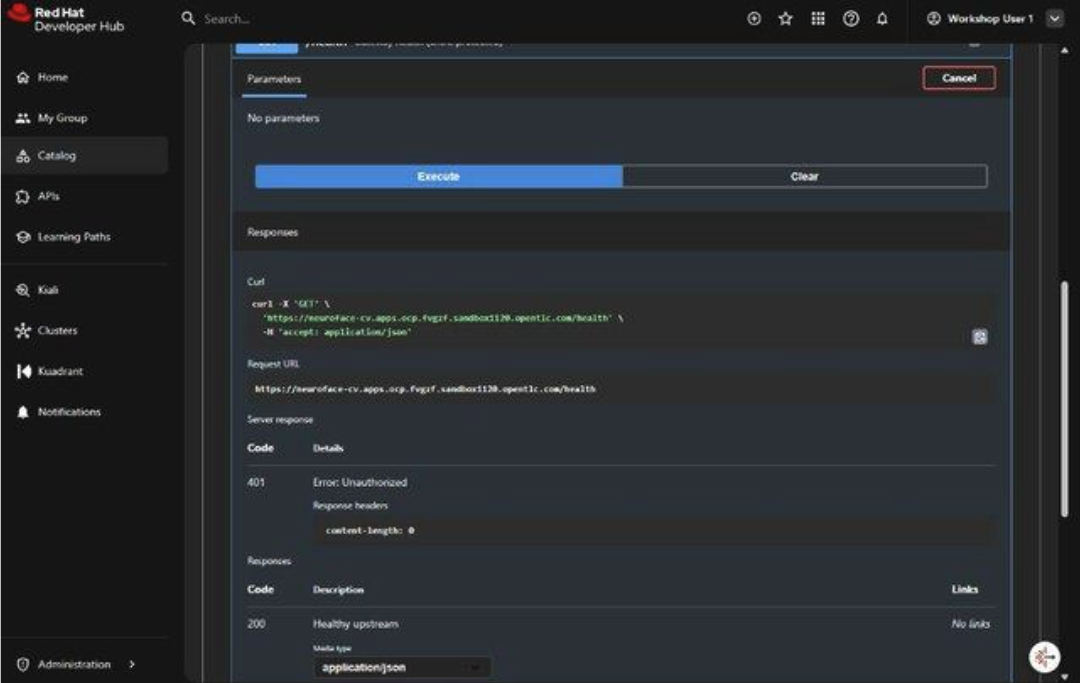
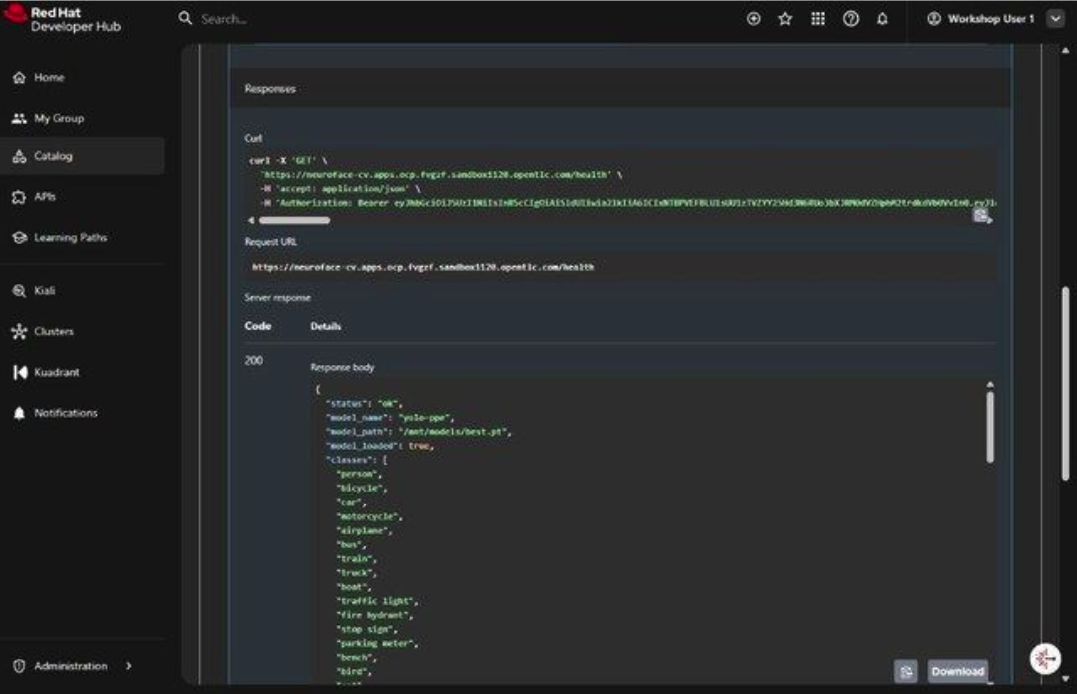
Figure 5 shows a successful Swagger Try it out on GET /health with a Bearer JWT returning HTTP 200. The AuthPolicy validates the token; the Gateway returns model metadata from the Computer Vision backend.
From the terminal:
export CLUSTER_DOMAIN="apps.<your-cluster-domain>"
export CLIENT_ID="client-neuroface-cv-openapi-my-app"
export CLIENT_SECRET="<secret-from-template>"

TOKEN=$(curl -sk -X POST \
 "https://keycloak.${CLUSTER_DOMAIN}/realms/cv/protocol/openid-connect/token" \
 -d "grant_type=client_credentials" \
 -d "client_id=${CLIENT_ID}" \
 -d "client_secret=${CLIENT_SECRET}" \
 | python3 -c "import sys,json; print(json.load(sys.stdin)['access_token'])")

curl -sk -H "Authorization: Bearer ${TOKEN}" \
 "https://neuroface-cv.${CLUSTER_DOMAIN}/health"
Expected output:
{"status": "ok", "model_name": "yolo-ppe", "model_loaded": true}Revoke OIDC clients
Revoke the OIDC client when it should no longer mint JWTs. For example, when a team member leaves, a secret leaks, or you finish the lab. The create template only provisions the client; until you revoke it, that client remains valid in realm cv. Use the Revoke OIDC client (Keycloak cv) self-service template with the same target API and client label used at creation time.
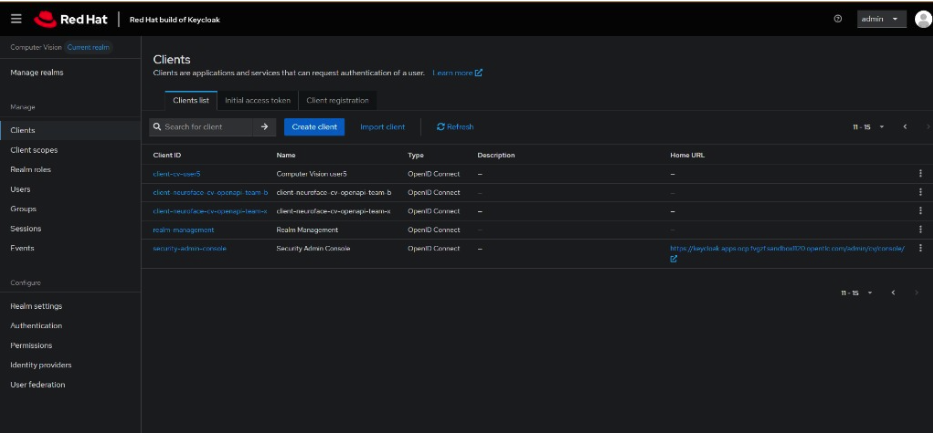
To verify, open the Keycloak Admin Console, select the Computer Vision realm (cv) from the realm dropdown, then open Clients in the left menu. Confirm the revoked client no longer appears in the list, for example, client-neuroface-cv-openapi-team-d. After revocation, the OIDC client no longer appears in this list.
Figure 6 shows the Clients list in realm Computer Vision (cv) after revocation.
NeuroFace demo
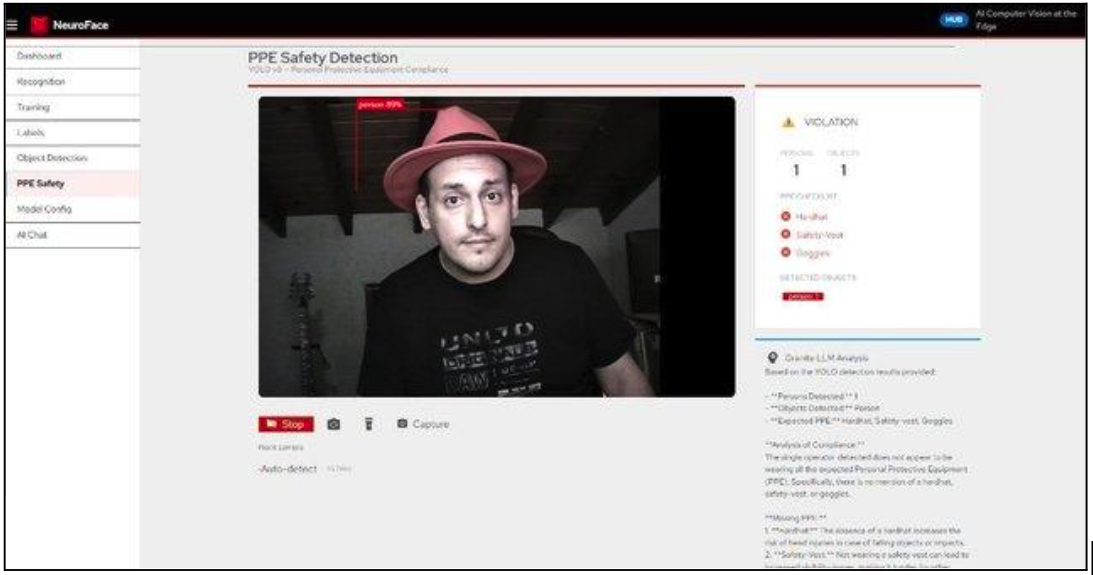
The Swagger and curl checks prove AuthPolicy on /health. NeuroFace is the application that consumes the Computer Vision API, and it calls /v1/predict through the same gateway. Run the demo to confirm a real client, not only Swagger, can use the JWT-protected path for inference. Figure 7 shows the NeuroFace Personal Protective Equipment (PPE) Safety Detection demo calling the protected Computer Vision Gateway.
AuthPolicy vs OIDCPolicy decision guide
Use this table when you choose how Connectivity Link authenticates callers. Pick an OIDCPolicy when a person logs in to the browser and the gateway keeps a session. Pick AuthPolicy with JWT when a machine or Swagger client already has a token and sends Authorization: Bearer on every request, as with this Computer Vision API.
Requirement | Use |
|---|---|
Human login in browser | OIDCPolicy + redirect |
M2M / Swagger client credentials | AuthPolicy + JWT |
CORS preflight from Swagger | AuthPolicy with when: OPTIONS exempt |
Session cookies after login | OIDCPolicy |
Now that NeuroFace has been successfully demonstrated, it’s time to make Swagger work on Connectivity Link with EnvoyFilter.

