AI
  • Get started with AI

    • Red Hat AI

      Accelerate the development and deployment of enterprise AI solutions.

    • AI learning hub

      Explore learning materials and tools, organized by task.

    • AI interactive demos

      Click through scenarios with Red Hat AI, including training LLMs and more.

    • AI/ML learning paths

      Expand your Red Hat OpenShift AI knowledge using these learning resources.

    • AI quickstarts

      Focused AI use cases designed for fast deployment on Red Hat AI platforms.

    • No-cost AI training

      Foundational Red Hat AI training.

  • Featured resources

    • Red Hat OpenShift AI
    • Open source AI for developers
    • AI product application development
    • Open source-powered AI/ML for hybrid cloud
    • AI and Node.js cheat sheet

Red Hat AI Factory with NVIDIA

Red Hat AI Factory with NVIDIA is a co-engineered, enterprise-grade AI solution for building, deploying, and managing AI at scale across hybrid cloud environments.

Learn
  • Self-guided

    • Documentation

      Find answers, get step-by-step guidance, and learn how to use Red Hat products.

    • Learning paths

      Explore curated walkthroughs for common development tasks.

    • Guided learning

      Receive custom learning paths powered by our AI assistant.

    • See all learning
  • Hands-on

    • Developer Sandbox

      Spin up Red Hat's products and technologies without setup or configuration.

    • Interactive labs

      Learn by doing in these hands-on, browser-based experiences.

    • Interactive demos

      Click through product features in these guided tours.

  • Browse by topic

    • AI/ML
    • Automation
    • Java
    • Kubernetes
    • Linux
    • See all topics
  • Training & certifications

    • Courses and exams
    • Certifications
    • Skills assessments
    • Red Hat Academy
    • Learning subscription
    • Explore training
Build
  • Get started

    • Red Hat build of Podman Desktop

      A downloadable, local development hub to experiment with our products and builds.

    • Developer Sandbox

      Spin up Red Hat's products and technologies without setup or configuration.

  • Download products

    • Red Hat Enterprise Linux
    • Red Hat AI
    • Red Hat OpenShift
    • Red Hat Ansible Automation Platform
    • See all products
  • Featured

    • Red Hat build of OpenJDK
    • Red Hat JBoss Enterprise Application Platform
    • Red Hat OpenShift Dev Spaces
    • Red Hat Developer Toolset
  • References

    • E-books
    • Documentation
    • Cheat sheets
    • Architecture center
Community
  • Get involved

    • Events
    • Live AI events
    • Red Hat Summit
    • Red Hat Accelerators
    • Community discussions
  • Follow along

    • Articles & blogs
    • Developer newsletter
    • Videos
    • Github
  • Get help

    • Customer service
    • Customer support
    • Regional contacts
    • Find a partner

Join the Red Hat Developer program

Download Red Hat products and project builds, access support documentation, learning content, and more.

ConsoleDocsSupport Search
New For you

Recommended

We'll recommend resources you may like as you browse. Try these suggestions for now.

  • Product downloads
  • Cheat sheets
  • Red Hat Developer learning portal
  • Developer blog
  • E-books
  • Developer Sandbox
Log in

Get more with a Red Hat Developer account

  • Product downloads
  • Console access
  • Event registration
  • Training & trials
Explore more account benefitsLog in or register

A subscription may be required for some services.

Contact us

Autoscaling the Red Hat Cache Service on OpenShift

August 8, 2018
Sebastian Łaskawiec
Related topics:
Kubernetes
Related products:
Red Hat Data GridRed Hat OpenShift Container Platform

    Earlier this year, Red Hat announced the Red Hat Cache Service which is a distributed in-memory caching service that runs on Red Hat OpenShift.  Red Hat Data Grid is used as the core of the cache service. The cache service is one of the things you can easily install on OpenShift through the OpenShift Service Catalog. You can find the cache service in the Red Hat OpenShift Online Pro tier.  (Alternatively, you can install the Cache Service on your own Red Hat OpenShift Container Platform installation by following the installation manual.)
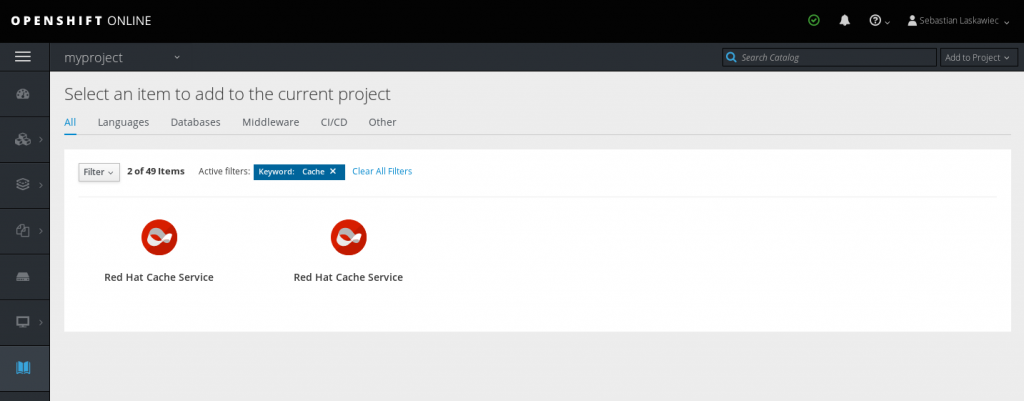
    The Cache Service automatically calculates the amount of user storage based on the container size it’s scheduled on. Typically, it’s 512MB. What’s more interesting is that the Cache Service can operate near the full memory capacity (~97–98 %).

    The automatic memory adjustment gives you a nice opportunity to try out the new Horizontal Pod Autoscaler (which now supports memory and custom metrics-based autoscaling). The autoscaler monitors the amount of memory used by the container and adds or removes Cache Service pods based on this measurement.

    The demo

    First, instantiate a new Cache Service from the Service Catalog. Then wait a few moments until it becomes ready.
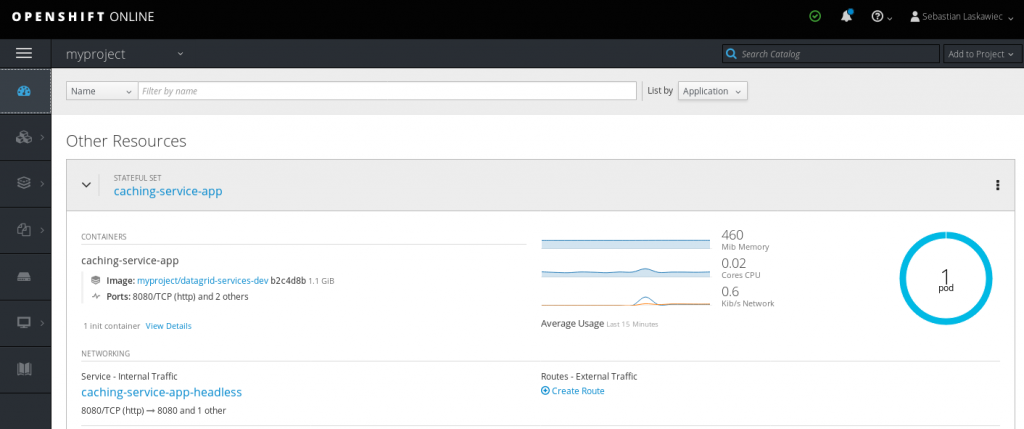
    The next step is to create a Horizontal Pod Autoscaler based on the following definition:

    https://gist.github.com/slaskawi/3d0b4aed6c352c4ac2f9827d3c4fd237

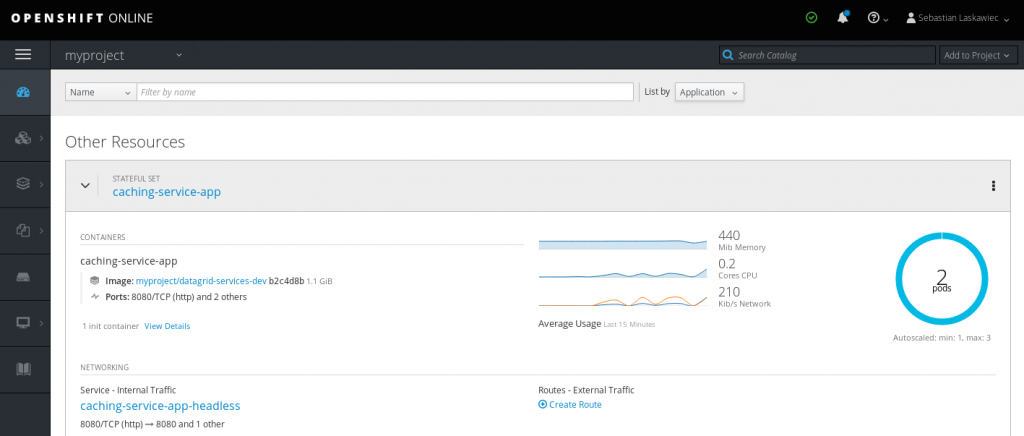
    Once a pod hits 92% of container memory, OpenShift will spin up another one.

    Next, Red Hat Data Grid will form a cluster of two (or three) nodes, which will increase the overall system’s capacity. The interesting thing to note is that the memory will not drop on pod number 0. It will remain at the same level. This is because the Cache Service uses a number of owners equal to 1 and the State Transfer minimizes data shuffling in the cluster.

    Next, load some data into the Data Grid. One way to do this is to create a Red Hat Enterprise Linux (RHEL) pod inside the same project and make REST calls with the data:

    https://gist.github.com/slaskawi/43667383c67f6c8d60bed2eb05ab0cfd

    The above command spins up a new RHEL pod and attaches TTY to it. This way, we will be able to invoke curl commands from inside of our project:

    https://gist.github.com/slaskawi/ccaafac852a228d6ec54d0f9ff421031

    The above command inserts 1,000 entries into the default cache. Each of the entries is roughly 10KB. Depending on the container size, we might increase the number of iterations in the loop or tweak the command to insert data into different key prefixes.

    Once the container hits the scaling limit, Horizontal Pod Autoscaler will create another pod.
    Conclusion

    Autoscaling Red Hat Cache Service is a really nice way of increasing overall system capacity depending on the load. Since the Cache Service is based on eviction (removing the least frequently used keys when it hits the memory limit) and off-heap. It was designed to reach 97–98% of the capacity when constantly adding data. Since new data “pushes out” old entries, the container will only scale up and never scale down.

    Try autoscaling Red Hat Cache Service to improve your system's overall capacity.

    Last updated: March 26, 2023

    Recent Posts

    • A day in the life of an NVIDIA H100 on Red Hat OpenShift 5

    • Migrate BuildConfigs to builds for Red Hat OpenShift with one plug-in install

    • Run Red Hat Enterprise Linux CoreOS on NVIDIA BlueField DPUs

    • Agent harness engineering: Separating model capabilities from enforcement

    • What's new for developers in Red Hat Enterprise Linux 10.3 and 9.9

    Red Hat Developers logo

    Platforms

    • Red Hat AI
    • Red Hat Enterprise Linux
    • Red Hat OpenShift
    • Red Hat Ansible Automation Platform
    • See all products

    Build

    • Developer Sandbox
    • Developer tools
    • Interactive tutorials
    • API catalog

    Quicklinks

    • Learning resources
    • E-books
    • Cheat sheets
    • Blog
    • Events
    • Newsletter

    Communicate

    • About us
    • Contact sales
    • Find a partner
    • Report a website issue
    • Site status dashboard
    • Report a security problem

    Red Hat Developer

    Build here. Go anywhere.

    We serve the builders. The problem solvers who create careers with code.

    Join us if you’re a developer, software engineer, web designer, front-end designer, UX designer, computer scientist, architect, tester, product manager, project manager or team lead.

    Sign me up

    Red Hat legal and privacy links

    • About Red Hat
    • Jobs
    • Events
    • Locations
    • Contact Red Hat
    • Red Hat Blog
    • Inclusion at Red Hat
    • Cool Stuff Store
    • Red Hat Summit
    © 2026 Red Hat

    Red Hat legal and privacy links

    • Privacy statement
    • Terms of use
    • All policies and guidelines
    • Digital accessibility
    Ask AI