AI
  • Get started with AI

    • Red Hat AI

      Accelerate the development and deployment of enterprise AI solutions.

    • AI learning hub

      Explore learning materials and tools, organized by task.

    • AI interactive demos

      Click through scenarios with Red Hat AI, including training LLMs and more.

    • AI/ML learning paths

      Expand your Red Hat OpenShift AI knowledge using these learning resources.

    • AI quickstarts

      Focused AI use cases designed for fast deployment on Red Hat AI platforms.

    • No-cost AI training

      Foundational Red Hat AI training.

  • Featured resources

    • Red Hat OpenShift AI
    • Open source AI for developers
    • AI product application development
    • Open source-powered AI/ML for hybrid cloud
    • AI and Node.js cheat sheet

Red Hat AI Factory with NVIDIA

Red Hat AI Factory with NVIDIA is a co-engineered, enterprise-grade AI solution for building, deploying, and managing AI at scale across hybrid cloud environments.

Learn
  • Self-guided

    • Documentation

      Find answers, get step-by-step guidance, and learn how to use Red Hat products.

    • Learning paths

      Explore curated walkthroughs for common development tasks.

    • Guided learning

      Receive custom learning paths powered by our AI assistant.

    • See all learning
  • Hands-on

    • Developer Sandbox

      Spin up Red Hat's products and technologies without setup or configuration.

    • Interactive labs

      Learn by doing in these hands-on, browser-based experiences.

    • Interactive demos

      Click through product features in these guided tours.

  • Browse by topic

    • AI/ML
    • Automation
    • Java
    • Kubernetes
    • Linux
    • See all topics
  • Training & certifications

    • Courses and exams
    • Certifications
    • Skills assessments
    • Red Hat Academy
    • Learning subscription
    • Explore training
Build
  • Get started

    • Red Hat build of Podman Desktop

      A downloadable, local development hub to experiment with our products and builds.

    • Developer Sandbox

      Spin up Red Hat's products and technologies without setup or configuration.

  • Download products

    • Red Hat Enterprise Linux
    • Red Hat AI
    • Red Hat OpenShift
    • Red Hat Ansible Automation Platform
    • See all products
  • Featured

    • Red Hat build of OpenJDK
    • Red Hat JBoss Enterprise Application Platform
    • Red Hat OpenShift Dev Spaces
    • Red Hat Developer Toolset
  • References

    • E-books
    • Documentation
    • Cheat sheets
    • Architecture center
Community
  • Get involved

    • Events
    • Live AI events
    • Red Hat Summit
    • Red Hat Accelerators
    • Community discussions
  • Follow along

    • Articles & blogs
    • Developer newsletter
    • Videos
    • Github
  • Get help

    • Customer service
    • Customer support
    • Regional contacts
    • Find a partner

Join the Red Hat Developer program

Download Red Hat products and project builds, access support documentation, learning content, and more.

ConsoleDocsSupport Search
New For you

Recommended

We'll recommend resources you may like as you browse. Try these suggestions for now.

  • Product downloads
  • Cheat sheets
  • Red Hat Developer learning portal
  • Developer blog
  • E-books
  • Developer Sandbox
Log in

Get more with a Red Hat Developer account

  • Product downloads
  • Console access
  • Event registration
  • Training & trials
Explore more account benefitsLog in or register

A subscription may be required for some services.

Contact us

The Eclipse Developer's guide to Clean Code (part 2)

February 9, 2015
Leo Ufimtsev
Related topics:
Developer toolsLinux
Related products:
Developer ToolsetRed Hat Enterprise Linux

    Last time we discussed de-duplicating some code. Today let us look into the effectiveness of refactored code, Java 8 support and moving/renaming code.

    But hold on, aren't method calls expensive?

    I took a course on compilers in University and did some research on the matter.
    In 1996 Java in-lining might have made sense. But nowadays the overhead that methods generate is relatively negligible, also the JVM is quite smart in optimizing bytecode by in-lining methods that make sense to in-line. Usually the benefits of clarity out-weigh the small constant-time overhead of the method call.

    There is an excellent blog post on the matter:

    "..method overheads are close to being non-existent. Just 205 ns difference between having 1023 additional method invocations in your source code. Remember, those were nanoseconds (10^-9 s) over there that we used for measurement. So thanks to JIT we can safely neglect most of the overhead introduced by method invocations." - How expensive is a method call

    There is also more official documentation from Oracle.

    Also interesting:
    - Blog: Do you get Just-in-time compilation?
    - Stack overflow: java how expensive is a method call

    "Avoiding premature optimization. The best practice is to write readable and well-designed code, and then optimize for the performance hotspots in your application. "


    Java 8 and Lambda Functions can be extracted also

    With the newer Eclipse versions, you can also extract inlined lambda functions that are getting too long.

    //Before:
    control.addListener (SWT.MouseDown, event -> mainGUI.startPomodoro (w.taskTree, w.shell));
    
    //After
    
    control.addListener (SWT.MouseDown, extracted (w));
    ...
    }
     private Listener extracted (UIWidgets w) {
     return event -> mainGUI.startPomodoro (w.taskTree, w.shell);
     }

    Move those methods

    Sometimes you want to move code around. E.g after extracting helper functions, they might not have the order that you want. Or sometimes when you open a class, you might notice that a public function is not on top of the class (which they should be).

    Instead of cut/pasting chunks of code, you can simply drag methods in the method outline and the code will migrate as well:

    EclipseMoveMethod


    (As a small note, A-Z ordering needs to be disabled for this to work)

    Give variables and methods meaningful names and continue to rename them later.

    Ambiguity

    If you come across a variable or method that has an ambiguous name, go ahead and rename it.

    For example, I'm currently working on a Drag-and-Drop class. The Drag-Source has the following methods, do any look ambiguous?

    drag(..)
    dragDataDelete(..)
    dragEnd(..)
    dragGetData(..)

    After careful inspection, dragDataDelete() / dragEnd() / dragGetData()  were methods that were called when an OS event occurred. However, 'drag()' was a method that was called manually from other code, which force-starts a drag operation. This is easily confused with the missing 'dragBegin()'  handler that is triggered by an OS event.
    Also in order to understand what 'drag()' does I have to read all the other methods and compare them, i.e it is not standalone.

    If you see this, follow the clean-code rule "Leave the playground cleaner than you left it". Rename it to something more meaning full such as: dragManualBegin(..). Renaming variables and methods is simple:

    • Quick rename:
      Select method (or variable/class/file) and press Alt+Shift+r, type the new name of the variable and press enter.
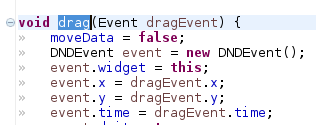
      drag
      All references to this method/variable/file are automatically updated:

      drag renamed in other places
    • Rename with preview:
      Sometimes you may want to see all the places that are affected by renaming. Simply press Alt+Shift+r twice to get a preview plane:
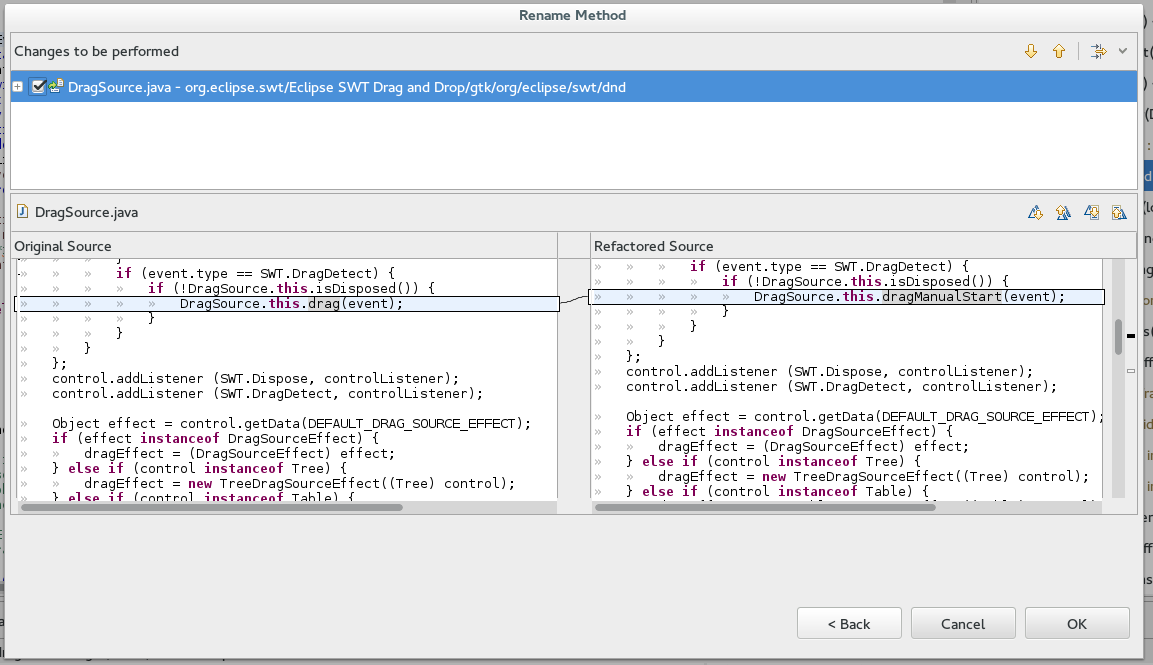
      drag rename preview

    Rename after time

    One should really spent some time deciding on how to name a variable. The name should describe the one thing that a function does.
    However, the content of the function will often change over time, and as such you should rename the variable/method accordingly.
    For example the 'drag()' function above was probably the first to have been written, then the others were probably added. After they were added the 'drag()' method should really have been renamed to reflect it's specialization.

    Rename works across classes

    The rename feature works across your entire project. So if you happen to be in need of renaming a class, go ahead.
    This is usually useful for when you're writing new code as oppose to maintaining older code =)

    Eclipse has a lot more refactoring features, but those are the once that I personally use the most.

    And if you haven't read the Clean Code book yet, it's highly recommended.

    Last updated: February 26, 2024

    Recent Posts

    • A day in the life of an NVIDIA H100 on Red Hat OpenShift 5

    • Migrate BuildConfigs to builds for Red Hat OpenShift with one plug-in install

    • Run Red Hat Enterprise Linux CoreOS on NVIDIA BlueField DPUs

    • Agent harness engineering: Separating model capabilities from enforcement

    • What's new for developers in Red Hat Enterprise Linux 10.3 and 9.9

    Red Hat Developers logo

    Platforms

    • Red Hat AI
    • Red Hat Enterprise Linux
    • Red Hat OpenShift
    • Red Hat Ansible Automation Platform
    • See all products

    Build

    • Developer Sandbox
    • Developer tools
    • Interactive tutorials
    • API catalog

    Quicklinks

    • Learning resources
    • E-books
    • Cheat sheets
    • Blog
    • Events
    • Newsletter

    Communicate

    • About us
    • Contact sales
    • Find a partner
    • Report a website issue
    • Site status dashboard
    • Report a security problem

    Red Hat Developer

    Build here. Go anywhere.

    We serve the builders. The problem solvers who create careers with code.

    Join us if you’re a developer, software engineer, web designer, front-end designer, UX designer, computer scientist, architect, tester, product manager, project manager or team lead.

    Sign me up

    Red Hat legal and privacy links

    • About Red Hat
    • Jobs
    • Events
    • Locations
    • Contact Red Hat
    • Red Hat Blog
    • Inclusion at Red Hat
    • Cool Stuff Store
    • Red Hat Summit
    © 2026 Red Hat

    Red Hat legal and privacy links

    • Privacy statement
    • Terms of use
    • All policies and guidelines
    • Digital accessibility
    Ask AI