[In case you aren't following the OpenShift blog, I'm cross posting my article here because I think it will be of interest to the Red Hat Developer commnity.]
The Open Service Broker API standard aims to standardize how services (cloud, third-party, on-premise, legacy, etc) are delivered to applications running on cloud platforms like OpenShift. This allows applications to consume services the exact same way no matter on which cloud platform they are deployed. The service broker pluggable architecture enables admins to add third-party brokers to the platform in order to make third-party and cloud services available to the application developers directly from the OpenShift service catalog. As an example AWS Service Broker created jointly by Amazon and Red Hat, Azure Service Broker created by Microsoft and Helm Service Broker created by Google to allow consumption of AWS services, Azure services and Helm charts on Kubernetes and OpenShift. Furthermore, admins can create their own brokers in order to make custom services like provisioning an Oracle database on their internal Oracle RAC available to the developers through the service catalog.
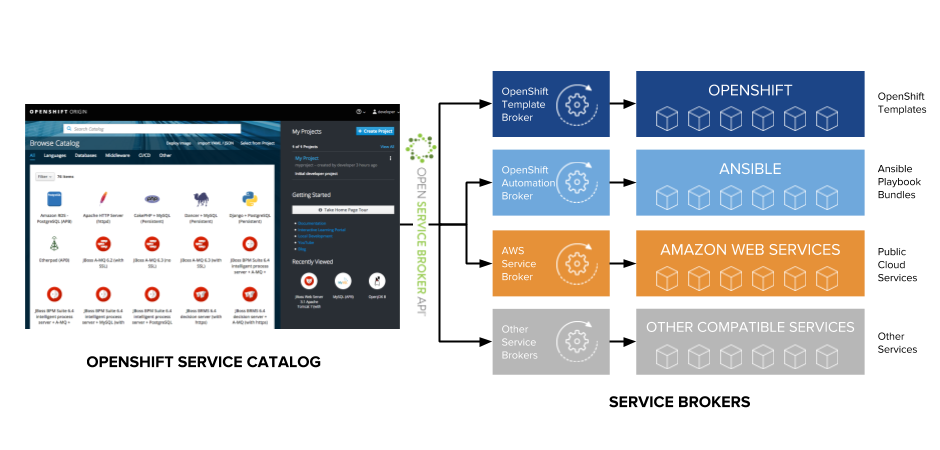
OpenShift Automation Broker is a service broker that is included in OpenShift out-of-the-box and leverages a lightweight, container-based application definition called an Ansible Playbook Bundle (APB) to automate service provisioning using Ansible. The playbooks can perform actions on OpenShift platform, as well as off platform such as provisioning a virtual machine on VMware and installing a database on it.
Ansible Galaxy Roles
The current structure of APBs requires all Ansible roles used in the playbooks to be available in the roles directory, as Ansible normally demands it.
myapb
├── apb.yml
├── Dockerfile
├── playbooks
│   ├── deprovision.yml
│   └── provision.yml
└── roles
    ├── myrole1
    └── myrole2
While that is useful, the power of Ansible lies in the large ecosystem of Ansible roles that are created by third-parties and the community which simplifies automating virtually anything. The expression “there is role for that!” is not far from reality in the Ansible world.
Ansible Galaxy is the hub for finding, reusing and sharing Ansible roles. Whenever one needs to create an Ansible role, the first step is usually to search on Ansible Galaxy for a role that already does the task needed.
Although on the roadmap, currently the Ansible Galaxy roles cannot be directly used in the APB playbooks unless they are already downloaded in the roles directory. Nevertheless, you can still use Ansible Galaxy roles in the APB through a few extra steps which are explained in the next section.
Using Ansible Galaxy Roles in APBs
The first step for using the Ansible Galaxy roles is to list those roles as dependencies in a requirements.yml file in the root of the APB which is the standard way of describing the Ansible Galaxy roles in Ansible:
- src: siamaksade.openshift_sonatype_nexus
  version: ocp-3.9
- src: siamaksade.openshift_gogs
  version: ocp-3.9
- src: siamaksade.openshift_eclipse_che
  version: ocp-3.9-1
The APB directory structure would look like the following:
myapb/
├── apb.yml
├── Dockerfile
├── requirements.yml
├── playbooks
│   ├── deprovision.yml
│   └── provision.yml
└── roles
    ├── myrole1
    └── myrole2
The above requirements.yml file declares that this APB requires the openshift_sonatype_nexus, openshift_gogs and openshift_eclipse_che roles from Ansible Galaxy.
Since Ansible Galaxy is not integrated into APBs yet, the next step is to add a few lines to the APB Dockerfile to install the dependencies when the APB is being built and packaged:
ADD requirements.yml /opt/apb/actions/requirements.yml
RUN ansible-galaxy install -r /opt/apb/actions/requirements.yml
Now you can use the declared roles in your APB action playbooks, for example in the playbooks/provision.yml which is the playbook that runs when an APB is provisioned via the OpenShift service catalog:
  roles:
  - role: ansible.kubernetes-modules
    install_python_requirements: no
  - role: ansibleplaybookbundle.asb-modules
  - role: siamaksade.openshift_sonatype_nexus
  - role: siamaksade.openshift_gogs
  - role: siamaksade.openshift_eclipse_che
Further Integration With Ansible Galaxy
In OpenShift 3.11, APBs will become a first class citizen of Ansible Galaxy and can be shared and reused conveniently the very same way that Ansible roles are shared and reused in Ansible Galaxy. The OpenShift Automation Broker will be able to discover APBs directly from Ansible Galaxy which means that a developer can publish their APB source code to Ansible Galaxy and the OpenShift Automation Broker will run the source directly on a special APB base image. This will allow developers to test their source code changes without the hassle of rebuilding the full APB container images each time they want to test it.
Furthermore, the integration with Ansible Galaxy would allow automatic resolution of the role dependencies based on the APB metadata and would allow using any role that is published to Ansible Galaxy and declared as a dependency in the metadata, directly in the playbooks.
Summary
APBs enable using Ansible playbooks for automating provisioning of services on OpenShift and also other platforms. Ansible Galaxy enriches the Ansible experience by providing a large set of pre-built roles that can be used to automate virtually anything. By creating a requirements.yml file and modifying the Dockerfile in an APB, one can take advantage of the Ansible Galaxy roles in authoring APBs and build complex automation flows.
Ansible Galaxy roles play an important role in APB authoring and therefore native Ansible Galaxy support in APBs is planned for future releases of OpenShift, possibly in OpenShift 3.11.
Last updated: June 3, 2024
