Redhat Developers  Logo
  • AI

    Get started with AI

    • Red Hat AI
      Accelerate the development and deployment of enterprise AI solutions.
    • AI learning hub
      Explore learning materials and tools, organized by task.
    • AI interactive demos
      Click through scenarios with Red Hat AI, including training LLMs and more.
    • AI/ML learning paths
      Expand your OpenShift AI knowledge using these learning resources.
    • AI quickstarts
      Focused AI use cases designed for fast deployment on Red Hat AI platforms.
    • No-cost AI training
      Foundational Red Hat AI training.

    Featured resources

    • OpenShift AI learning
    • Open source AI for developers
    • AI product application development
    • Open source-powered AI/ML for hybrid cloud
    • AI and Node.js cheat sheet

    Red Hat AI Factory with NVIDIA

    • Red Hat AI Factory with NVIDIA is a co-engineered, enterprise-grade AI solution for building, deploying, and managing AI at scale across hybrid cloud environments.
    • Explore the solution
  • Learn

    Self-guided

    • Documentation
      Find answers, get step-by-step guidance, and learn how to use Red Hat products.
    • Learning paths
      Explore curated walkthroughs for common development tasks.
    • Guided learning
      Receive custom learning paths powered by our AI assistant.
    • See all learning

    Hands-on

    • Developer Sandbox
      Spin up Red Hat's products and technologies without setup or configuration.
    • Interactive labs
      Learn by doing in these hands-on, browser-based experiences.
    • Interactive demos
      Click through product features in these guided tours.

    Browse by topic

    • AI/ML
    • Automation
    • Java
    • Kubernetes
    • Linux
    • See all topics

    Training & certifications

    • Courses and exams
    • Certifications
    • Skills assessments
    • Red Hat Academy
    • Learning subscription
    • Explore training
  • Build

    Get started

    • Red Hat build of Podman Desktop
      A downloadable, local development hub to experiment with our products and builds.
    • Developer Sandbox
      Spin up Red Hat's products and technologies without setup or configuration.

    Download products

    • Access product downloads to start building and testing right away.
    • Red Hat Enterprise Linux
    • Red Hat AI
    • Red Hat OpenShift
    • Red Hat Ansible Automation Platform
    • See all products

    Featured

    • Red Hat build of OpenJDK
    • Red Hat JBoss Enterprise Application Platform
    • Red Hat OpenShift Dev Spaces
    • Red Hat Developer Toolset

    References

    • E-books
    • Documentation
    • Cheat sheets
    • Architecture center
  • Community

    Get involved

    • Events
    • Live AI events
    • Red Hat Summit
    • Red Hat Accelerators
    • Community discussions

    Follow along

    • Articles & blogs
    • Developer newsletter
    • Videos
    • Github

    Get help

    • Customer service
    • Customer support
    • Regional contacts
    • Find a partner

    Join the Red Hat Developer program

    • Download Red Hat products and project builds, access support documentation, learning content, and more.
    • Explore the benefits

Mastering deployments with Kubernetes & OpenShift Article

May 3, 2017
Brian Atkisson
Related topics:
Developer toolsKubernetes
Related products:
Red Hat OpenShift Container Platform

    Rafael Benevides, Director of Developer Experience, at Red Hat spoke on rapidly deploying software on OpenShift with zero downtime.

    Throwing software over to an operations team to deploy during a scheduled maintenance window is a thing of the past.  Businesses simply can no longer afford scheduled downtime.  Applications need to be developed such that small, frequent updates can be released continuously via containers.  Rafael shows us how to solve this problem with OpenShift.


    Blue/Green Deployments

    This is a released strategy where there are two or more release channels in which new software can be pushed to one channel.  Traffic is then safely migrated to the new channel, in a transaction-safe manner, at the proxy layer to the new code.  This gives you a safe failback mechanism while allowing frequent updates without affecting service to customers.  In the case of OpenShift, this means new containers are released to one of the two sides while preserving the older version as long as necessary.

    In the OpenShift UI, it is just a matter of changing the route in the blue/green deployment.

    Rolling Updates

    Rolling updates are the default deployment method used by OpenShift.  This means that when a new container is pushed, OpenShift replaces the existing containers in a controlled way with the new software, as long as health checks are passed.  In non-container environments, rolling updates simply pull one node from the load balancer, update it, and place it back into service.  OpenShift essentially performs the same events, but on the container-level.

    Canary Deployments

    The canary term comes from the mining industry in which a canary bird was taken down into the mine, essentially detecting harmful conditions.  The software industry takes a more humane approach to canary deployments.  This essentially means the new software is released to a subset of users first for a period of time. OpenShift supports this method using a weighting methodology, all from within the OpenShift UI.  Once the canary traffic has been validated, all remaining containers are replaced.

    CI/CD Pipelines
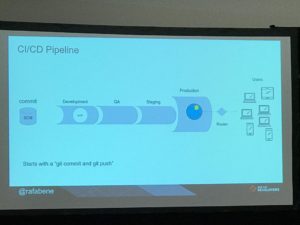
    Deployment strategies can then be combined with CI/CD pipelines, ensuring continuous integration and continuous delivery. New software is then constantly tested and deployed. Features and bug fixes can be pushed to production as they are ready rather than as release windows are available.  This dramatically increases the value of development work to an organization. After all, features sitting in some dev branch provide no value to an organization.

    In order to realize CI/CD, OpenShift provides a Jenkinsfile template for defining the automated tests and environment pipeline.  There is a large library of canned includes for the Jenkinsfile, making it super easy to just plug in the CI/CD functionality you need without the pain of developing it yourself.

    As you can see, OpenShift gives you the tools you need in order to safely and continuously release software, breaking the mold of the traditional release window.


    Download and try Red Hat OpenShift Container Platform for free.

    Last updated: October 31, 2023

    Recent Posts

    • Every layer counts: Defense in depth for AI agents with Red Hat AI

    • Fun in the RUN instruction: Why container builds with distroless images can surprise you

    • Trusted software factory: Building trust in the agentic AI era

    • Build a zero trust AI pipeline with OpenShift and RHEL CVMs

    • Red Hat Hardened Images: Top 5 benefits for software developers

    Red Hat Developers logo LinkedIn YouTube Twitter Facebook

    Platforms

    • Red Hat AI
    • Red Hat Enterprise Linux
    • Red Hat OpenShift
    • Red Hat Ansible Automation Platform
    • See all products

    Build

    • Developer Sandbox
    • Developer tools
    • Interactive tutorials
    • API catalog

    Quicklinks

    • Learning resources
    • E-books
    • Cheat sheets
    • Blog
    • Events
    • Newsletter

    Communicate

    • About us
    • Contact sales
    • Find a partner
    • Report a website issue
    • Site status dashboard
    • Report a security problem

    RED HAT DEVELOPER

    Build here. Go anywhere.

    We serve the builders. The problem solvers who create careers with code.

    Join us if you’re a developer, software engineer, web designer, front-end designer, UX designer, computer scientist, architect, tester, product manager, project manager or team lead.

    Sign me up

    Red Hat legal and privacy links

    • About Red Hat
    • Jobs
    • Events
    • Locations
    • Contact Red Hat
    • Red Hat Blog
    • Inclusion at Red Hat
    • Cool Stuff Store
    • Red Hat Summit
    © 2026 Red Hat

    Red Hat legal and privacy links

    • Privacy statement
    • Terms of use
    • All policies and guidelines
    • Digital accessibility

    Chat Support

    Please log in with your Red Hat account to access chat support.