Evaluating local large language model (LLM) performance before scaling to enterprise production doesn't require complex infrastructure. With Red Hat Enterprise Linux (RHEL) and Red Hat AI Inference, you can launch, benchmark, and test an OpenAI-compatible server on your local hardware in minutes.
Many enterprise teams want the speed and privacy of local AI without relying on external Software-as-a-Service (SaaS) APIs. In this guide, you'll learn how to deploy an inference container, benchmark its performance under simulated traffic with GuideLLM, and connect a chat interface with Open WebUI to evaluate model quality, all on your own hardware.
Requirements
- OS: RHEL 10.2
- CPU architecture: x86_64
- GPU: Any number of NVIDIA or AMD GPUs
- VRAM: Model-dependent, but generally 8 GB
- Storage: ~45 GB for Podman images + size of the model weights
- Red Hat registry access: Required to log in to access the GuideLLM and Red Hat AI Inference images
- Hugging Face token (optional): Required to access gated models
Ensure that the proper drivers and toolkits (NVIDIA Container Toolkit or AMD ROCm drivers) are installed on the host for your inference container to connect to your hardware.
Step 1. Preflight steps
Log in to the Red Hat registry and pull the appropriate Red Hat AI Inference image for your hardware.
podman login registry.redhat.io

# Only for NVIDIA
podman pull registry.redhat.io/rhaii/vllm-cuda-rhel9:3.5.0

# Only for AMD
podman pull registry.redhat.io/rhaii/vllm-rocm-rhel9:3.5.0
All the images used in this guide are available in the Red Hat Ecosystem Catalog page.
To speed up subsequent deployments, create a cache directory to mount to the container. The first time the model is pulled, it will be saved here.
mkdir -p ~/rhaii-cacheExport your Hugging Face token if you plan on using any gated models.
export HF_TOKEN=hf_XXXXXXXXXXXXXXXXXXXXXXNext, decide which model you want to run. Your model choice depends on your GPU VRAM, target latency thresholds, and expected prompt length. Check out the Red Hat AI page on Hugging Face for validated open-weight models.
The following table shows recommended models based on VRAM. A general rule of thumb is to choose a model that takes up about 90% of your available VRAM.
This includes space for the model weights and past conversation data, or key-value (KV) cache, to prevent out-of-memory (OOM) errors. As context length increases, allowing longer chat sessions, the space needed for KV cache scales linearly. Because we use a relatively small context length, we focus primarily on the size of the model weights, which you can find under Files and versions on each model's Hugging Face page.
Use the following table as a guide to select your model, or explore llm-d Planner for interactive recommendations.
| Total VRAM | Recommended models |
|---|---|
| 8 GB | RedHatAI/Llama-3.2-1B-Instruct-FP8-dynamic |
| 16 GB–24 GB | RedHatAI/Qwen3.5-9B-FP8-dynamic |
| 32 GB–48 GB | RedHatAI/Qwen3.6-35B-A3B-NVFP4 |
| 80 GB | RedHatAI/gemma-4-31B-it-FP8-block |
| 160 GB+ | RedHatAI/Qwen3-235B-A22B-NVFP4 |
For our single L40S GPU (48 GB VRAM), we will use RedHatAI/Qwen3.6-35B-A3B-NVFP4.
# Choose your model, paste their Hugging Face path
export MODEL_ID=RedHatAI/Qwen3.6-35B-A3B-NVFP4

# Declare the number of GPUs you plan to you (enough total VRAM for the model to fit)
export NUM_GPU=1
Step 2. Run Red Hat AI Inference
Based on your hardware, use the Podman CLI to run one of the following commands:
# NVIDIA
podman run --rm -it \
  --name inference-server \
  -p 8000:8000 \
  --device nvidia.com/gpu=all \
  --ipc=host \
  --security-opt=label=disable \
  --userns=keep-id:uid=1001 \
  -v rhaii-cache:/opt/app-root/src/.cache:Z \
  -e "HF_TOKEN=$HF_TOKEN" \
  -e HF_HUB_OFFLINE=0 \
  registry.redhat.io/rhaii/vllm-cuda-rhel9:3.5.0 \
  --model "$MODEL_ID" \
  --host 0.0.0.0 \
  --gpu-memory-utilization 0.9 \
  --max-model-len 16384 \
  --tensor-parallel-size "$NUM_GPU" \
  --enable-auto-tool-choice \
  --tool-call-parser hermes \
  --reasoning-parser qwen3
# AMD
podman run --rm -it \
--name inference-server \
-p 8000:8000 \
--device /dev/kfd \
--device /dev/dri \
--group-add keep-groups \
--ipc=host \
--security-opt=label=disable \
--userns=keep-id:uid=1001 \
-v rhaii-cache:/opt/app-root/src/.cache:Z \
-e "HF_TOKEN=$HF_TOKEN" \
-e HF_HUB_OFFLINE=0 \
registry.redhat.io/rhaii/vllm-rocm-rhel9:3.5.0 \
--model "$MODEL_ID" \
--host 0.0.0.0 \
--gpu-memory-utilization 0.9 \
--max-model-len 16384 \
--tensor-parallel-size "$NUM_GPU" \
--enable-auto-tool-choice \
--tool-call-parser hermes \
--reasoning-parser qwen3Flags before the image name configure the container runtime, while flags after it set up the vLLM server parameters. The --device flag exposes GPU hardware (NVIDIA or AMD), while -v mounts the cache directory so model weights persist across restarts. The value passed to the --reasoning-parser flag is specific to the Qwen3 family of models. If you're using another model that outputs <think> tags, check out the vLLM documentation for compatible parser values. If your model does not use think tags, then you can omit this flag.
For more information on any flags you might want to include or modify based on your setup, consult the vLLM recipes page and search for your model of choice.
The model is reachable once the container logs display output similar to the following:
(APIServer pid=1) INFO 08-24 18:14:49 [api_server.py:581] Starting vLLM server on http://0.0.0.0:8000The logs then list all available API routes to reach the model.
Now that the model is serving, send a few curl requests to test those routes.
First, let's ensure that the server is reachable.
curl -sf http://127.0.0.1:8000/health > /dev/null && echo "Server is healthy!"Next, send your first inference request.
curl -s http://127.0.0.1:8000/v1/chat/completions \
  -H "Content-Type: application/json" \
  -d '{
    "model": "'"$MODEL_ID"'",
    "messages": [
      {
        "role": "system",
        "content": "You are an enterprise IT strategist who provides concise, business-focused advice."
      },
      {
        "role": "user",
        "content": "What are a couple pros for running your models on-prem?"
      }
    ],
    "max_tokens": 1000,
    "temperature": 0.7
  }' | jq
Note
The jq utility formats the JSON response from the server, but if it is not installed, install it with your package manager or omit | jq entirely.
Congratulations—your model is active and ready to process requests.
Next, we'll benchmark the server's performance on your hardware.
Step 3. Benchmarking
In a new terminal session, pull the GuideLLM image from the Red Hat registry. GuideLLM is an evaluation tool under the vLLM project for evaluating LLMs, intended to provide an assessment of performance on your hardware.
Confirm authentication and pull the GuideLLM image while the model is still serving.
# confirm authentication
podman login registry.redhat.io

# pull the GuideLLM image
podman pull registry.redhat.io/rhai/guidellm-rhel9:3.5.0
The PSAP benchmark guide outlines several testing strategies. For this run, we'll simulate realistic traffic patterns that mirror how end users interact with the server. Export the environment variable pair that matches your intended use case:
# For balanced use cases (for general use, chat bot behavior)
export PROMPT_TOKENS=1000
export OUTPUT_TOKENS=1000

# For decode-heavy use cases (long-form generation, coding)
export PROMPT_TOKENS=512
export OUTPUT_TOKENS=2048

# For prefill-heavy use cases (brief summarizations for long documents)
export PROMPT_TOKENS=2048
export OUTPUT_TOKENS=128
Then re-export the model name using the following command:
export MODEL_ID=$(curl -s http://127.0.0.1:8000/v1/models | jq -r '.data[0].id')With GuideLLM, we will run concurrency benchmarking by simulating server load from 1 to 100 users using the --profile flag. You can adjust this range or explore other test profiles in the GuideLLM documentation. For this walkthrough, the maximum duration for each stream is set to 3 minutes, but you can extend this to 10 minutes (as used in the PSAP guide) for more detailed results.
To run GuideLLM, paste the following command in your terminal:
podman run --rm -t \
  --net=host \
  --name guidellm-benchmark \
  --security-opt=label=disable \
  --userns=keep-id:uid=1001 \
  -v ~/.guidellm/results:/results:Z \
  -e "HF_TOKEN=$HF_TOKEN" \
  registry.redhat.io/rhai/guidellm-rhel9:3.5.0 \
  guidellm run \
  --backend "kind=openai_http,target=http://127.0.0.1:8000,model=${MODEL_ID}" \
  --data "kind=synthetic_text,prompt_tokens=${PROMPT_TOKENS},output_tokens=${OUTPUT_TOKENS}" \
  --profile '{"kind":"concurrent","streams":[1,5,10,25,50,100]}' \
  --constraint "kind=max_duration,seconds=180" \
  --output "kind=json,path=/results/benchmark.json" \
  --output "kind=html,path=/results/benchmark.html"
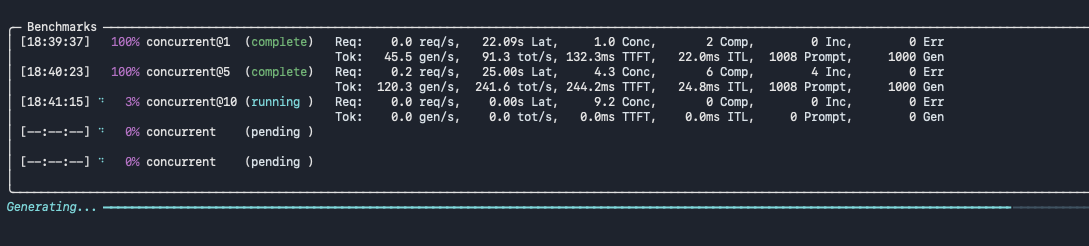
While GuideLLM runs, terminal logs display execution progress across concurrent streams, as shown in Figure 1.
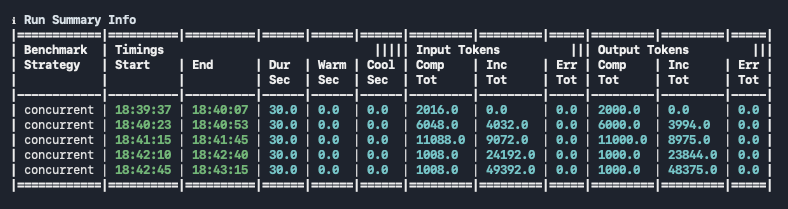
Once all streams finish, GuideLLM outputs a final run summary table, as shown in Figure 2.
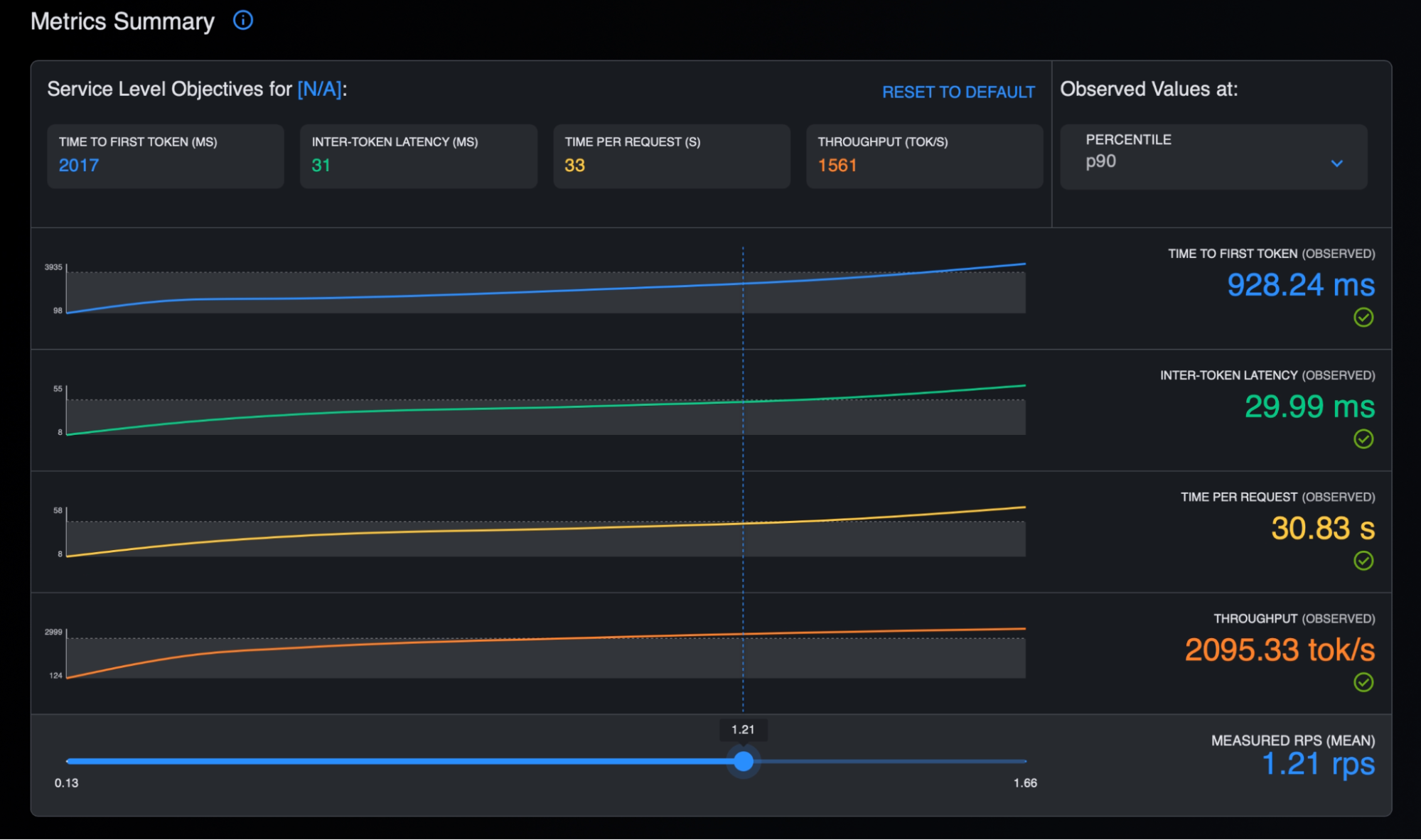
Open the generated HTML file under ~/.guidellm/results/ in your browser to examine the high-level metrics summary, as shown in Figure 3.
Scroll down within the HTML report to review the detailed distribution curves across request rates (Figure 4).
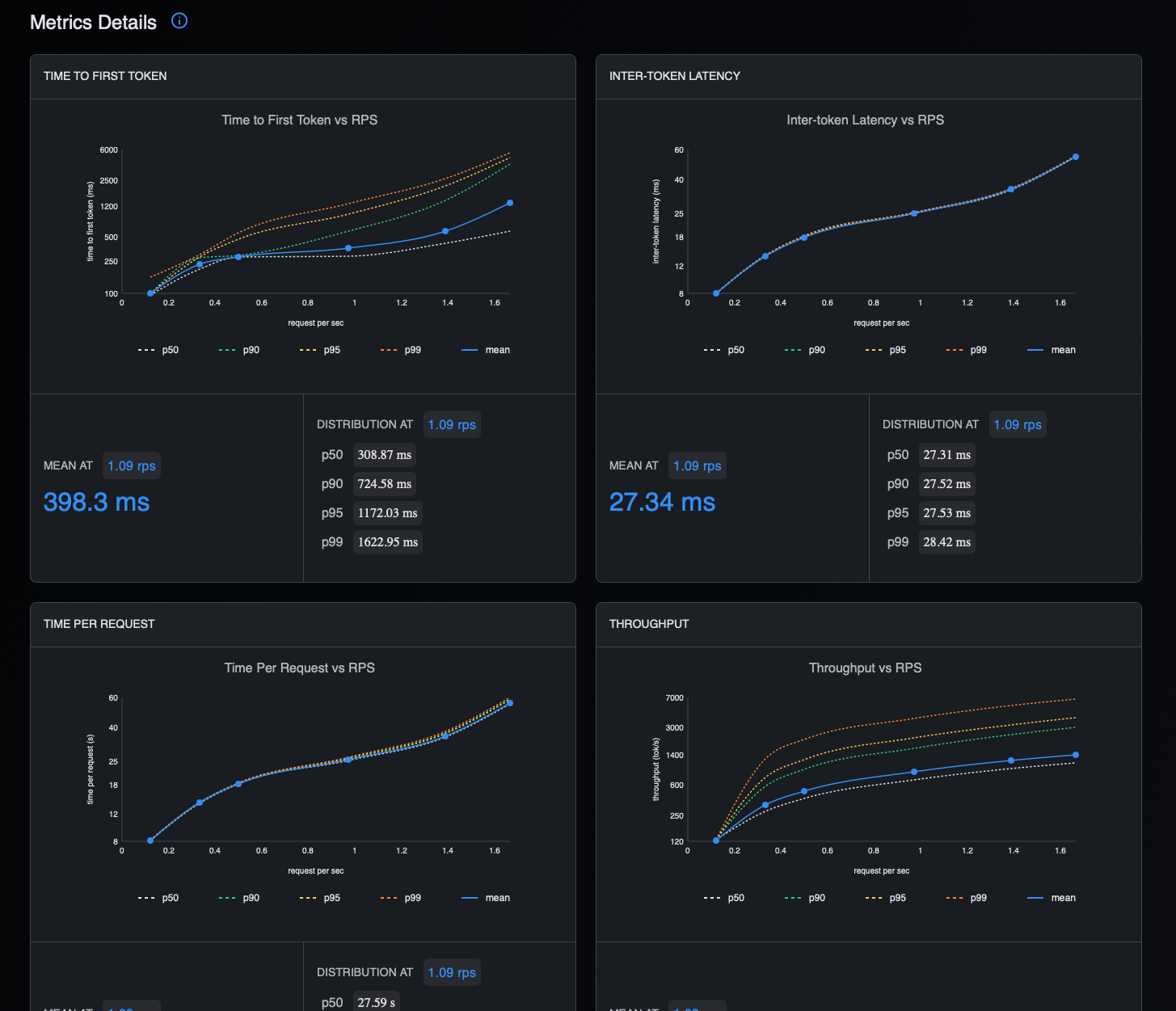
The workload report visualizes the benchmarking so you can compare key performance metrics across different rates of traffic (requests per second) and percentile groups (how performance breaks down across your requests, where “p99” reflects the worst 1% of experiences).
Time to first token (TTFT) tracks how quickly the model generates the first token in response to your request, representing perceived waiting time. Inter-token latency (ITL) measures the time between tokens, reflecting the pace of the response once the model begins generating text. Throughput captures the number of tokens per second that the server is processing, or how much the server can handle at once. You can use this report to decide whether your current model and hardware configuration meets target metrics for your use case.
Step 4. Enabling a user interface
Before we put it to the test, let's render a user interface to chat with our model. Run the following podman command on the remote machine:
podman run -d \
  --name open-webui \
  --network host \
  -v open-webui:/app/backend/data:Z \
  -e WEBUI_AUTH=false \
  -e OPENAI_API_BASE_URL=http://127.0.0.1:8000/v1 \
  --restart always \
  ghcr.io/open-webui/open-webui:main
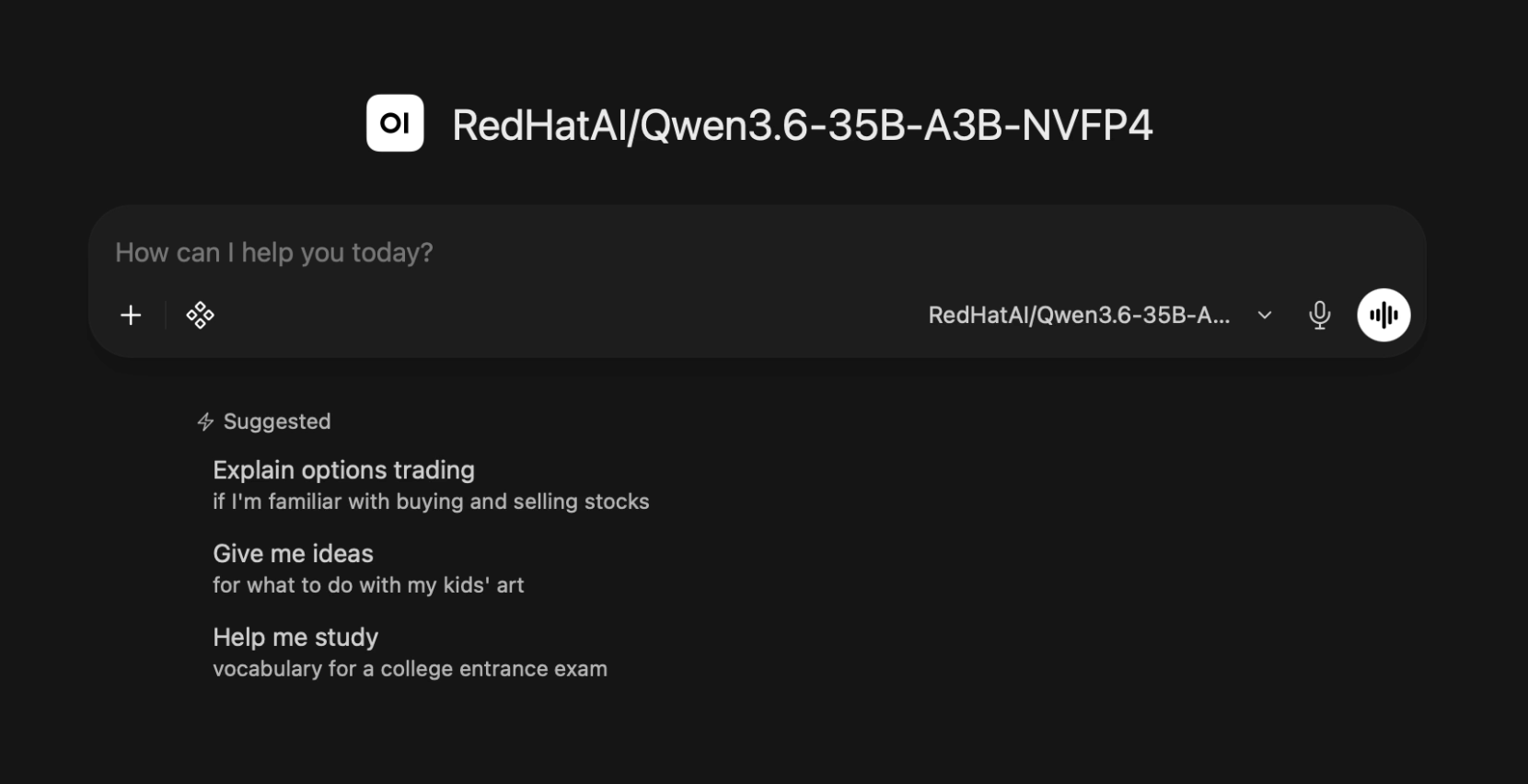
Navigate to http://127.0.0.1:8080 in your browser to view the interface.
If you run the server on a remote machine and want to access the UI locally, run the following port forwarding command:
ssh -N -L 8080:127.0.0.1:8080 <username>@<remote-server-ip>Your browser displays the interface shown in Figure 5, where you can chat with your model in natural language.
Step 5. Putting the model to the test
To evaluate your model's capabilities, paste the following prompts into Open WebUI and compare the output against the expected solutions.
Note
Increase the --max-model-len parameter value for longer-running tasks.
Logical reasoning prompt
Paste the following logic game rules into your chat interface to test the model's reasoning capabilities.
Let's play a logic game. I have chosen a secret 5-digit number using a unique permutation of the digits 1 through 5 (e.g., 31524).

Rules:

On your turn, submit a 5-digit guess using digits 1–5 without repeating any digit.

I will respond only with the total number of digits that are in the exact correct position (0 to 5).

Try to guess the secret number in as few attempts as possible.

Please make your first guess.
Expected response: The minimum number of guesses to guarantee the correct answer is 6.
Summarization prompt
Use the following prompt to test the model's ability to summarize an excerpt from Michael Santos's Red Hat Developer article into concise bullet points.
Read the following excerpt from Michael Santos's Red Hat Developer post and provide a summary in 3 to 4 concise bullet points that capture the main points, key findings, and implications.

A generative AI (gen AI) model is trained using a variety of texts from the internet. Instead of focusing on specifics, the model is trained to be general, allowing it to come up with creative answers, engage in complex conversations, and even display a sense of humor. Despite this, AI doesn't possess comprehension, understanding, or belief. Its responses are generated based on patterns learned from training data.

AI systems like any large language model (LLM) are reflections of humanity's collective knowledge in a single interface. These models' intelligence comes from their success as prediction machines, which allows them to emulate human interaction in a conversational format.

The way gen AI models operate is based on the concept of tokens, which are discrete units of language ranging from individual characters to whole words. These models process a specific number of tokens at a time using complex mathematical calculations to predict the most likely next token in a sequence.

Models like generative pre-trained transformers (GPTs) generate text one token at a time. After producing each token, the model reviews the entire sequence it has generated so far and processes it again to generate the next token. This recursive process continues until the final token completes the generated text.
This means that the quality of the AI's response depends on the prompt or instruction that a user provides. In other words, the way we interact with and instruct AI significantly influences the quality of the answers it produces.

Prompt engineering refers to the practice of designing and crafting effective prompts or instructions for AI models to achieve desired outputs. In the context of language models like GPTs, prompt engineering involves formulating input text that leads the model to generate accurate, relevant, and contextually appropriate responses.

Effective prompt engineering is important because language models don't possess true understanding or common sense reasoning. They generate responses based on patterns learned from training data. Crafting well-designed prompts can help guide the model to produce more accurate and meaningful outputs, while poorly formulated prompts might lead to incorrect or nonsensical results.

Prompt design is the systematic crafting of well-suited instructions for an LLM, with the aim of achieving a specific and well-defined objective. This practice combines both artistic and scientific elements, including:

Understanding the LLM: Different LLMs respond differently to the same prompt. Additionally, certain language models might have distinct keywords or cues that trigger specific interpretations in their responses.

Domain expertise: Proficiency in the relevant field is crucial while formulating prompts. For example, creating a prompt to answer a physics problem requires knowledge of physics.

Iterative process and evaluating quality: Devising the perfect prompt often involves trial and refinement. Having a method to assess the quality of the generated output that goes beyond subjective judgment is essential.
Expected response:
- Pattern Prediction Over Comprehension: Generative AI models function as statistical prediction engines rather than conscious entities, generating text recursively token-by-token based on learned patterns without genuine understanding or reasoning.
- Input-Driven Output Quality: Because models lack inherent comprehension, the accuracy, relevance, and utility of their responses are directly determined by the instructions provided in the user prompt.
- Prompt Engineering as a Guiding Framework: Systematic prompt design bridges the gap between probabilistic text generation and desired results, steering the AI toward precise outputs while preventing hallucinations or nonsensical answers.
- Execution Demands Expertise and Iteration: Effective prompt crafting requires a balance of model-specific behavior awareness, relevant domain expertise, and continuous, objective testing and refinement.
Programming prompt
Evaluate the model's coding abilities by pasting the following Python challenge into your chat interface.
Write a Python CLI script that reads pending meeting requests for a VIP user from standard input (sys.stdin), calculates the maximum total number of unique meetings that can be scheduled without any time overlaps, and prints the integer result to standard output (stdout).

Each meeting request contains a name and a list of alternative acceptable time slots. Each time slot is represented as [start_minute, end_minute] in minutes from midnight.

Constraints and specifications:
- Each meeting can be assigned to at most one of its provided time slots.
- Two meetings overlap if they share any time window. For example, [10, 30] and [30, 50] do not overlap (the boundary is exclusive), but [10, 31] and [30, 50] do.
- If a meeting cannot fit into the overall schedule without causing a conflict, it must be skipped.
- The script must accept a single JSON-formatted string via stdin, process the input using a function max_meetings_booked(meetings), and print only the resulting integer count.

Input format (JSON via standard input):
[
  {"name": "Meeting A", "slots": [[540, 600], [840, 900]]},
  {"name": "Meeting B", "slots": [[570, 630]]},
  {"name": "Meeting C", "slots": [[600, 660], [870, 930]]}
]

CLI execution command:
python solution.py < input.json

Output format: An integer printed to stdout representing the maximum count of successfully scheduled unique meetings.
Expected response: The model should generate a Python script that outputs 2 for the provided sample input. Additional test cases to verify the script's logic include:
[{"name": "Team Standup", "slots": [[540, 570]]}, {"name": "1-on-1", "slots": [[570, 600]]}, {"name": "Client Call", "slots": [[600, 660]]}]— Expected output: 3[{"name": "Design Sync", "slots": [[600, 660]]}, {"name": "Product Review", "slots": [[600, 660]]}, {"name": "Engineering Alignment", "slots": [[600, 660]]}]— Expected output: 1[{"name": "Interview A", "slots": [[500, 550]]}, {"name": "Interview B", "slots": [[520, 570], [600, 650]]}, {"name": "Interview C", "slots": [[550, 600]]}]— Expected output: 3[{"name": "All-Hands", "slots": [[500, 600], [700, 800]]}, {"name": "Budget Sync", "slots": [[500, 600]]}, {"name": "Strategy Session", "slots": [[700, 800]]}]— Expected output: 2
What's next?
You've now successfully deployed an AI inference server on your own hardware, benchmarked its performance, and put your model to the test.
To scale your local inference to a production cluster or explore related Red Hat software, visit Red Hat AI quickstarts, a collection of innovative AI use cases from our community. These focused examples help you deploy quickly on Red Hat AI.

