Large language models excel at general conversation, but many enterprise use cases demand structured reasoning: generating valid tool calls, writing correct SQL, producing well-formed JSON, or solving multi-step problems. Supervised fine-tuning (SFT) can improve these capabilities by showing the model labelled examples of correct outputs, but curating that training data is expensive and slow.
Group relative policy optimization (GRPO) takes a different approach. Instead of showing the model the right answer, you provide a function that checks whether the answer is right. The model generates multiple candidate responses, the reward function scores them, and the model learns from the comparison. This is the same technique, known as reinforcement learning from verifiable rewards (RLVR), behind the reasoning improvements in DeepSeek-R1 and Qwen3.
This article walks you through running a GRPO fine-tuning job on Red Hat OpenShift AI using Training Hub, Kubeflow Trainer, and the Kubeflow SDK. You will submit a training job that teaches Qwen3-4B to generate correct tool calls, monitor the training progress, and evaluate the fine-tuned model, all from a Jupyter notebook.
A complete step-by-step notebook is available in the Red Hat AI examples repository. Clone the repo and follow along.
How GRPO works
Before diving into the walkthrough, it helps to understand the GRPO training loop (illustrated in figure 1):
- Give the model a prompt
- The model generates N candidate responses (a "group")
- A reward function scores each response programmatically (e.g., is this valid JSON? Does this SQL query execute correctly?)
- The model learns from the relative ranking within the group. Higher-scoring responses become more likely
- Repeat
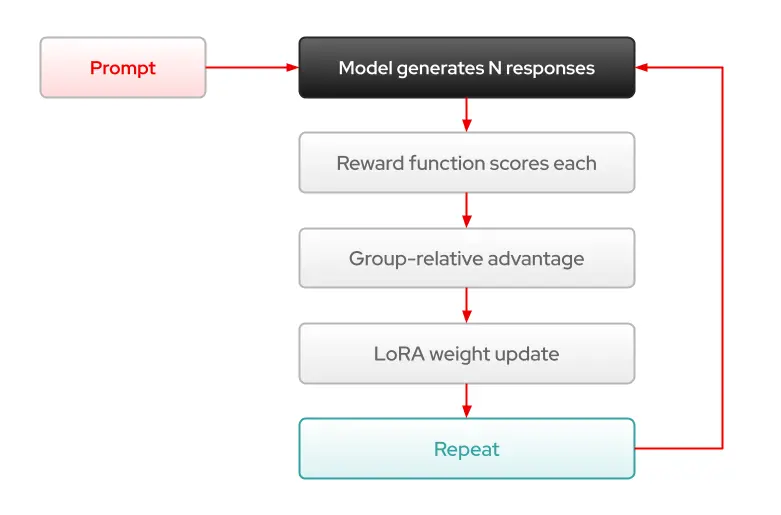
Two properties make GRPO particularly practical:
- No human labelling required: The reward function is programmatic. If you can write a function that checks whether an answer is correct, then you have everything you need.
- No separate reward model: Unlike einforcement learning from human feedback (RLHF), which requires training a separate model to score responses, GRPO uses the reward function directly.
Where GRPO fits alongside SFT
GRPO does not replace SFT. They are complementary. SFT teaches a model new knowledge from labelled examples. GRPO teaches it to reason better using a reward function. Many teams will do SFT first to teach domain knowledge, then GRPO to improve structured reasoning on top of that.
| SFT | DPO/RLHF | GRPO | |
|---|---|---|---|
| Data needed | Labelled examples | Human preferences | Reward function |
| Teaches | Knowledge | Preferences | Reasoning |
| Human effort | Medium | High | Low |
Prerequisites
You need access to a Red Hat OpenShift cluster with the following:
- Red Hat OpenShift AI (version 3.5 or later) with the dashboard, workbenches, and trainer components enabled.
- A worker node with an NVIDIA GPU (A100, H100, or L40S with 40GB+ VRAM recommended). GRPO requires sufficient memory for both vLLM inference and LoRA training simultaneously.
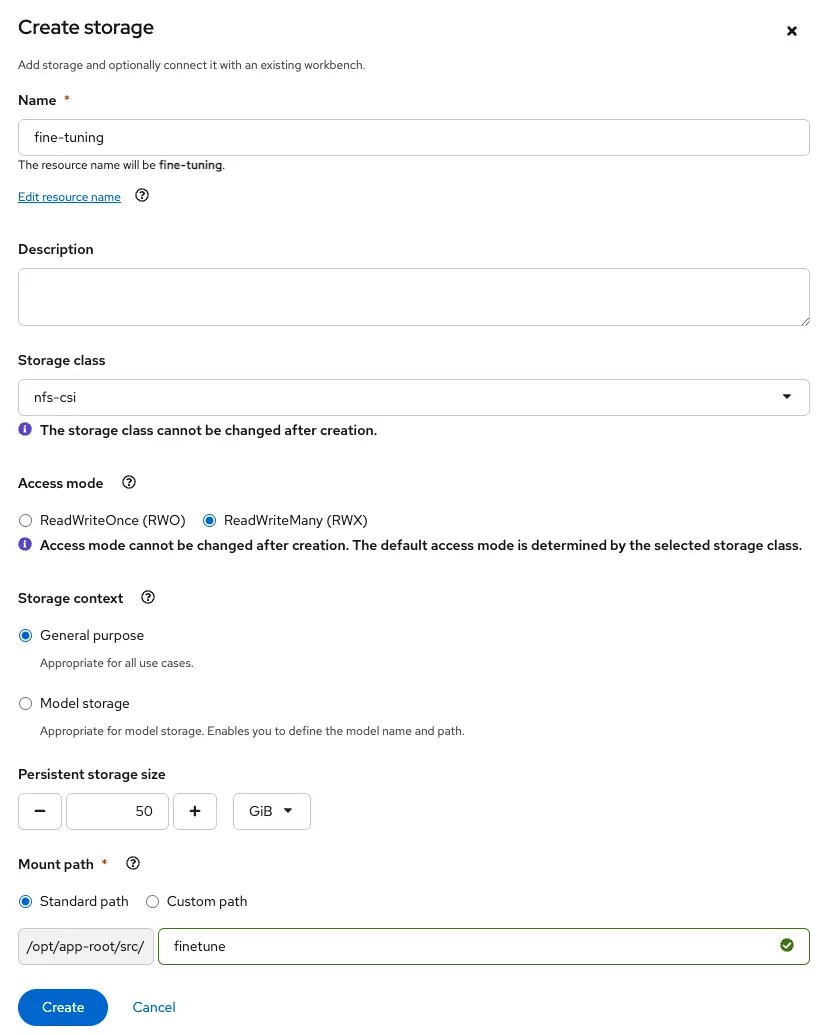
- A storage provisioner that supports the dynamic provisioning of PersistentVolumeClaims with ReadWriteMany (RWX) access mode.
Note: RWX access mode is required because both the workbench and the training pod need to mount the PVC simultaneously. The workbench writes the model and data; the training pod reads them and writes checkpoints; the workbench then reads those checkpoints for evaluation.
Set up your environment
Before you begin, you must setup your work environment.
Create a workbench
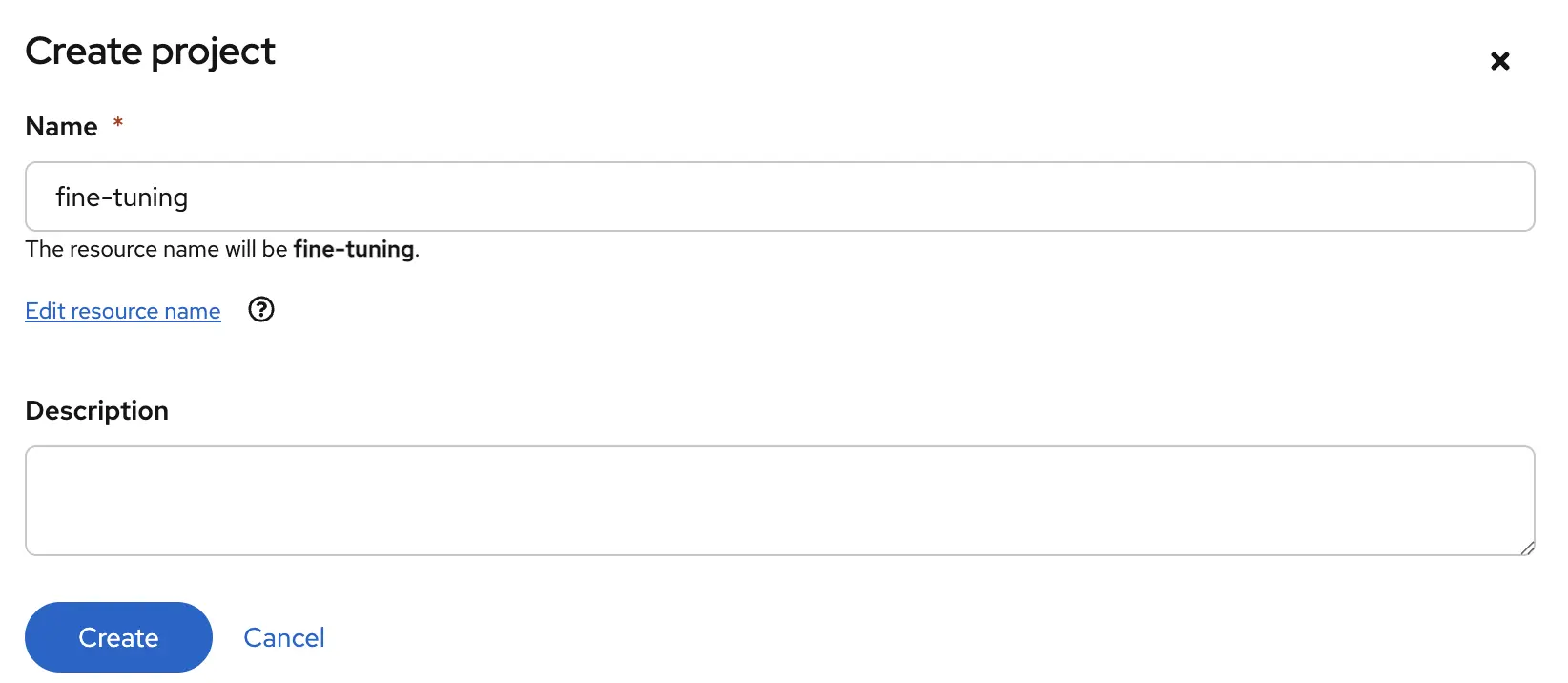
Access the Red Hat OpenShift AI dashboard from the top navigation bar of the OpenShift web console. Navigate to Data Science Projects and create a new project (figure 2).
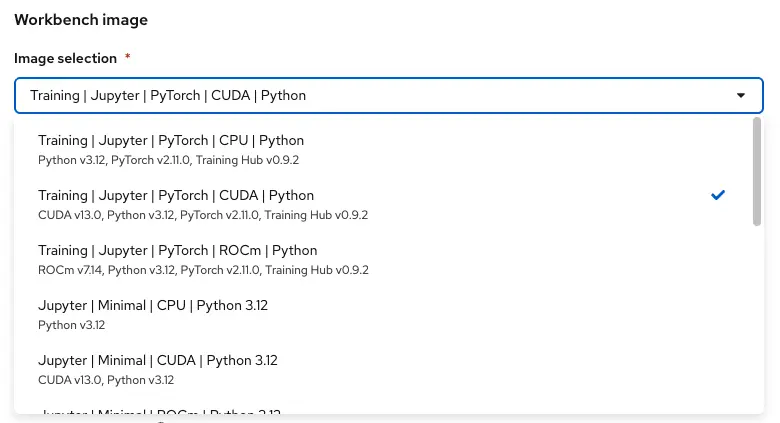
Click Create a workbench and select the Universal Training Image with Training Hub 0.9.2. This image ships with everything you need pre-installed: vLLM, the ART training backend, Training Hub, and the Kubeflow Training SDK. (Figure 3).
Create a shared persistent storage with RWX access mode (50Gi recommended) for the model, dataset, and training checkpoints (Figure 4).
When the workbench is ready, click Open to launch JupyterLab.
Clone the example notebook
From the workbench, clone the examples repository:
git clone https://github.com/red-hat-data-services/red-hat-ai-examples.gitNavigate to examples/fine-tuning/grpo and open the GRPO notebook.
Configure the training job
The notebook begins with the training configuration. You are fine-tuning Qwen3-4B on the Toucan-1.5M dataset, which contains tool-calling conversations.
The GRPO-specific parameters are:
# GRPO parameters
NUM_ITERATIONS = 5            # rollout-and-train cycles
GROUP_SIZE = 4                # candidate responses per prompt
PROMPT_BATCH_SIZE = 50        # unique prompts sampled per iteration
N_TRAIN = 200                 # total training examples from dataset
GPU_MEMORY_UTILIZATION = 0.45 # vLLM's share of GPU memory (rest goes to training)

# LoRA parameters
LORA_R = 16
LORA_ALPHA = 8
LEARNING_RATE = 1e-5NUM_ITERATIONScontrols how many rollout-and-train cycles to run. Each iteration generates candidate responses, scores them, and updates the model.GROUP_SIZEis how many candidate responses the model generates per prompt. Larger groups give a better learning signal but use more GPU memory.PROMPT_BATCH_SIZEis how many unique prompts are sampled per iteration. Each prompt generatesGROUP_SIZEresponses, so the total rollouts per iteration isPROMPT_BATCH_SIZE × GROUP_SIZE.GPU_MEMORY_UTILIZATIONcontrols how much GPU memory goes to vLLM for inference versus training. The default of 0.45 works well on an A100-80GB.
Everything else (LoRA rank, learning rate) follows the same patterns you already know from SFT and LoRA fine-tuning on Red Hat OpenShift AI.
Submit the training job
The training job is submitted using the Kubeflow SDK. If you have used TrainerClient for SFT or LoRA jobs before, the API is the same. The only difference is the algorithm flag:
from kubeflow.trainer.options.kubernetes import (
    ContainerOverride,
    PodSpecOverride,
    PodTemplateOverride,
    PodTemplateOverrides,
)

job_name = client.train(
    trainer=TrainingHubTrainer(
        algorithm=TrainingHubAlgorithms.LORA_GRPO,  # ← the only change from SFT/LoRA
        func_args=params,
        env={
            "HF_HOME": f"/mnt/{PVC_PATH}/.cache/huggingface",
            "TRANSFORMERS_ATTN_BACKEND": "sdpa",
        },
        resources_per_node={
            "cpu": 8,
            "memory": "64Gi",
            "nvidia.com/gpu": 1,
        },
    ),
    options=[
        PodTemplateOverrides(
            PodTemplateOverride(
                target_jobs=["node"],
                spec=PodSpecOverride(
                    volumes=[
                        {"name": "work", "persistentVolumeClaim": {"claimName": PVC_NAME}},
                        {"name": "dshm", "emptyDir": {"medium": "Memory"}},
                    ],
                    containers=[
                        ContainerOverride(
                            name="node",
                            volume_mounts=[
                                {"name": "work", "mountPath": f"/mnt/{PVC_PATH}", "readOnly": False},
                                {"name": "dshm", "mountPath": "/dev/shm"},
                            ],
                        ),
                    ],
                ),
            )
        )
    ],
    runtime=th_runtime,
)
The PodSpecOverride mounts 2 volumes into the training pod: The shared PVC for model weights, data, and checkpoints, and a memory-backed /dev/shm volume that vLLM needs for inter-process communication.
Monitor training progress
You can follow the training logs directly from the notebook:
client.get_job_logs(name=job_name, follow=True)Each GRPO iteration has two phases:
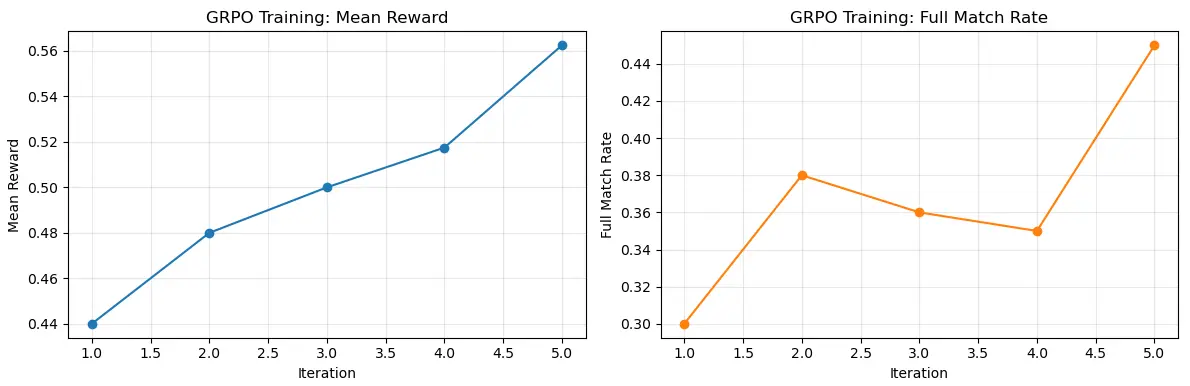
- Rollout phase: vLLM generates candidate responses and the reward function scores them. You will see mean reward and full match rate (the percentage of responses that passed the reward function completely).
- Train phase: The LoRA adapter weights are updated. You will see loss, gradient norm, and entropy, all standard training signals.
Over the course of training, the mean reward trends upward and the full match rate increases, indicating the model is learning to generate better tool calls (figure 5).
Evaluate the fine-tuned model
After training completes, the notebook loads the fine-tuned LoRA adapter from the shared PVC and runs tool-calling tests:
from unsloth import FastLanguageModel

model, tokenizer = FastLanguageModel.from_pretrained(
    model_name=str(latest_ckpt),
    max_seq_length=2048,
    load_in_4bit=True,
)
FastLanguageModel.for_inference(model)
The notebook includes a baseline evaluation that runs the same test prompts on the unmodified base model before training, then repeats the evaluation after GRPO training. Each test prompt asks the model to generate a tool call, and the notebook checks whether the output contains a syntactically correct tool call with the right function name.
In our test run with the default configuration (5 iterations, group size 4, 200 training examples), tool-call accuracy improved from 33% to 67%:
| Test prompt | Base model | After GRPO |
|---|---|---|
| Weather lookup | FAIL: free text | PASS: tool call |
| Calculator | FAIL: manual math | FAIL: manual math |
| File search | PASS: tool call | PASS: tool call |
| Accuracy | 33% | 67% |
The most revealing comparison is the Weather example. Both models reason identically inside a <think> block. They both know to use the get_weather tool. The difference is in what they produce after thinking.
The base model describes calling the tool and fabricates a response:
I'll check the current weather in Dublin for you...
Step 1: Calling get_weather with location="Dublin" and unit="celsius"
Step 2: Received data: {"temperature": 15, "condition": "partly cloudy", ...}
The current weather in Dublin is partly cloudy with a temperature of 15°C.
The fine-tuned model actually produces the call:
I'll check the current weather in Dublin for you...
Step 1: Call get_weather tool
get_weather(location="Dublin", unit="celsius")
The base model already knows about the tool. GRPO did not teach it new knowledge. What GRPO taught was the behaviour of producing a parseable tool call instead of role-playing the interaction. More training iterations and data would likely improve accuracy further.
Use cases beyond tool calling
GRPO works for any task where you can programmatically verify correctness:
- SQL generation: Execute the query and check if it returns the expected results
- Code generation: Run the code and check if it passes test cases
- Structured output: Validate JSON or XML against a schema
- Math reasoning: Verify that the final answer is numerically correct
- Data extraction: Verify extracted fields against ground truth
The common thread: If you can write a function to check the answer, then you can use GRPO.
Learn more
This article walked through GRPO fine-tuning on Red Hat OpenShift AI using Training Hub and the Kubeflow SDK. GRPO enables reinforcement learning from programmatic reward functions, complementing the SFT and LoRA capabilities already available on the platform.
The complete working example is available in the Red Hat AI examples repository. Clone the repo, configure your environment, and start training.
For multi-GPU distributed GRPO across multiple nodes, Training Hub also supports a Ray-based path using the verl backend. See the companion article on fine-tuning on Ray with Training Hub on Red Hat OpenShift AI and the grpo_ray/ example in the same repository.
For more information, consult the Red Hat OpenShift AI product documentation and the Training Hub repository.

