Running Red Hat OpenShift Pipelines at scale usually means watching execution times slowly degrade as concurrency increases. Most teams hit a wall. Execution times balloon from seconds to minutes, and adding more controller replicas barely helps. But OpenShift Pipelines 1.20 changes this with StatefulSet-based deployments, and the results are dramatic.
The real difference: Leader election vs. sharding
High availability (HA) mode provides fault tolerance with multiple controller replicas. OpenShift Pipelines supports two implementation approaches, each optimized for different operational priorities.
Leader election is the standard Kubernetes HA pattern used across the ecosystem. One controller holds the lease and processes all reconciliation work, while others stand by ready to take over if the leader fails. This approach provides automatic failover and simpler operational characteristics, making it well-suited for environments where resilience is the primary concern.
StatefulSet-based sharding distributes work across all replicas using hash-based assignment. Each pod receives a stable identity (controller-0, controller-1, etc.) and processes a deterministic subset of work. The controller uses hash(key) % N to assign each PipelineRun to a specific replica, where N is the total number of pods. This mapping remains consistent across pod restarts, ensuring predictable work distribution. All replicas actively participate in processing, enabling higher parallelism.
Both approaches have valid use cases. Leader election excels when operational simplicity and automatic failover are critical. StatefulSet-based sharding is optimized for high-concurrency workloads where maximizing throughput and resource utilization across replicas becomes important. For teams running pipelines at scale with high concurrency, sharding can provide substantial performance improvements.
Performance characteristics
OpenShift Pipelines 1.20 introduced StatefulSet-based deployments as an alternative to leader election. With stable pod identities and deterministic work assignment, the sharding approach achieves consistent ownership of reconciliation work and predictable distribution across replicas. This enables more effective utilization across replicas and higher throughput under concurrent load.
Test setup
We ran 1,000 PipelineRuns (4,000 TaskRuns total) on Red Hat OpenShift 4.x using the math benchmark scenario from our performance test suite. The math scenario executes a basic pipeline with 4 simple tasks that pass parameters and results between them, designed to stress the controller and scheduler without external dependencies.
Cluster configuration:
- Control plane: 3× m6a.2xlarge (8 vCPUs, 32 GB memory each)
- Compute plane: 5× m6a.2xlarge (8 vCPUs, 32 GB memory each)
- Controller pods: 10 replicas, each allocated 1 CPU core and 2 GiB memory
We measured execution time, scheduling delays, and controller resource utilization using Prometheus metrics collected every 30 seconds. Full test configuration and scripts are available in our performance repository.
We stress-tested both HA approaches across concurrency levels ranging from 50 to 200 pipelines. Results are based on the test setup, using OpenShift Pipelines 1.20 with both deployment and StatefulSet configurations (10 replicas each). Performance may vary based on cluster size and workload characteristics.
The following table shows the average time taken to complete a single PipelineRun at different concurrency levels. The gap widens as concurrency increases, demonstrating the performance impact of the different HA approaches under load.
Concurrent Pipelines | Deployment (Leader Election) | StatefulSet (Sharding) | Improvement |
50 | 30.4 s | 8.8 s | 3.5× faster |
100 | 79.3 s | 14.2 s | 5.6× faster |
150 | 127.7 s | 41.7 s | 3× faster |
200 | 176.1 s | 57.3 s | 3× faster |
This behavior is further illustrated by examining workload distribution across controller replicas.
Workload distribution across controller replicas
The heatmap in Figure 1 shows the TaskRun distribution across multiple pipeline controller pods. Higher color density indicates that a specific controller pod handled more TaskRuns.
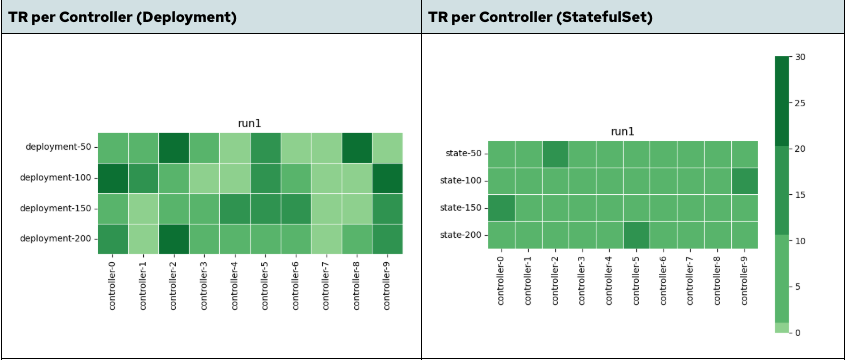
In the deployment-based controller, the distribution is uneven. A subset of controller pods handles a disproportionate share of TaskRuns, while others remain underutilized, especially at higher concurrency levels. This leads to localized load concentration, where a subset of controllers becomes the bottleneck, limiting overall throughput.
In contrast, the StatefulSet-based controller illustrates that the distribution is much more uniform. TaskRuns are spread consistently across replicas, ensuring more balanced contribution from all controller replicas.
The impact is twofold:
- Better parallelism: Work is processed across multiple controllers instead of being concentrated on a few.
- Higher utilization: Fewer idle replicas leads to more efficient resource usage.
These improvements are not driven solely by faster execution, but also by reduced queuing, improved work distribution, and more effective utilization of controller resources under concurrency.
Why this matters
The improvements are not limited to overall pipeline duration. They are visible across multiple system-level metrics at higher concurrency.
This table shows key improvements at 200 concurrent pipelines:
Metric | Deployment (Leader Election) | StatefulSet (Sharding) | Improvement |
PipelineRun duration (avg) | 176.1 s | 57.3 s | ~3× faster |
TaskRun duration (avg) | 87.9 s | 44.7 s | ~2× faster |
TaskRun scheduling delay (avg) | 31.7 s | 14.5 s | ~2.2× lower |
Controller CPU usage (avg) | ~0.42 cores | ~0.70 cores | Higher utilization |
Controller memory usage (avg) | ~4.5 GB | ~5.0 GB | +12% (slight increase) |
Workqueue depth (avg) | ~658 | ~2649 | ~4× higher concurrency |
Observations:
- Faster feedback loops: Pipeline execution time drops significantly, reducing developer wait time from minutes to under a minute at scale.
- Reduced queuing delays: Lower TaskRun scheduling delay indicates the system spends less time waiting and more time executing.
- Better resource utilization: Higher CPU usage reflects effective parallel processing rather than idle replicas.
- Higher concurrent processing capacity: StatefulSet maintains 4× more items in active processing, indicating better parallelization across controller replicas rather than sequential bottlenecks.
- Predictable performance: More consistent execution enables reliable capacity planning.
This is not a marginal improvement. It significantly impacts overall delivery time at scale.
Making the switch
OpenShift Pipelines 1.20 and later support StatefulSet-based controller deployments (based on Tekton v0.56.0+).
To enable StatefulSet mode, patch the TektonConfig resource:
kubectl patch TektonConfig/config --type merge --patch \
  '{"spec":{"pipeline":{"performance":{"statefulset-ordinals":true,"buckets":1,"replicas":1}}}}'
This enables StatefulSet mode with a single replica.
Note: For StatefulSets, the buckets and replicas values must match to ensure even work distribution. To achieve better performance, you can configure higher values based on your workload concurrency.
Higher replica counts improve parallelism but also increase resource usage. Monitor CPU and memory utilization to determine the optimal configuration for your workload.
Recommended approach:
- Test in staging with your actual workloads.
- Measure the improvements against your baseline metrics.
- Tune
bucketsandreplicasbased on observed performance. - Roll out to production during a maintenance window.
No major architectural changes are required. The controller behavior remains compatible with existing pipelines. We repeated the same experiments on OpenShift Pipelines 1.21 and observed comparable performance improvements across concurrency levels.
Scaling pipelines: Recommendations for production
For most production workloads at scale, StatefulSet is the recommended choice. StatefulSet-based deployments provide significantly better performance, more predictable behavior, and improved resource utilization.
OpenShift Pipelines 1.20+ introduces a simple change with measurable impact. The trade-off is minimal, and the gains are substantial, making it a practical optimization for teams looking to improve pipeline efficiency at scale.

