In the modern cloud-native ecosystem, observability is no longer optional—it's the lifeblood of reliable system architecture. We rely on OpenTelemetry (OTel) to gather traces, metrics, and logs necessary to keep our applications running smoothly. But as our telemetry pipelines grow in complexity, a critical security question emerges: Who is watching the watchers, and how do we secure the data they collect?
Historically, connecting an OpenTelemetry collector to an observability backend meant relying on long-lived API keys, static tokens, or shared secrets. In a world where the perimeter has dissolved, managing static credentials across thousands of ephemeral pods or VMs is not just an operational headache, it's a security vulnerability waiting to be exploited.
What is zero trust architecture
The core tenet of zero trust is simple: Never trust, always verify. By integrating OpenTelemetry with a zero trust workload identity manager, you can fundamentally shift how your observability pipelines authenticate. Instead of relying on static secrets that can be leaked or stolen, you can assign cryptographically verifiable, short-lived identities directly to your workloads.
In this article, we explore how you can bridge the gap between OpenTelemetry and Workload Identity Management. We explore how to strip static credentials from your collector configurations, enforce strict identity-based access controls for your telemetry data, and build a truly secretless observability pipeline that satisfies both your site reliability engineer (SRE) and SecOps teams.
What you need for OpenTelemetry zero trust integration
Before we start configuring secretless observability pipelines, you need a baseline environment ready to go. To follow along with this tutorial, ensure you have the following prerequisites in place:
- A running Red Hat OpenShift cluster: You need cluster-admin access to deploy and configure custom resources and namespaces.
- Zero trust workload identity manager: This must be installed and fully configured on your OpenShift cluster. The installation and architectural setup of the workload identity manager itself is outside the scope of this guide.
- Red Hat build of OpenTelemetry operator: Ensure the operator is installed using OperatorHub and running successfully in your cluster. This is required to manage your OpenTelemetry collector instances.
- GitHub container registry access: Your OpenShift nodes must have outbound network access to pull container images from ghcr.io, because this example utilizes essential community images for workloads.
Deploying the OpenTelemetry collectors and identity resources
Instead of relying on static tokens, the client-side collectors authenticate with server-side collectors using cryptographically signed identities. To accomplish this, we deploy the following four key resources to our OpenShift cluster:
- OpenTelemetry client-collector: This instance acts as the agent.
- OpenTelemetry server-collector: This instance acts as the central gateway. It receives telemetry from client-collectors but, crucially, is configured to intercept and validate the incoming identity credentials.
ClusterSPIFFEIDtemplate: The backbone of our zero trust routing. This custom resource handles thesubjectAltName(SAN) generation for the certificates.- ConfigMap (trust domain configuration): A centralized configuration map containing our environment's specific
TRUST_DOMAIN.
All listed CRs are available in a Git repository.
1. Create the namespace
First, we need an isolated namespace for our telemetry workloads. Call it ztwim-otc:
cat <<'EOF' | oc create -f-
apiVersion: v1
kind: Namespace
metadata:
  name: ztwim-otc
EOF
2. Define the SPIFFE ID template
Next, deploy the ClusterSPIFFEID custom resource. This template instructs the workload identity manager on how to construct the SPIFFE ID for our OpenTelemetry pods, relying on the pod's namespace, service account, and trust domain.
cat <<'EOF' | oc create -f-
apiVersion: spire.spiffe.io/v1alpha1
kind: ClusterSPIFFEID
metadata:
  name: otc
spec:
  className: zero-trust-workload-identity-manager-spire
  dnsNameTemplates:
    - '{{ index .PodMeta.Labels "app.kubernetes.io/name" }}'
    - '{{ index .PodMeta.Labels "app.kubernetes.io/name" }}.{{ .PodMeta.Namespace }}'
    - '{{ index .PodMeta.Labels "app.kubernetes.io/name" }}.{{ .PodMeta.Namespace }}.svc.cluster.local'
  podSelector:
    matchLabels:
      app.kubernetes.io/component: opentelemetry-collector
      app.kubernetes.io/managed-by: opentelemetry-operator
  spiffeIDTemplate: spiffe://{{ .TrustDomain }}/ns/{{ .PodMeta.Namespace }}/sa/{{ .PodSpec.ServiceAccountName }}
EOF
3. Configure the trust domain and SPIFFE helper
Before deploying the collectors, we need two ConfigMaps. The first (spiffe-helper) configures a helper utility that interfaces with the SPIRE agent to request and store short-lived SVIDs (SPIFFE verifiable identity documents) as certificates. The second (spiffe-trust-domain) establishes our root domain (in this example, example.com).
cat <<'EOF' | oc -n ztwim-otc create -f-
apiVersion: v1
data:
  helper.conf: |
    # SPIRE agent unix socket path
    agent_address = "/spiffe-workload-api/spire-agent.sock"

    #
    cmd = ""

    #
    cmd_args = ""

    # Directory to store certificates
    cert_dir = "/opt/client-certs"

    # No renew signal is used in this example
    renew_signal = ""

    # Certificate, key and bundle names
    svid_file_name = "svid.pem"
    svid_key_file_name = "svid.key"
    svid_bundle_file_name = "svid_bundle.pem"
    cert_file_mode = 0644
    key_file_mode = 0644

    jwt_svids = [
      {
      jwt_audience = "opentelemetry-collector"
      jwt_svid_file_name = "svid_token"
      }
    ]
kind: ConfigMap
metadata:
  name: spiffe-helper
---
apiVersion: v1
data:
  TRUST_DOMAIN: example.com
kind: ConfigMap
metadata:
  name: spiffe-trust-domain
EOF
4. Extract the ZeroTrustWorkloadIdentity Manager certificate for oidc-discovery
The OIDC endpoint is exposed through TLS. If you do not expose it with a public valid certificate, extract the CA including intermediate certificates and create a secret to be used for TLS validation inside the OpenTelemetryCollector containers.
Depending on your ZeroTrustWorkloadIdentity Manager configuration, the extract might look different. Ensure to deploy the Certificate secret with the name of oidc-discovery-example-com-certificate:
oc -n zero-trust-workload-identity-manager get \
 route spire-oidc-discovery-provider \
 -o jsonpath='{.spec.tls.caCertificate}'
To create a trust-bundle, use the oc command with the certificate you just extracted. For example:
oc -n ztwim-otc create secret generic \
oidc-discovery-example-com-certificate \
--from-literal="ca.crt"="$(oc -n zero-trust-workload-identity-manager get route spire-oidc-discovery-provider -o jsonpath='{.spec.tls.caCertificate}')"
5. Deploy the client collector (the agent)
Here is where the magic happens. We deploy the client OpenTelemetry Collector. Notice the initContainers block: it runs the spiffe-helper to fetch the initial certificates before the collector starts. Down in the exporters configuration, we instruct the OLTP exporter to use these dynamic certificates for mTLS and inject the x-spiffe-id header into outgoing traffic.
cat <<'EOF' | oc -n ztwim-otc create -f-
apiVersion: opentelemetry.io/v1beta1
kind: OpenTelemetryCollector
metadata:
  labels:
    spiffe.io/spire-managed-identity: 'true'
  name: client
spec:
  initContainers:
    - args:
        - -config
        - /etc/spiffe-helper/helper.conf
      restartPolicy: Always
      startupProbe:
        exec:
          command:
            - stat
            - /opt/client-certs/svid.pem
        initialDelaySeconds: 1
        periodSeconds: 2
        failureThreshold: 15
      image: registry.redhat.io/zero-trust-workload-identity-manager/spiffe-helper-rhel9:v0.10.0
      name: spiffe-helper
      resources: {}
      securityContext:
        capabilities:
          drop:
            - ALL
      volumeMounts:
        - mountPath: /spiffe-workload-api
          name: spiffe-workload-api
          readOnly: true
        - mountPath: /opt/client-certs
          name: client-certs
        - mountPath: /etc/spiffe-helper
          name: spiffe-helper
  config:
    extensions:
      oidc:
        issuer_url: https://oidc-discovery.apps.central.example.com
        audience: "opentelemetry-collector"
        username_claim: "sub"
        issuer_ca_path: /etc/certs/oidc/ca.crt
    exporters:
      debug:
        sampling_initial: 5
        sampling_thereafter: 200
        verbosity: detailed
      otlp_http/ztwim:
        endpoint: https://server-collector:4318
        retry_on_failure:
          enabled: true
        tls:
          ca_file: /opt/client-certs/svid_bundle.pem
          cert_file: /opt/client-certs/svid.pem
          key_file: /opt/client-certs/svid.key
        headers:
          "x-spiffe-id": "spiffe://${env:TRUST_DOMAIN}/ns/${env:POD_NAMESPACE}/sa/${env:POD_SA_NAME}"
    receivers:
      otlp:
        protocols:
          grpc:
            endpoint: 0.0.0.0:4317
            tls:
              ca_file: /opt/client-certs/svid_bundle.pem
              cert_file: /opt/client-certs/svid.pem
              client_ca_file: /opt/client-certs/svid_bundle.pem
              key_file: /opt/client-certs/svid.key
              max_version: '1.3'
              min_version: '1.3'
              reload_interval: 1m
            include_metadata: true
      otlp/protected:
        protocols:
          grpc:
            endpoint: 0.0.0.0:14317
            tls:
              ca_file: /opt/client-certs/svid_bundle.pem
              cert_file: /opt/client-certs/svid.pem
              client_ca_file: /opt/client-certs/svid_bundle.pem
              key_file: /opt/client-certs/svid.key
              max_version: '1.3'
              min_version: '1.3'
              reload_interval: 1m
            include_metadata: true
            auth:
              authenticator: oidc
    processors:
      attributes/spiffe:
        actions:
          - key: peer.spiffe_id
            from_context: metadata.x-spiffe-id
            action: upsert
      resource/svid:
        attributes:
          - key: subject
            action: upsert
            from_context: auth.claims.sub
    service:
      extensions:
        - oidc
      pipelines:
        logs:
          exporters:
            - otlp_http/ztwim
            - debug
          processors:
            - attributes/spiffe
            - resource/svid
          receivers:
            - otlp
            - otlp/protected
        metrics:
          exporters:
            - otlp_http/ztwim
            - debug
          processors:
            - attributes/spiffe
            - resource/svid
          receivers:
            - otlp
            - otlp/protected
        traces:
          exporters:
            - otlp_http/ztwim
            - debug
          processors:
            - attributes/spiffe
            - resource/svid
          receivers:
            - otlp
            - otlp/protected
      telemetry:
        logs:
          level: info
        metrics:
          readers:
            - pull:
                exporter:
                  prometheus:
                    host: 0.0.0.0
                    port: 8888
  configVersions: 1
  daemonSetUpdateStrategy: {}
  deploymentUpdateStrategy: {}
  env:
    - name: KUBE_NODE_NAME
      valueFrom:
        fieldRef:
          apiVersion: v1
          fieldPath: spec.nodeName
    - name: POD_NAMESPACE
      valueFrom:
        fieldRef:
          fieldPath: metadata.namespace
    - name: POD_SA_NAME
      valueFrom:
        fieldRef:
          fieldPath: spec.serviceAccountName
    - name: TRUST_DOMAIN
      valueFrom:
        configMapKeyRef:
          name: spiffe-trust-domain
          key: TRUST_DOMAIN
  ingress:
    route: {}
  ipFamilyPolicy: SingleStack
  managementState: managed
  mode: deployment
  networkPolicy:
    enabled: true
  observability:
    metrics:
      enableMetrics: true
  podAnnotations:
    kubectl.kubernetes.io/default-container: otc-container
  podDnsConfig: {}
  replicas: 1
  resources: {}
  targetAllocator:
    allocationStrategy: consistent-hashing
    collectorNotReadyGracePeriod: 30s
    collectorTargetReloadInterval: 30s
    filterStrategy: relabel-config
    observability:
      metrics: {}
    prometheusCR:
      scrapeInterval: 30s
    resources: {}
  upgradeStrategy: automatic
  volumeMounts:
    - mountPath: /opt/client-certs
      name: client-certs
    - mountPath: /etc/certs/oidc
      name: oidc-ca
  volumes:
    - csi:
        driver: csi.spiffe.io
        readOnly: true
      name: spiffe-workload-api
    - emptyDir:
        medium: Memory
      name: client-certs
    - configMap:
        defaultMode: 420
        name: spiffe-helper
      name: spiffe-helper
    - configMap:
        defaultMode: 420
        name: spiffe-trust-domain
      name: spiffe-trust-domain
    - secret:
        secretName: oidc-discovery-example-com-certificate
      name: oidc-ca
EOF
6. Deploy the server collector (the gateway)
Finally, we deploy the server OpenTelemetry collector. This instance receives data from the client. It uses a combination of the attributes/extract and transform/concat processors to pull the x-spiffe-id from the incoming request context, format it, and append it natively to the telemetry attributes (logs, metrics, and traces) before routing it to the final backend.
cat <<'EOF' | oc -n ztwim-otc create -f-
apiVersion: opentelemetry.io/v1beta1
kind: OpenTelemetryCollector
metadata:
  labels:
    spiffe.io/spire-managed-identity: 'true'
  name: server
spec:
  initContainers:
    - args:
        - -config
        - /etc/spiffe-helper/helper.conf
      restartPolicy: Always
      startupProbe:
        exec:
          command:
            - stat
            - /opt/client-certs/svid.pem
        initialDelaySeconds: 1
        periodSeconds: 2
        failureThreshold: 15
      image: registry.redhat.io/zero-trust-workload-identity-manager/spiffe-helper-rhel9:v0.10.0
      name: spiffe-helper
      resources: {}
      securityContext:
        capabilities:
          drop:
            - ALL
      volumeMounts:
        - mountPath: /spiffe-workload-api
          name: spiffe-workload-api
          readOnly: true
        - mountPath: /opt/client-certs
          name: client-certs
        - mountPath: /etc/spiffe-helper
          name: spiffe-helper
  config:
    exporters:
      debug:
        sampling_initial: 5
        sampling_thereafter: 200
        verbosity: detailed
    receivers:
      otlp:
        protocols:
          grpc:
            endpoint: 0.0.0.0:4317
            tls:
              ca_file: /opt/client-certs/svid_bundle.pem
              cert_file: /opt/client-certs/svid.pem
              client_ca_file: /opt/client-certs/svid_bundle.pem
              key_file: /opt/client-certs/svid.key
              max_version: '1.3'
              min_version: '1.3'
              reload_interval: 1m
            include_metadata: true
          http:
            endpoint: 0.0.0.0:4318
            tls:
              ca_file: /opt/client-certs/svid_bundle.pem
              cert_file: /opt/client-certs/svid.pem
              client_ca_file: /opt/client-certs/svid_bundle.pem
              key_file: /opt/client-certs/svid.key
              max_version: '1.3'
              min_version: '1.3'
              reload_interval: 1m
            include_metadata: true
    processors:
      attributes/extract:
        actions:
          - key: tmp.next_spiffe_id
            from_context: metadata.x-spiffe-id
            action: upsert
      transform/concat:
        error_mode: ignore
        log_statements:
          - context: log
            statements:
              - set(attributes["peer.spiffe_id"], Concat([attributes["peer.spiffe_id"], attributes["tmp.next_spiffe_id"]], ",")) where attributes["peer.spiffe_id"] != nil
              - set(attributes["peer.spiffe_id"], attributes["tmp.next_spiffe_id"]) where attributes["peer.spiffe_id"] == nil
        metric_statements:
          - context: datapoint
            statements:
              - set(attributes["peer.spiffe_id"], Concat([attributes["peer.spiffe_id"], attributes["tmp.next_spiffe_id"]], ",")) where attributes["peer.spiffe_id"] != nil
              - set(attributes["peer.spiffe_id"], attributes["tmp.next_spiffe_id"]) where attributes["peer.spiffe_id"] == nil
        trace_statements:
          - context: span
            statements:
              - set(attributes["peer.spiffe_id"], Concat([attributes["peer.spiffe_id"], attributes["tmp.next_spiffe_id"]], ",")) where attributes["peer.spiffe_id"] != nil
              - set(attributes["peer.spiffe_id"], attributes["tmp.next_spiffe_id"]) where attributes["peer.spiffe_id"] == nil
      attributes/cleanup:
        actions:
          - key: tmp.next_spiffe_id
            action: delete
    service:
      pipelines:
        logs:
          exporters:
            - debug
          processors:
            - attributes/extract
            - transform/concat
            - attributes/cleanup
          receivers:
            - otlp
        metrics:
          exporters:
            - debug
          processors:
            - attributes/extract
            - transform/concat
            - attributes/cleanup
          receivers:
            - otlp
        traces:
          exporters:
            - debug
          processors:
            - attributes/extract
            - transform/concat
            - attributes/cleanup
          receivers:
            - otlp
      telemetry:
        logs:
          level: info
        metrics:
          readers:
            - pull:
                exporter:
                  prometheus:
                    host: 0.0.0.0
                    port: 8888
  configVersions: 1
  daemonSetUpdateStrategy: {}
  deploymentUpdateStrategy: {}
  env:
    - name: KUBE_NODE_NAME
      valueFrom:
        fieldRef:
          apiVersion: v1
          fieldPath: spec.nodeName
    - name: POD_NAMESPACE
      valueFrom:
        fieldRef:
          fieldPath: metadata.namespace
    - name: POD_SA_NAME
      valueFrom:
        fieldRef:
          fieldPath: spec.serviceAccountName
    - name: TRUST_DOMAIN
      valueFrom:
        configMapKeyRef:
          name: spiffe-trust-domain
          key: TRUST_DOMAIN
  ingress:
    route: {}
  ipFamilyPolicy: SingleStack
  managementState: managed
  mode: deployment
  networkPolicy:
    enabled: true
  observability:
    metrics:
      enableMetrics: true
  podAnnotations:
    kubectl.kubernetes.io/default-container: otc-container
  podDnsConfig: {}
  replicas: 1
  resources: {}
  targetAllocator:
    allocationStrategy: consistent-hashing
    collectorNotReadyGracePeriod: 30s
    collectorTargetReloadInterval: 30s
    filterStrategy: relabel-config
    observability:
      metrics: {}
    prometheusCR:
      scrapeInterval: 30s
    resources: {}
  upgradeStrategy: automatic
  volumeMounts:
    - mountPath: /opt/client-certs
      name: client-certs
  volumes:
    - csi:
        driver: csi.spiffe.io
        readOnly: true
      name: spiffe-workload-api
    - emptyDir:
        medium: Memory
      name: client-certs
    - configMap:
        defaultMode: 420
        name: spiffe-helper
      name: spiffe-helper
    - configMap:
        defaultMode: 420
        name: spiffe-trust-domain
      name: spiffe-trust-domain
EOF
Verification: Seeing zero trust in action
With our agent and gateway collectors deployed, it's time to prove that our secretless pipeline is actually working. To do this, we need to send some data through the system. We will deploy a standard OpenTelemetry utility called telemetrygen to generate test telemetry and push it to our client collector.
Deploy the generator:
cat <<'EOF' | oc -n ztwim-otc create -f-
apiVersion: v1
kind: Pod
metadata:
  labels:
    run: telemetrygen
  name: telemetrygen
spec:
  initContainers:
    - args:
        - -config
        - /etc/spiffe-helper/helper.conf
      restartPolicy: Always
      startupProbe:
        exec:
          command:
            - stat
            - /opt/client-certs/svid.pem
        initialDelaySeconds: 1
        periodSeconds: 2
        failureThreshold: 15
      image: registry.redhat.io/zero-trust-workload-identity-manager/spiffe-helper-rhel9:v0.10.0
      name: spiffe-helper
      resources: {}
      securityContext:
        capabilities:
          drop:
            - ALL
      volumeMounts:
        - mountPath: /spiffe-workload-api
          name: spiffe-workload-api
          readOnly: true
        - mountPath: /opt/client-certs
          name: client-certs
        - mountPath: /etc/spiffe-helper
          name: spiffe-helper
  containers:
    - args:
        - logs
        - --otlp-endpoint
        - client-collector:4317
        - --logs
        - "1"
        - --body
        - "Hello World"
        - --ca-cert
        - /opt/client-certs/svid_bundle.pem
        - --client-cert
        - /opt/client-certs/svid.pem
        - --client-key
        - /opt/client-certs/svid.key
        - --mtls
        - --telemetry-attributes
        - peer.spiffe_id="spiffe://$(TRUST_DOMAIN)/ns/$(POD_NAMESPACE)/sa/$(POD_SA_NAME)"
      image: ghcr.io/open-telemetry/opentelemetry-collector-contrib/telemetrygen
      imagePullPolicy: IfNotPresent
      name: logs
      volumeMounts:
        - mountPath: /opt/client-certs
          name: client-certs
      env:
        - name: POD_NAMESPACE
          valueFrom:
            fieldRef:
              fieldPath: metadata.namespace
        - name: POD_SA_NAME
          valueFrom:
            fieldRef:
              fieldPath: spec.serviceAccountName
        - name: TRUST_DOMAIN
          valueFrom:
              configMapKeyRef:
                name: spiffe-trust-domain
                key: TRUST_DOMAIN
    - args:
        - metrics
        - --otlp-endpoint
        - client-collector:4317
        - --metrics
        - "1"
        - --metric-type
        - Gauge
        - --ca-cert
        - /opt/client-certs/svid_bundle.pem
        - --client-cert
        - /opt/client-certs/svid.pem
        - --client-key
        - /opt/client-certs/svid.key
        - --mtls
        - --telemetry-attributes
        - peer.spiffe_id="spiffe://$(TRUST_DOMAIN)/ns/$(POD_NAMESPACE)/sa/$(POD_SA_NAME)"
      image: ghcr.io/open-telemetry/opentelemetry-collector-contrib/telemetrygen
      imagePullPolicy: IfNotPresent
      name: metrics
      volumeMounts:
        - mountPath: /opt/client-certs
          name: client-certs
      env:
        - name: POD_NAMESPACE
          valueFrom:
            fieldRef:
              fieldPath: metadata.namespace
        - name: POD_SA_NAME
          valueFrom:
            fieldRef:
              fieldPath: spec.serviceAccountName
        - name: TRUST_DOMAIN
          valueFrom:
              configMapKeyRef:
                name: spiffe-trust-domain
                key: TRUST_DOMAIN
    - args:
        - traces
        - --otlp-endpoint
        - client-collector:4317
        - --traces
        - "1"
        - --ca-cert
        - /opt/client-certs/svid_bundle.pem
        - --client-cert
        - /opt/client-certs/svid.pem
        - --client-key
        - /opt/client-certs/svid.key
        - --mtls
        - --telemetry-attributes
        - peer.spiffe_id="spiffe://$(TRUST_DOMAIN)/ns/$(POD_NAMESPACE)/sa/$(POD_SA_NAME)"
      image: ghcr.io/open-telemetry/opentelemetry-collector-contrib/telemetrygen
      imagePullPolicy: IfNotPresent
      name: traces
      volumeMounts:
        - mountPath: /opt/client-certs
          name: client-certs
      env:
        - name: POD_NAMESPACE
          valueFrom:
            fieldRef:
              fieldPath: metadata.namespace
        - name: POD_SA_NAME
          valueFrom:
            fieldRef:
              fieldPath: spec.serviceAccountName
        - name: TRUST_DOMAIN
          valueFrom:
              configMapKeyRef:
                name: spiffe-trust-domain
                key: TRUST_DOMAIN
  volumes:
    - csi:
        driver: csi.spiffe.io
        readOnly: true
      name: spiffe-workload-api
    - emptyDir:
        medium: Memory
      name: client-certs
    - configMap:
        defaultMode: 420
        name: spiffe-helper
      name: spiffe-helper
    - configMap:
        defaultMode: 420
        name: spiffe-trust-domain
      name: spiffe-trust-domain
  dnsPolicy: ClusterFirst
  enableServiceLinks: true
  preemptionPolicy: PreemptLowerPriority
  priority: 0
  restartPolicy: Never
  schedulerName: default-scheduler
  terminationGracePeriodSeconds: 30
EOF
The telemetrygen pod immediately starts sending dummy logs, metrics, and traces to the client collector. The client collector uses its newly minted SPIFFE identity to securely open an mTLS connection and forward that data to the server collector.
If our zero trust architecture is functioning correctly, the server collector intercepts the incoming data, validates the cryptographic identity of the client, extracts the SPIFFE ID, and appends it natively to the telemetry payload. Look at the logs of the server collector to see the final result:
oc -n ztwim-otc logs deploy/server-collectorLooking at the output
Scrolling through the logs, you see output similar to this:
Resource SchemaURL: https://opentelemetry.io/schemas/1.38.0
Resource attributes:
     -> service.name: Str(telemetrygen)
ScopeLogs #0
ScopeLogs SchemaURL:
InstrumentationScope
LogRecord #0
ObservedTimestamp: 1970-01-01 00:00:00 +0000 UTC
Timestamp: 2026-04-01 07:44:49.1218137 +0000 UTC
SeverityText: Info
SeverityNumber: Info(9)
Body: Str(Hello World)
Attributes:
     -> app: Str(server)
     -> peer.spiffe_id: Str(spiffe://example.com/ns/ztwim-otc/sa/client-collector)
Trace ID:
Span ID:
Flags: 0
	{"resource": {"service.instance.id": "b6651655-57dd-45af-bdd6-98d03d51d600", "service.name": "otelcol", "service.version": "0.144.0"}, "otelcol.component.id": "debug", "otelcol.component.kind": "exporter", "otelcol.signal": "logs"}
Why this matters
Look closely at the Attributes section, specifically this line:
-> peer.spiffe_id:
Str(spiffe://example.com/ns/ztwim-otc/sa/client-collector)
This is the proof that your zero trust integration is a success.
Normally mTLS is the gold standard for securing the hops between your OpenTelemetry collectors, but what about the very first hop—from your application to the client collector? Sometimes, configuring mTLS natively within an application pod is impractical due to legacy code or library constraints. For these scenarios, the zero trust workload identity manager allows us to issue short-lived SPIFFE JWT (JSON web token) SVIDs. Applications can easily use these tokens as standard bearer tokens in HTTP/gRPC headers to authenticate telemetry data.
Let's test this out by configuring our telemetrygen pod to authenticate against the client collector using a JWT. This will prove that we can secure the pipeline all the way down to the application layer.
1. Clean up and restart
First, remove the previous unauthenticated telemetrygen instance and restart the client-collector to ensure it generates our configured JWT SVIDs from the SPIFFE helper:
oc -n ztwim-otc delete pod telemetrygen
oc -n ztwim-otc rollout restart deploy/client-collector
2. Extract the JWT into a Secret
We don't want to modify the telemetrygen container image, so we need to work around the missing capability to read the JWT token from disk into an env variable. In a production environment, the recommendation for zero-touch mTLS instrumentation is to inject a sidecar OpenTelemetry collector to handle the authorization and mTLS connectivity for the application.
The telemetrygen utility cannot natively read bearer tokens directly from a mounted file. It expects them from an environment variable. To accommodate this, we extract the newly generated svid_token from the client collector and place it into a standard Kubernetes Secret.
oc -n ztwim-otc create secret generic svid-token \
--from-literal=token="$(oc -n ztwim-otc exec -ti deploy/client-collector -- cat /opt/client-certs/svid_token)"
Because JWTs are short-lived, they eventually expire. If you're testing this over a long period and need to recreate the secret, use the following command instead:
oc -n ztwim-otc create secret generic svid-token \
  --from-literal=token="$(oc -n ztwim-otc exec -ti deploy/client-collector -- cat /opt/client-certs/svid_token)" \
  --dry-run=client -o yaml | oc -n ztwim-otc replace -f-
3. Deploy the Protected Telemetry Generator
Next, deploy a new version of the generator. This specific deployment is designed as a stress test for our security rules. It is configured to send all three telemetry signals (logs, metrics, and traces). However, only the trace signal is configured to pass the bearer authentication token.
cat <<'EOF' | oc -n ztwim-otc create -f-
apiVersion: v1
kind: Pod
metadata:
  labels:
    run: telemetrygen
  name: telemetrygen
spec:
  initContainers:
    - args:
        - -config
        - /etc/spiffe-helper/helper.conf
      restartPolicy: Always
      startupProbe:
        exec:
          command:
            - stat
            - /opt/client-certs/svid.pem
        initialDelaySeconds: 1
        periodSeconds: 2
        failureThreshold: 15
      image: registry.redhat.io/zero-trust-workload-identity-manager/spiffe-helper-rhel9:v0.10.0
      name: spiffe-helper
      resources: {}
      securityContext:
        capabilities:
          drop:
            - ALL
      volumeMounts:
        - mountPath: /spiffe-workload-api
          name: spiffe-workload-api
          readOnly: true
        - mountPath: /opt/client-certs
          name: client-certs
        - mountPath: /etc/spiffe-helper
          name: spiffe-helper
  containers:
    - args:
        - logs
        - --otlp-endpoint
        - client-collector:4317
        - --logs
        - "1"
        - --body
        - "Hello World"
        - --ca-cert
        - /opt/client-certs/svid_bundle.pem
        - --client-cert
        - /opt/client-certs/svid.pem
        - --client-key
        - /opt/client-certs/svid.key
        - --mtls
        - --telemetry-attributes
        - peer.spiffe_id="spiffe://$(TRUST_DOMAIN)/ns/$(POD_NAMESPACE)/sa/$(POD_SA_NAME)"
      image: ghcr.io/open-telemetry/opentelemetry-collector-contrib/telemetrygen
      imagePullPolicy: IfNotPresent
      name: logs
      volumeMounts:
        - mountPath: /opt/client-certs
          name: client-certs
      env:
        - name: POD_NAMESPACE
          valueFrom:
            fieldRef:
              fieldPath: metadata.namespace
        - name: POD_SA_NAME
          valueFrom:
            fieldRef:
              fieldPath: spec.serviceAccountName
        - name: TRUST_DOMAIN
          valueFrom:
              configMapKeyRef:
                name: spiffe-trust-domain
                key: TRUST_DOMAIN
    - args:
        - metrics
        - --otlp-endpoint
        - client-collector:4317
        - --metrics
        - "1"
        - --metric-type
        - Gauge
        - --ca-cert
        - /opt/client-certs/svid_bundle.pem
        - --client-cert
        - /opt/client-certs/svid.pem
        - --client-key
        - /opt/client-certs/svid.key
        - --mtls
        - --telemetry-attributes
        - peer.spiffe_id="spiffe://$(TRUST_DOMAIN)/ns/$(POD_NAMESPACE)/sa/$(POD_SA_NAME)"
      image: ghcr.io/open-telemetry/opentelemetry-collector-contrib/telemetrygen
      imagePullPolicy: IfNotPresent
      name: metrics
      volumeMounts:
        - mountPath: /opt/client-certs
          name: client-certs
      env:
        - name: POD_NAMESPACE
          valueFrom:
            fieldRef:
              fieldPath: metadata.namespace
        - name: POD_SA_NAME
          valueFrom:
            fieldRef:
              fieldPath: spec.serviceAccountName
        - name: TRUST_DOMAIN
          valueFrom:
              configMapKeyRef:
                name: spiffe-trust-domain
                key: TRUST_DOMAIN
    - args:
        - traces
        - --otlp-endpoint
        - client-collector:4317
        - --traces
        - "1"
        - --ca-cert
        - /opt/client-certs/svid_bundle.pem
        - --client-cert
        - /opt/client-certs/svid.pem
        - --client-key
        - /opt/client-certs/svid.key
        - --mtls
        - --telemetry-attributes
        - peer.spiffe_id="spiffe://$(TRUST_DOMAIN)/ns/$(POD_NAMESPACE)/sa/$(POD_SA_NAME)"
        - --otlp-header
        - Authorization="Bearer $(TOKEN)"
      image: ghcr.io/open-telemetry/opentelemetry-collector-contrib/telemetrygen
      imagePullPolicy: IfNotPresent
      name: traces
      volumeMounts:
        - mountPath: /opt/client-certs
          name: client-certs
      env:
        - name: POD_NAMESPACE
          valueFrom:
            fieldRef:
              fieldPath: metadata.namespace
        - name: POD_SA_NAME
          valueFrom:
            fieldRef:
              fieldPath: spec.serviceAccountName
        - name: TRUST_DOMAIN
          valueFrom:
              configMapKeyRef:
                name: spiffe-trust-domain
                key: TRUST_DOMAIN
        - name: TOKEN
          valueFrom:
            secretKeyRef:
              name: svid-token
              key: token
  volumes:
    - csi:
        driver: csi.spiffe.io
        readOnly: true
      name: spiffe-workload-api
    - emptyDir:
        medium: Memory
      name: client-certs
    - configMap:
        defaultMode: 420
        name: spiffe-helper
      name: spiffe-helper
    - configMap:
        defaultMode: 420
        name: spiffe-trust-domain
      name: spiffe-trust-domain
  dnsPolicy: ClusterFirst
  enableServiceLinks: true
  preemptionPolicy: PreemptLowerPriority
  priority: 0
  restartPolicy: Never
  schedulerName: default-scheduler
  terminationGracePeriodSeconds: 30
EOF
4. Verify the authenticated traces (the success)
Let's check the server collector logs to see what data successfully made it through the pipeline.
oc -n ztwim-otc logs deploy/server-collectorExample output:
Resource SchemaURL: https://opentelemetry.io/schemas/1.38.0
Resource attributes:
     -> service.name: Str(telemetrygen)
ScopeSpans #0
ScopeSpans SchemaURL:
InstrumentationScope telemetrygen
Span #0
    Trace ID       : 2b4256bd32dc5f3c7e7b9bf52446567d
    Parent ID      : 84ceffbb396e7fe9
    ID             : 1ae71df3dc82c66c
    Name           : okey-dokey-0
    Kind           : Server
    Start time     : 2026-04-01 11:58:56.22429783 +0000 UTC
    End time       : 2026-04-01 11:58:56.22442083 +0000 UTC
    Status code    : Unset
    Status message :
    DroppedAttributesCount: 0
    DroppedEventsCount: 0
    DroppedLinksCount: 0
Attributes:
     -> network.peer.address: Str(1.2.3.4)
     -> peer.service: Str(telemetrygen-client)
     -> peer.spiffe_id: Str(spiffe://example.com/ns/ztwim-otc/sa/default,spiffe://example.com/ns/ztwim-otc/sa/client-collector)
Span #1
    Trace ID       : 2b4256bd32dc5f3c7e7b9bf52446567d
    Parent ID      :
    ID             : 84ceffbb396e7fe9
    Name           : lets-go
    Kind           : Client
    Start time     : 2026-04-01 11:58:56.22429783 +0000 UTC
    End time       : 2026-04-01 11:58:56.22442083 +0000 UTC
    Status code    : Unset
    Status message :
    DroppedAttributesCount: 0
    DroppedEventsCount: 0
    DroppedLinksCount: 0
Attributes:
     -> network.peer.address: Str(1.2.3.4)
     -> peer.service: Str(telemetrygen-server)
     -> peer.spiffe_id: Str(spiffe://example.com/ns/ztwim-otc/sa/default,spiffe://example.com/ns/ztwim-otc/sa/client-collector)
	{"resource": {"service.instance.id": "1d773198-907e-400e-881b-7bcbef3747bb", "service.name": "otelcol", "service.version": "0.144.0"}, "otelcol.component.id": "debug", "otelcol.component.kind": "exporter", "otelcol.signal": "traces"}
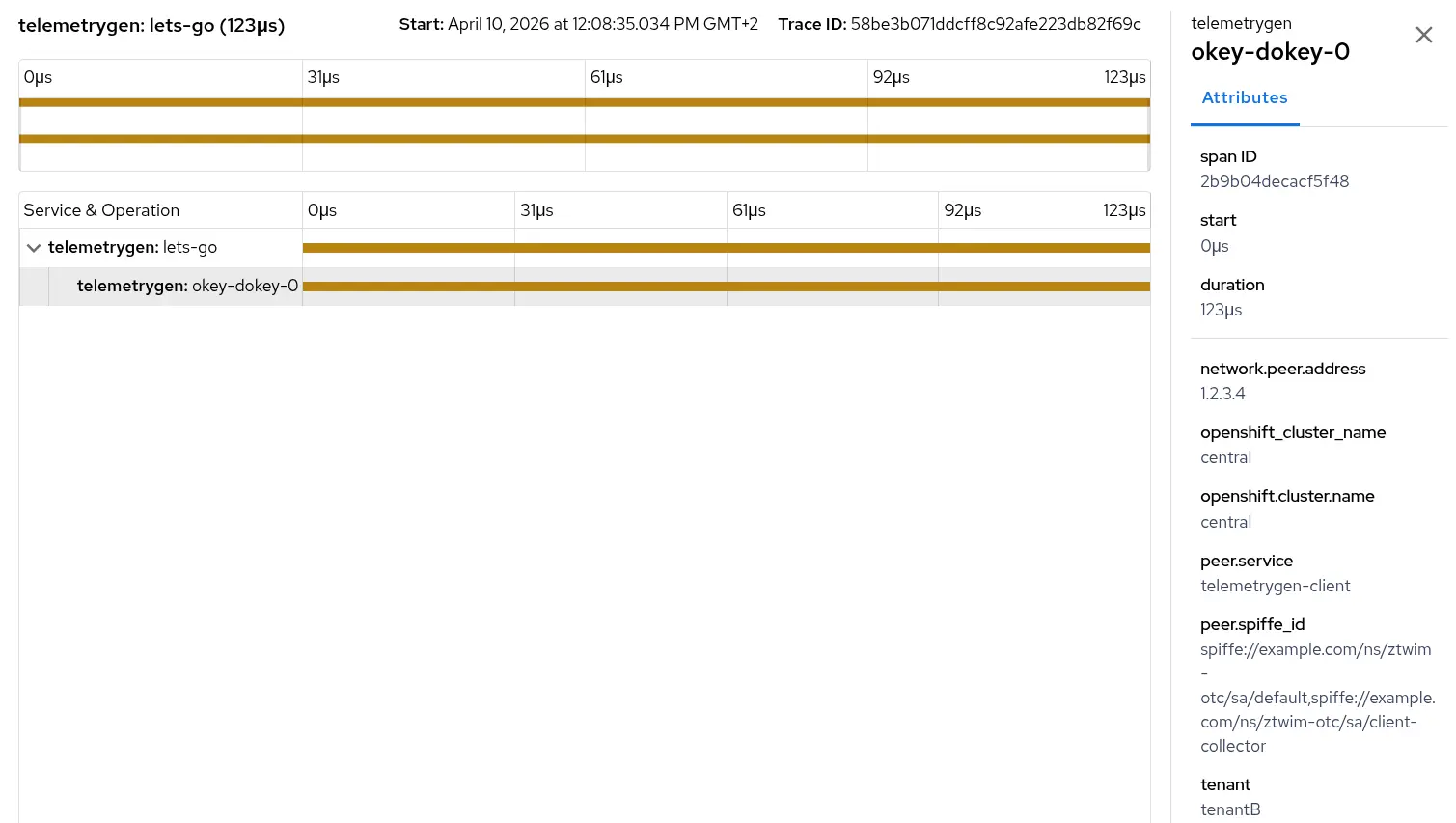
Look closely at the peer.spiffe_id attribute. Because we used the transform/concat processor in our gateway, the attribute now shows the full chain of trust: spiffe://example.com/ns/ztwim-otc/sa/default,spiffe://example.com/ns/ztwim-otc/sa/client-collector.
We successfully tracked the exact identity of the application pod (sa/default) and the collector that processed it (sa/client-collector). An graphical example of this is shown in Figure 1:
5. Verify the rejected signals (the security proof)
What happened to the logs and metrics that didn't have the bearer token attached? Let's check the logs of the telemetrygen container itself.
You see output resembling this:
2026-04-01T11:58:55.836Z ERROR logs/worker.go:142 failed to export batched logs {"worker": 0, "error": "rpc error: code = Unauthenticated desc = authentication didn't succeed"}This is a massive win for SecOps. The OpenTelemetry client collector actively rejected the incoming log and metric data because it lacked a verifiable zero trust identity.
Conclusion
You shouldn't have to choose between a secure observability pipeline and a highly efficient one. Pairing the Red Hat Build of OpenTelemetry with a zero trust workload identity manager lets you establish a flexible, rock-solid, and cryptographically verified telemetry flow.
As a result, your SREs get the critical metrics required to guarantee uptime, and SecOps gets the peace of mind that every single monitor is strictly authenticated. It's time to leave hardcoded credentials in the past and step into the era of zero trust.

