Redhat Developers  Logo
  • AI

    Get started with AI

    • Red Hat AI
      Accelerate the development and deployment of enterprise AI solutions.
    • AI learning hub
      Explore learning materials and tools, organized by task.
    • AI interactive demos
      Click through scenarios with Red Hat AI, including training LLMs and more.
    • AI/ML learning paths
      Expand your OpenShift AI knowledge using these learning resources.
    • AI quickstarts
      Focused AI use cases designed for fast deployment on Red Hat AI platforms.
    • No-cost AI training
      Foundational Red Hat AI training.

    Featured resources

    • OpenShift AI learning
    • Open source AI for developers
    • AI product application development
    • Open source-powered AI/ML for hybrid cloud
    • AI and Node.js cheat sheet

    Red Hat AI Factory with NVIDIA

    • Red Hat AI Factory with NVIDIA is a co-engineered, enterprise-grade AI solution for building, deploying, and managing AI at scale across hybrid cloud environments.
    • Explore the solution
  • Learn

    Self-guided

    • Documentation
      Find answers, get step-by-step guidance, and learn how to use Red Hat products.
    • Learning paths
      Explore curated walkthroughs for common development tasks.
    • Guided learning
      Receive custom learning paths powered by our AI assistant.
    • See all learning

    Hands-on

    • Developer Sandbox
      Spin up Red Hat's products and technologies without setup or configuration.
    • Interactive labs
      Learn by doing in these hands-on, browser-based experiences.
    • Interactive demos
      Click through product features in these guided tours.

    Browse by topic

    • AI/ML
    • Automation
    • Java
    • Kubernetes
    • Linux
    • See all topics

    Training & certifications

    • Courses and exams
    • Certifications
    • Skills assessments
    • Red Hat Academy
    • Learning subscription
    • Explore training
  • Build

    Get started

    • Red Hat build of Podman Desktop
      A downloadable, local development hub to experiment with our products and builds.
    • Developer Sandbox
      Spin up Red Hat's products and technologies without setup or configuration.

    Download products

    • Access product downloads to start building and testing right away.
    • Red Hat Enterprise Linux
    • Red Hat AI
    • Red Hat OpenShift
    • Red Hat Ansible Automation Platform
    • See all products

    Featured

    • Red Hat build of OpenJDK
    • Red Hat JBoss Enterprise Application Platform
    • Red Hat OpenShift Dev Spaces
    • Red Hat Developer Toolset

    References

    • E-books
    • Documentation
    • Cheat sheets
    • Architecture center
  • Community

    Get involved

    • Events
    • Live AI events
    • Red Hat Summit
    • Red Hat Accelerators
    • Community discussions

    Follow along

    • Articles & blogs
    • Developer newsletter
    • Videos
    • Github

    Get help

    • Customer service
    • Customer support
    • Regional contacts
    • Find a partner

    Join the Red Hat Developer program

    • Download Red Hat products and project builds, access support documentation, learning content, and more.
    • Explore the benefits

InterSystems IRIS operations made easy with Red Hat Lightspeed

September 20, 2024
Stefan Bunciak Jaylin Zhou
Related topics:
DatabasesHybrid cloudLinux
Related products:
Red Hat Enterprise LinuxRed Hat Lightspeed

    Red Hat Lightspeed (formerly Red Hat Insights), leveraging the power of its Advisor service, offers Red Hat administrators forward-thinking guidance and timely alerts for their Red Hat systems, drawing upon the collective knowledge and experience of Red Hat's own experts, along with select independent software vendor (ISV) partners.

    The Red Hat Lightspeed team has been recently working very closely with our ISV partner, InterSystems, a leading provider of data solutions for healthcare and other industries, to empower Red Hat Enterprise Linux (RHEL) system administrators to seamlessly operate InterSystems IRIS through a new set of Advisor recommendations, as informed by InterSystems in their earlier blog post. 

    InterSystems IRIS offers a robust, integrated platform for building innovative, intelligent applications that harness the power of generative AI and semantic search technologies. With IRIS’s built-in, AI-driven capabilities, our joint customers can create smart enterprise solutions that analyze and understand diverse types of data, generate insights, and make predictions while ensuring optimal system performance via actionable Advisor recommendations. Red Hat Lightspeed Advisor assists systems administrators to remediate configuration settings that may degrade InterSystems IRIS performance. 

    There are no additional steps required to enable this bespoke integration, except for connecting a RHEL machine running InterSystems IRIS to Red Hat Lightspeed. Our getting started guide contains easy-to-follow instructions on how to connect systems to Red Hat Lightspeed. Red Hat Lightspeed users will now see a new topic called "InterSystems" within the Advisor service, which groups all the individual recommendations which are related to InterSystems products. These are based on years of experience supporting InterSystems IRIS on Red Hat Enterprise Linux. See Figure 1.
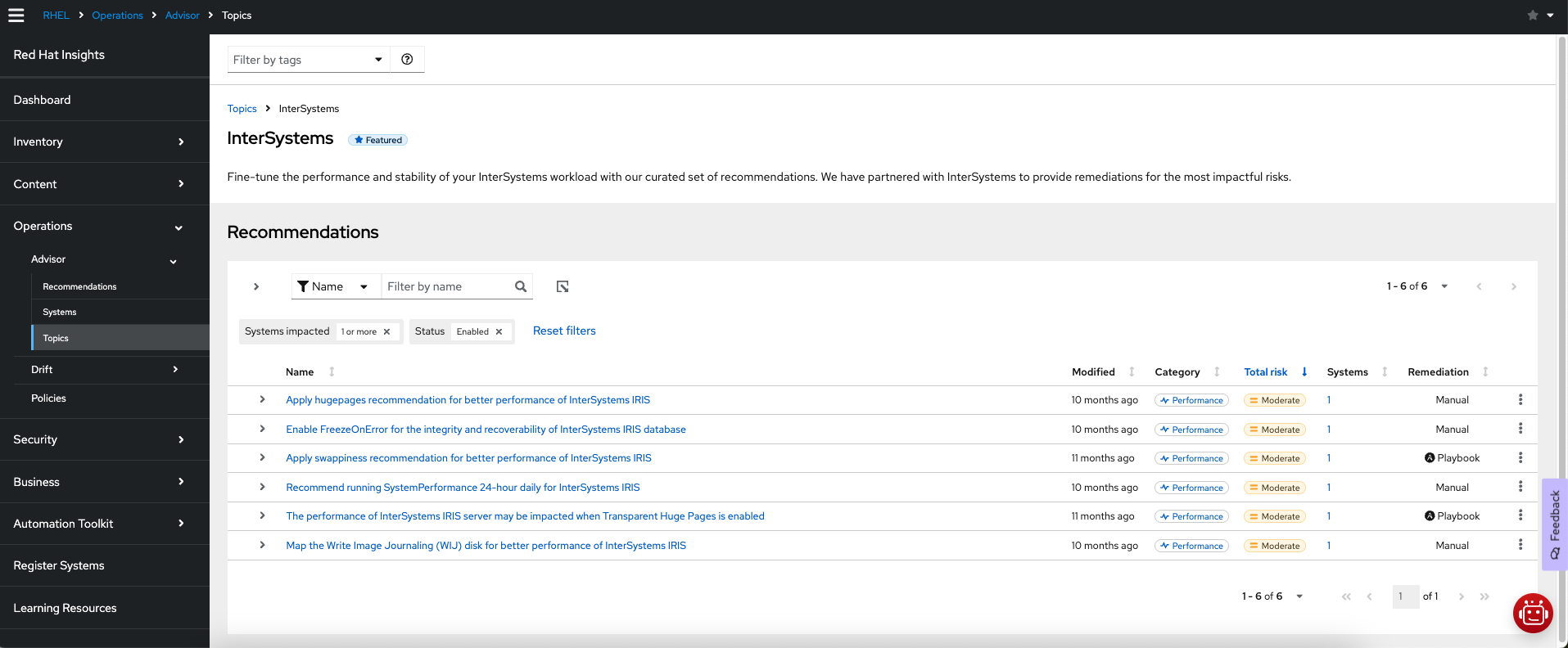
    Red Hat Insights topic grouping all InterSystems recommendations
    Red Hat Insights topic grouping all InterSystems recommendations
    Figure 1: Red Hat Lightspeed topic grouping all InterSystems recommendations.

    Tuning InterSystems IRIS performance

    Red Hat Lightspeed Advisor constantly evaluates several configuration attributes related to HugePages, Transparent HugePages (THP), swappiness, and shmmax kernel parameters for conformance with the InterSystems best practices. This way, Red Hat Lightspeed Advisor ensures optimal performance of InterSystems IRIS installations. In case it detects incompatibility or contradictory settings, a recommendation will be presented in the Red Hat Lightspeed user interface, and a new recommendation event is triggered. See Configuring notifications on the Red Hat Hybrid Cloud Console to learn more. Figure 2 shows one such recommendation.
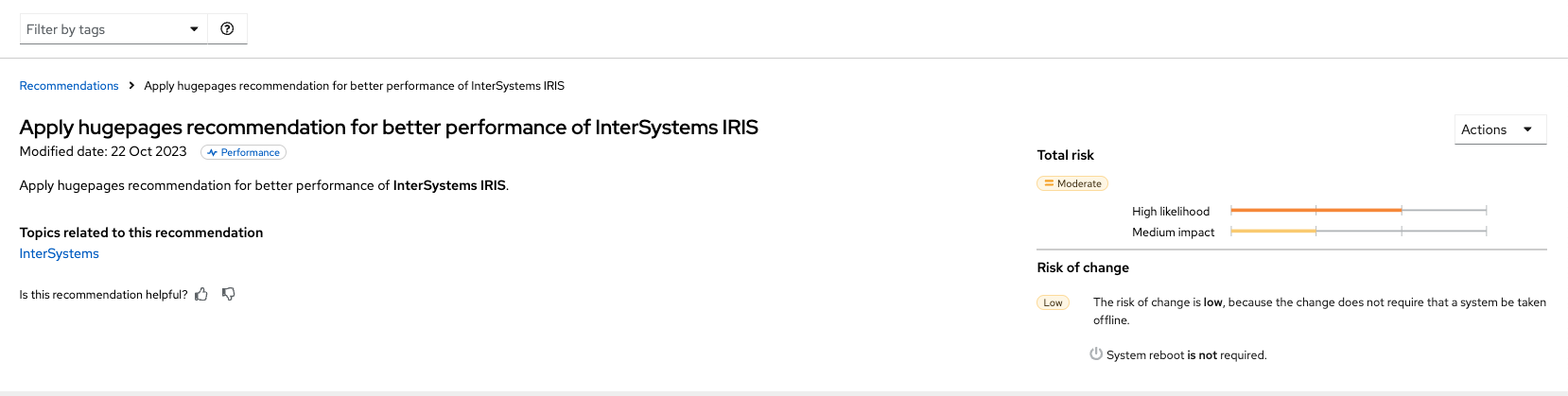
    Example of a recommendation suggesting to adjust the huge pages configuration
    Example of a recommendation suggesting to adjust the huge pages configuration
    Figure 2: Example of a recommendation suggesting to adjust the huge pages configuration.

    Preventing failover issues

    To ensure high availability and prevent potential failover issues with InterSystems IRIS, Red Hat Lightspeed now recommends setting an arbiter in high-availability deployments of InterSystems IRIS to significantly expand the scope of automatic failover capabilities, allowing for smoother recovery in a broader range of potential failure situations. 

    Additionally, the Advisor service suggests enabling the "Freeze on Error" option to prevent data loss in the event of a system failure which prevents writing to journal devices for better integrity and recoverability of the InterSystems IRIS database. 

    Finally, separating the primary and alternate journal directories by placing them on distinct storage devices, separated from database and write image journal (WIJ) storage, is also part of the new set of Advisor recommendations. This setup ensures data integrity and recoverability while minimizing downtime.

    Every Advisor recommendation provides system administrators details about the detected Red Hat Enterprise Linux version, InterSystems IRIS instance information, and system-specific, step-by-step instructions to remediate the detected issue. See Figure 3. Additional information linked to the InterSystems documentation for further reference is also included. 
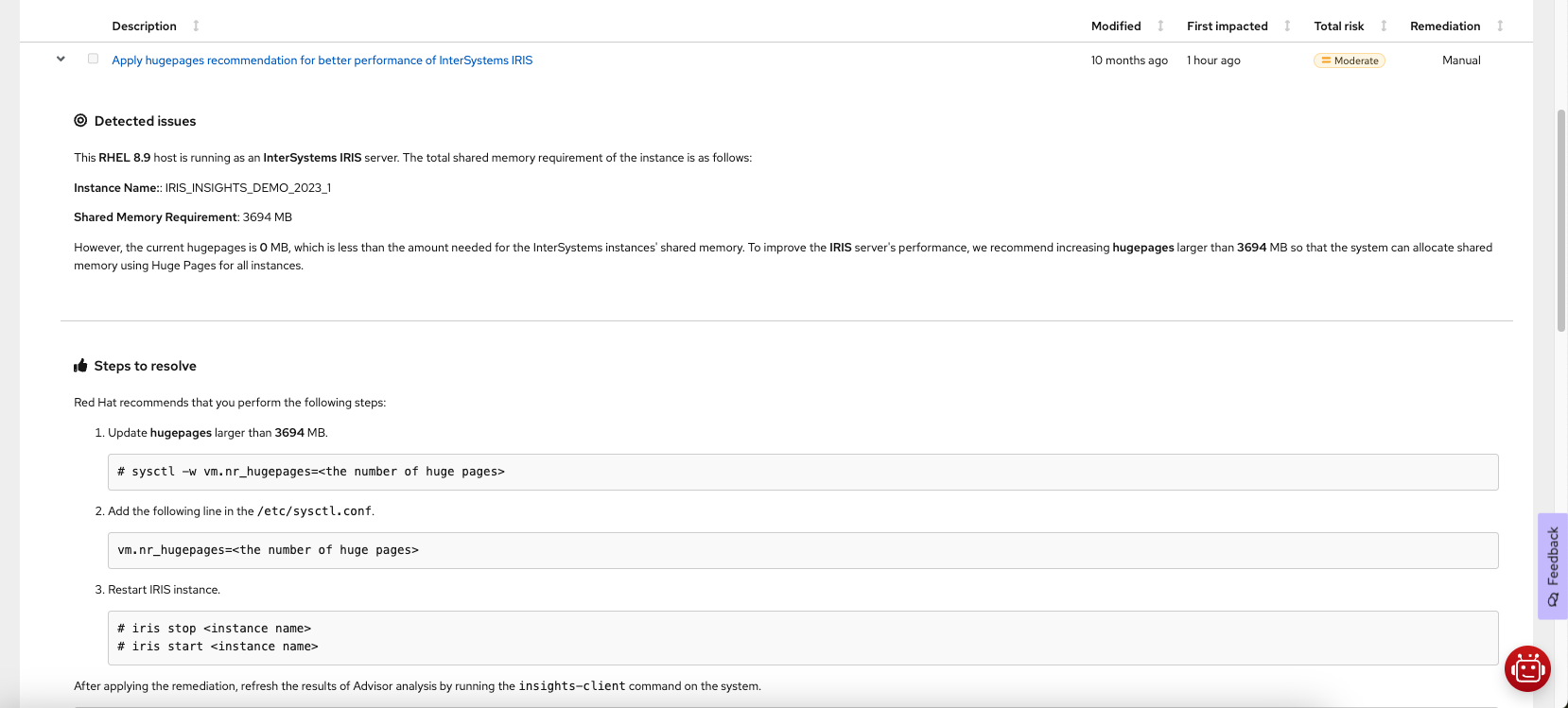
    Example of remediation steps of an InterSystems recommendation
    Example of remediation steps of an InterSystems recommendation
    Figure 3: Example of remediation steps of an InterSystems recommendation.

    New facts available via Red Hat Lightspeed APIs

    Red Hat Lightspeed offers multiple ways of integrating and/or querying its data to seamlessly integrate its findings into your operational workflows. As part of our collaboration with InterSystems, we've introduced three new system facts that allow those who prefer to access their Red Hat Lightspeed Inventory through APIs to do so: product, instance_name, and version. Those facts are regrouped in a new intersystems attribute as part of the system profile in the inventory.

    To query Red Hat Lightspeed inventory for these new systems facts, you can use the following command:

    curl -X 'GET' \
    'https://console.redhat.com/api/inventory/v1/hosts/<uuid>/system_profile?per_page=50&page=1&fields%5Bsystem_profile%5D=intersystems' \
      -H 'accept: application/json' \
      -H 'Authorization: Bearer <token>'
    

    Here is an example of a JSON response:

    {
      "id": "<uuid>",
      "system_profile": {
        "intersystems": {
          "running_instances": [
            {
              "product": "IRIS",
              "instance_name": "IRIS_INSIGHTS_1",
              "version": "2023.1"
            }
          ],
          "is_intersystems": true
        }
      }
    }

    Check out the Red Hat Lightspeed API cheat sheet to get started with Lightspeed APIs.

    Enable Red Hat Lightspeed with InterSystems today

    Registering your systems with Red Hat Lightspeed is very straightforward and typically requires only a single command to be executed. Nevertheless, we offer the registration assistant application, which will help you complete the necessary steps based on your setup. Analysis of InterSystems workloads requires no additional steps and is enabled by default as part of Red Hat Lightspeed. 

    Last updated: April 8, 2026

    Related Posts

    • Leverage Red Hat Satellite for Red Hat Lightspeed reporting and automation

    • Satellite webhook and Insights automation for efficient RHEL operations

    • Convert CentOS Linux to RHEL using Red Hat Lightspeed

    • Synchronize instance tags from Amazon EC2 and Microsoft Azure with Red Hat Lightspeed

    • Extend Red Hat Lightspeed client to execute custom automation

    • Detect network issues in Open vSwitch using Red Hat Lightspeed

    Recent Posts

    • Red Hat Hardened Images: Top 5 benefits for software developers

    • How EvalHub manages two-layer Kubernetes control planes

    • Tekton joins the CNCF as an incubating project

    • Federated identity across the hybrid cloud using zero trust workload identity manager

    • Confidential virtual machine storage attack scenarios

    What’s up next?

    Use Red Hat Lightspeed APIs to obtain system details and findings, as well as to interact with specific Lightspeed applications.

    Get the cheat sheet
    Red Hat Developers logo LinkedIn YouTube Twitter Facebook

    Platforms

    • Red Hat AI
    • Red Hat Enterprise Linux
    • Red Hat OpenShift
    • Red Hat Ansible Automation Platform
    • See all products

    Build

    • Developer Sandbox
    • Developer tools
    • Interactive tutorials
    • API catalog

    Quicklinks

    • Learning resources
    • E-books
    • Cheat sheets
    • Blog
    • Events
    • Newsletter

    Communicate

    • About us
    • Contact sales
    • Find a partner
    • Report a website issue
    • Site status dashboard
    • Report a security problem

    RED HAT DEVELOPER

    Build here. Go anywhere.

    We serve the builders. The problem solvers who create careers with code.

    Join us if you’re a developer, software engineer, web designer, front-end designer, UX designer, computer scientist, architect, tester, product manager, project manager or team lead.

    Sign me up

    Red Hat legal and privacy links

    • About Red Hat
    • Jobs
    • Events
    • Locations
    • Contact Red Hat
    • Red Hat Blog
    • Inclusion at Red Hat
    • Cool Stuff Store
    • Red Hat Summit
    © 2026 Red Hat

    Red Hat legal and privacy links

    • Privacy statement
    • Terms of use
    • All policies and guidelines
    • Digital accessibility

    Chat Support

    Please log in with your Red Hat account to access chat support.