Redhat Developers  Logo
  • Products

    Platforms

    • Red Hat Enterprise Linux
      Red Hat Enterprise Linux Icon
    • Red Hat AI
      Red Hat AI
    • Red Hat OpenShift
      Openshift icon
    • Red Hat Ansible Automation Platform
      Ansible icon
    • See all Red Hat products

    Featured

    • Red Hat build of OpenJDK
    • Red Hat Developer Hub
    • Red Hat JBoss Enterprise Application Platform
    • Red Hat OpenShift Dev Spaces
    • Red Hat OpenShift Local
    • Red Hat Developer Sandbox

      Try Red Hat products and technologies without setup or configuration fees for 30 days with this shared Red Hat OpenShift and Kubernetes cluster.
    • Try at no cost
  • Technologies

    Featured

    • AI/ML
      AI/ML Icon
    • Linux
      Linux Icon
    • Kubernetes
      Cloud icon
    • Automation
      Automation Icon showing arrows moving in a circle around a gear
    • See all technologies
    • Programming languages & frameworks

      • Java
      • Python
      • JavaScript
    • System design & architecture

      • Red Hat architecture and design patterns
      • Microservices
      • Event-Driven Architecture
      • Databases
    • Developer experience

      • Productivity
      • Tools
      • GitOps
    • Automated data processing

      • AI/ML
      • Data science
      • Apache Kafka on Kubernetes
    • Platform engineering

      • DevOps
      • DevSecOps
      • Red Hat Ansible Automation Platform for applications and services
    • Secure development & architectures

      • Security
      • Secure coding
  • Learn

    Featured

    • Kubernetes & cloud native
      Openshift icon
    • Linux
      Rhel icon
    • Automation
      Ansible cloud icon
    • AI/ML
      AI/ML Icon
    • See all learning resources

    E-books

    • GitOps cookbook
    • Podman in action
    • Kubernetes operators
    • The path to GitOps
    • See all e-books

    Cheat sheets

    • Linux commands
    • Bash commands
    • Git
    • systemd commands
    • See all cheat sheets

    Documentation

    • Product documentation
    • API catalog
    • Legacy documentation
  • Developer Sandbox

    Developer Sandbox

    • Access Red Hat’s products and technologies without setup or configuration, and start developing quicker than ever before with our new, no-cost sandbox environments.
    • Explore the Developer Sandbox

    Featured Developer Sandbox activities

    • Get started with your Developer Sandbox
    • OpenShift virtualization and application modernization using the Developer Sandbox
    • Explore all Developer Sandbox activities

    Ready to start developing apps?

    • Try at no cost
  • Blog
  • Events
  • Videos

What's New in OpenShift GitOps 1.19

January 12, 2026
Gerald Nunn
Related topics:
GitOps
Related products:
Red Hat OpenShift GitOps

    GitOps is now the definitive standard for managing Kubernetes cluster configuration and applications. Red Hat continues to see the widespread adoption of the GitOps methodology across our portfolio as customers look for ways to increase efficiency in their operations and development teams.

    Red Hat is pleased to announce that version 1.19 of OpenShift GitOps has been released, bringing with it some exciting new capabilities.

    New in version 1.19

    Argo CD Agent is Generally Available (GA)

    The Argo CD Agent is now Generally Available in OpenShift GitOps 1.19. This feature improves Argo CD scalability by distributing some components while maintaining the single pane of glass for management that many users appreciate with Argo CD.

    A full release blog on the Argo CD Agent, along with an interactive demonstration, is available here. Documentation on the Argo CD Agent is available with Architecture and an Installation Guide.

    Argo CD Image Updater is Tech Preview (TP)

    We are introducing the Argo CD Image Updater in Tech Preview to bridge the gap between CI and CD. This feature enables automatic updating of image references in manifests based on changes in image repositories. It can simplify integration between Continuous Integration (CI) tools like OpenShift Pipelines, GitHub Actions, etc and Argo CD.

    Improved OpenShift Console Support for Applications and ApplicationSets

    In the last release, OpenShift GitOps 1.18, an OpenShift Console plugin for OpenShift GitOps was provided as a Developer Preview that implemented the list pages in the console. In OpenShift GitOps 1.19 this plugin has been removed with implementations of the Details pages as per the screenshots below.
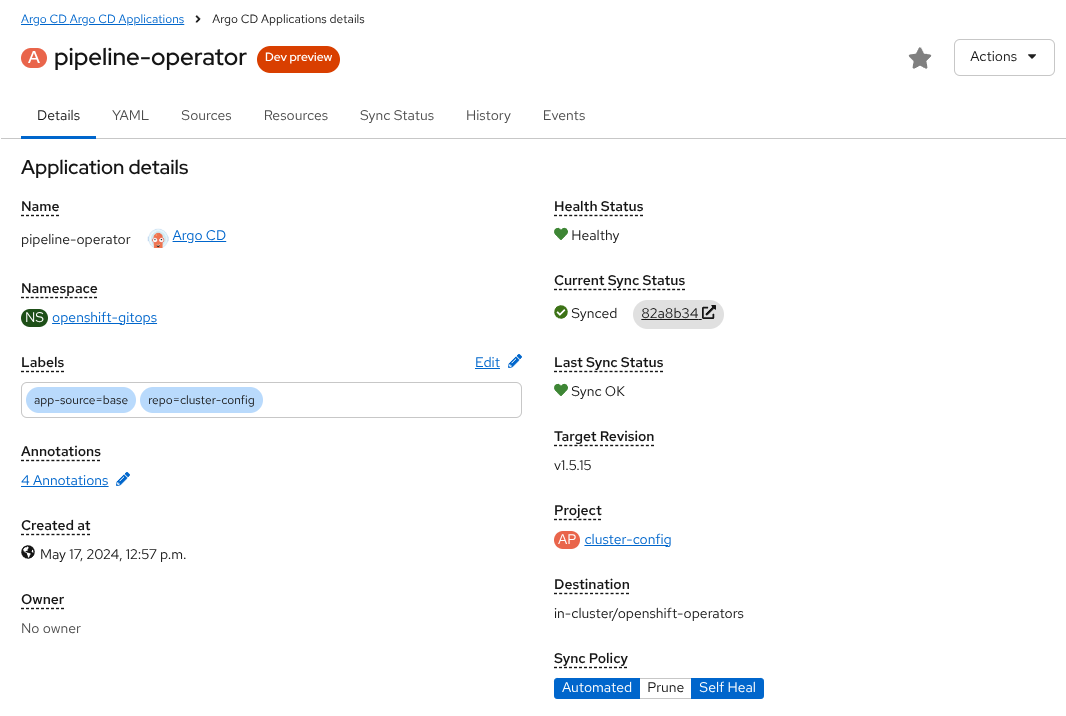
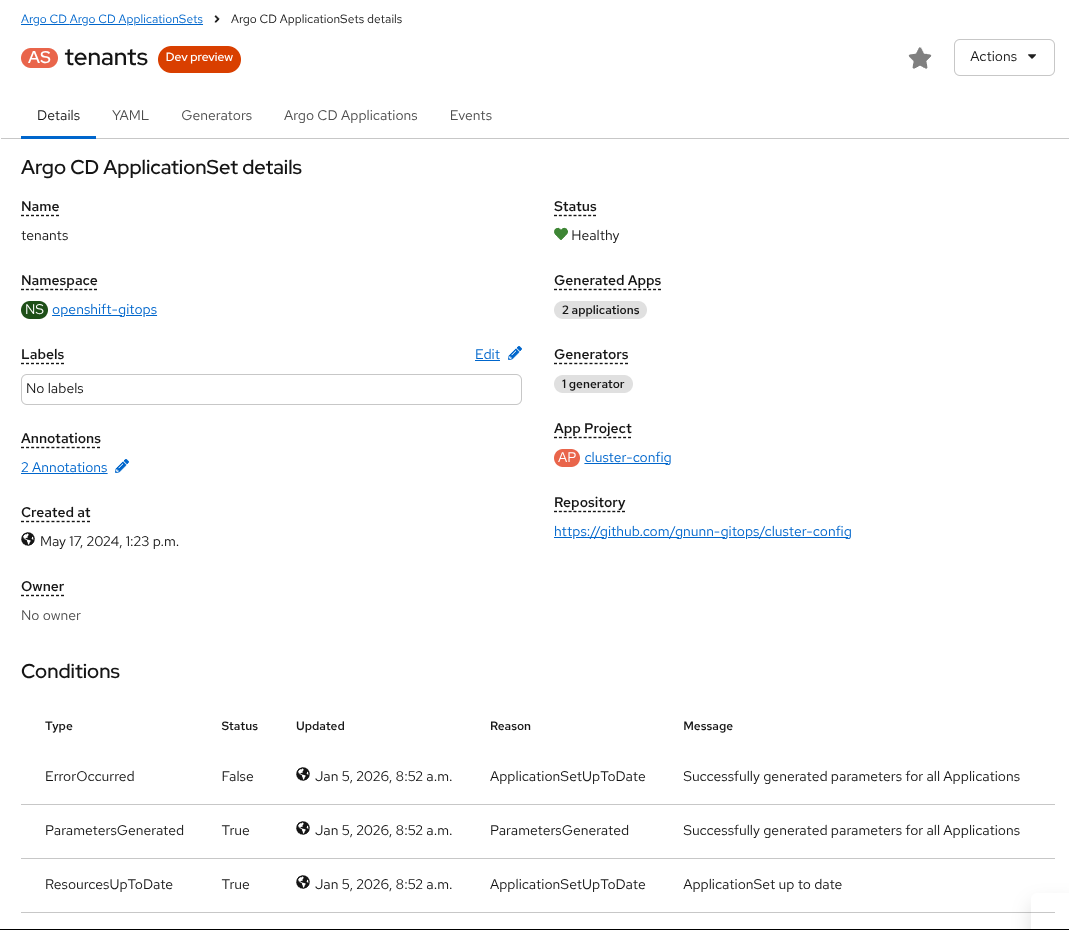
    Argo CD Application Details
    Argo CD Application Details
    Argo CD ApplicationSet Details
    Argo CD ApplicationSet Details

    This plugin remains in Developer Preview.

    Annotation Tracking is the Default

    Argo CD 3.0 made annotation tracking the default rather than label tracking which was the default in Argo CD 2.x. Annotation tracking has a number of benefits including weeding out false positives, for example operators copying labels/annotations to resources, automatically due to Argo CD being able to include more information in annotations then labels (limited to 63 characters).

    In previous releases with Argo CD 3.x the operator maintained label tracking as the default to give users time to switch to the new tracking method. With this release annotation tracking is now the default. When upgrading, users may need to re-sync applications to apply the new annotation to managed resources as per the upstream documentation here.

    Notifications in Any Namespace

    When using Apps-In-Any-Namespace it wasn’t possible for teams to configure Argo CD Notifications in those namespaces. With OpenShift GitOps 1.19 this feature is now supported based on the upstream feature here.

    Argo CD 3.1

    This version continues to use Argo CD 3.1 as per the previous 1.18 release of OpenShift GitOps. 

    Conclusion

    OpenShift GitOps 1.19 is a significant update with many new features, to learn more about this update please review the official documentation and release notes.

    Disclaimer: Please note the content in this blog post has not been thoroughly reviewed by the Red Hat Developer editorial team. Any opinions expressed in this post are the author's own and do not necessarily reflect the policies or positions of Red Hat.

    Recent Posts

    • Upgrade volume performance without downtime: VolumeAttributesClass on OpenShift

    • What’s new for developers in OpenShift 4.21

    • Kafka Monthly Digest: January 2026

    • How Developer Hub simplifies Backstage configuration

    • AI-generated product review summaries with OpenShift AI

    Red Hat Developers logo LinkedIn YouTube Twitter Facebook

    Platforms

    • Red Hat AI
    • Red Hat Enterprise Linux
    • Red Hat OpenShift
    • Red Hat Ansible Automation Platform
    • See all products

    Build

    • Developer Sandbox
    • Developer tools
    • Interactive tutorials
    • API catalog

    Quicklinks

    • Learning resources
    • E-books
    • Cheat sheets
    • Blog
    • Events
    • Newsletter

    Communicate

    • About us
    • Contact sales
    • Find a partner
    • Report a website issue
    • Site status dashboard
    • Report a security problem

    RED HAT DEVELOPER

    Build here. Go anywhere.

    We serve the builders. The problem solvers who create careers with code.

    Join us if you’re a developer, software engineer, web designer, front-end designer, UX designer, computer scientist, architect, tester, product manager, project manager or team lead.

    Sign me up

    Red Hat legal and privacy links

    • About Red Hat
    • Jobs
    • Events
    • Locations
    • Contact Red Hat
    • Red Hat Blog
    • Inclusion at Red Hat
    • Cool Stuff Store
    • Red Hat Summit
    © 2025 Red Hat

    Red Hat legal and privacy links

    • Privacy statement
    • Terms of use
    • All policies and guidelines
    • Digital accessibility

    Report a website issue