In the third part of this article series (see links to previous articles below), we will look at how Strimzi exposes Apache Kafka using Red Hat OpenShift routes. This article will explain how routes work and how they can be used with Apache Kafka. Routes are available only on OpenShift, but if you are a Kubernetes user, don't be sad; a forthcoming article in this series will discuss using Kubernetes Ingress, which is similar to OpenShift routes.
Note: Productized and supported versions of the Strimzi and Apache Kafka projects are available as part of the Red Hat AMQ product.
Red Hat OpenShift routes
Routes are an OpenShift concept for exposing services to the outside of the Red Hat OpenShift platform. Routes handle both data routing as well as DNS resolution. DNS resolution is usually handled using wildcard DNS entries, which allows OpenShift to assign each route its own DNS name based on the wildcard entry. Users don't have to do anything special to handle the DNS records. If you don't own any domains where you can set up the wildcard entries, OpenShift can use services such as nip.io for the wildcard DNS routing. Data routing is done using the HAProxy load balancer, which serves as the router behind the domain names.
The main use case of the router is HTTP(S) routing. The routes are able to do path-based routing of HTTP and HTTPS (with TLS termination) traffic. In this mode, the HTTP requests will be routed to different services based on the request path. However, because the Apache Kafka protocol is not based on HTTP, the HTTP features are not very useful for Strimzi and Kafka brokers.
Luckily, the routes can be also used for TLS passthrough. In this mode, it uses TLS Server Name Indication (SNI) to determine the service to which the traffic should be routed and passes the TLS connection to the service (and eventually to the pod backing the service) without decoding it. This mode is what Strimzi uses to expose Kafka.
If you want to learn more about OpenShift routes, check the OpenShift documentation.
Exposing Kafka using OpenShift routes
Exposing Kafka using OpenShift routes is probably the easiest of all the available listener types. All you need to do is to configure it in the Kafka custom resource.
apiVersion: kafka.strimzi.io/v1beta1
kind: Kafka
metadata:
  name: my-cluster
spec:
  kafka:
    # ...
    listeners:
      # ...
      external:
        type: route
    # ...
The Strimzi Kafka Operator and OpenShift will take care of the rest. To provide access to the individual brokers, we use the same tricks we used with node ports and which were described in the previous article. We create a dedicated service for each of the brokers, which will be used to address the individual brokers directly. Apart from that, we will also use one service for the bootstrapping of the clients. This service would round-robin between all available Kafka brokers.
Unlike when using node ports, these services will be only regular Kubernetes services of the clusterIP type. The Strimzi Kafka operator will also create a Route resource for each of these services, which will expose them using the HAProxy router. The DNS addresses assigned to these routes will be used by Strimzi to configure the advertised addresses in the different Kafka brokers.
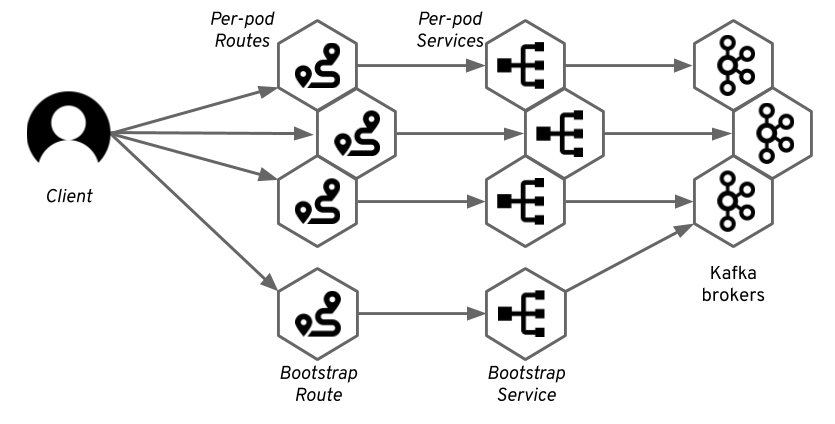
Kafka clients will connect to the bootstrap route, which will route them through the bootstrap service to one of the brokers. From this broker, clients will get the metadata that will contain the DNS names of the per-broker routes. The Kafka clients will use these addresses to connect to the routes dedicated to the specific broker, and the router will again route it through the corresponding service to the right pod.
As explained in the previous section, the routers main use case is routing of HTTP(S) traffic. Therefore, it is always listening on ports 80 and 443. Because Strimzi is using the TLS passthrough functionality, the following will be true:
- The port will always be 443 as the port used for HTTPS.
- The traffic will always use TLS encryption.
Getting the address to connect to with your client is easy. As mentioned previously, the port will always be 443. This can cause problems when users try to connect to port 9094 instead of 443. But, 443 is always the correct port number with OpenShift routes. You can find the host in the status of the Route resource (replace my-clusterwith the name of your cluster):
oc get routes my-cluster-kafka-bootstrap -o=jsonpath='{.status.ingress[0].host}{"\n"}'
By default, the DNS name of the route will be based on the name of the service it points to and on the name of the OpenShift project. For example, for my Kafka cluster named my-cluster running in project named myproject, the default DNS name will be my-cluster-kafka-bootstrap-myproject.<router-domain>.
Because the traffic will always use TLS, you must always configure TLS in your Kafka clients. This includes getting the TLS certificate from the broker and configuring it in the client. You can use following commands to get the CA certificate used by the Kafka brokers and import it into Java keystore file, which can be used with Java applications (replace my-cluster with the name of your cluster):
oc extract secret/my-cluster-cluster-ca-cert --keys=ca.crt --to=- > ca.crt
keytool -import -trustcacerts -alias root -file ca.crt -keystore truststore.jks -storepass password -noprompt
With the certificate and address, you can connect to the Kafka cluster. The following example uses the kafka-console-producer.sh utility, which is part of Apache Kafka:
bin/kafka-console-producer.sh --broker-list :443 --producer-property security.protocol=SSL --producer-property ssl.truststore.password=password --producer-property ssl.truststore.location=./truststore.jks --topic
For more details, see the Strimzi documentation.
Customizations
As explained in the previous section, by default, the routes get automatically assigned DNS names based on the name of your cluster and namespace. However, you can customize this and specify your own DNS names:
# ...
listeners:
  external:
    type: route
    authentication:
      type: tls
    overrides:
      bootstrap:
        host: bootstrap.myrouter.com
      brokers:
      - broker: 0
        host: broker-0.myrouter.com
      - broker: 1
        host: broker-1.myrouter.com
      - broker: 2
        host: broker-2.myrouter.com
# ...
The customized names still need to match the DNS configuration of the OpenShift router, but you can give them a friendlier name. The custom DNS names (as well as the names automatically assigned to the routes) will, of course, be added to the TLS certificates and your Kafka clients can use TLS hostname verification.
Pros and cons
Routes are only available on Red Hat OpenShift. So, if you are using Kubernetes, this is clearly a deal-breaking disadvantage. Another potential disadvantage is that routes always use TLS encryption. You will always have to deal with the TLS certificates and encryption in your Kafka clients and applications.
You will also need to carefully consider performance. The OpenShift HAProxy router will act as a middleman between your Kafka clients and brokers. This approach can add latency and can also become a performance bottleneck. Applications using Kafka often generate a lot of traffic—hundreds or even thousands of megabytes per second. Keep this in mind and make sure that the Kafka traffic will still leave some capacity for other applications using the router. Luckily, the OpenShift router is scalable and highly configurable so you can fine-tune its performance and, if needed, even set up a separate instance of the router for the Kafka routes.
The main advantage of using Red Hat OpenShift routes is that they are so easy to get working. Unlike the node ports discussed in the previous article, which are often tricky to configure and require a deeper knowledge of Kubernetes and the infrastructure, OpenShift routes work very reliably out of the box on any OpenShift installation.

