Chaos engineering tests whether applications and platforms can maintain service during disruption and recover within agreed limits. Controlled failures help you find and fix weaknesses before they affect production.
This article recommends 4 phases of chaos testing with Krkn, as illustrated in figure 1:
- Strategize
- Execute and harden
- Explore
- Future-proof and integrate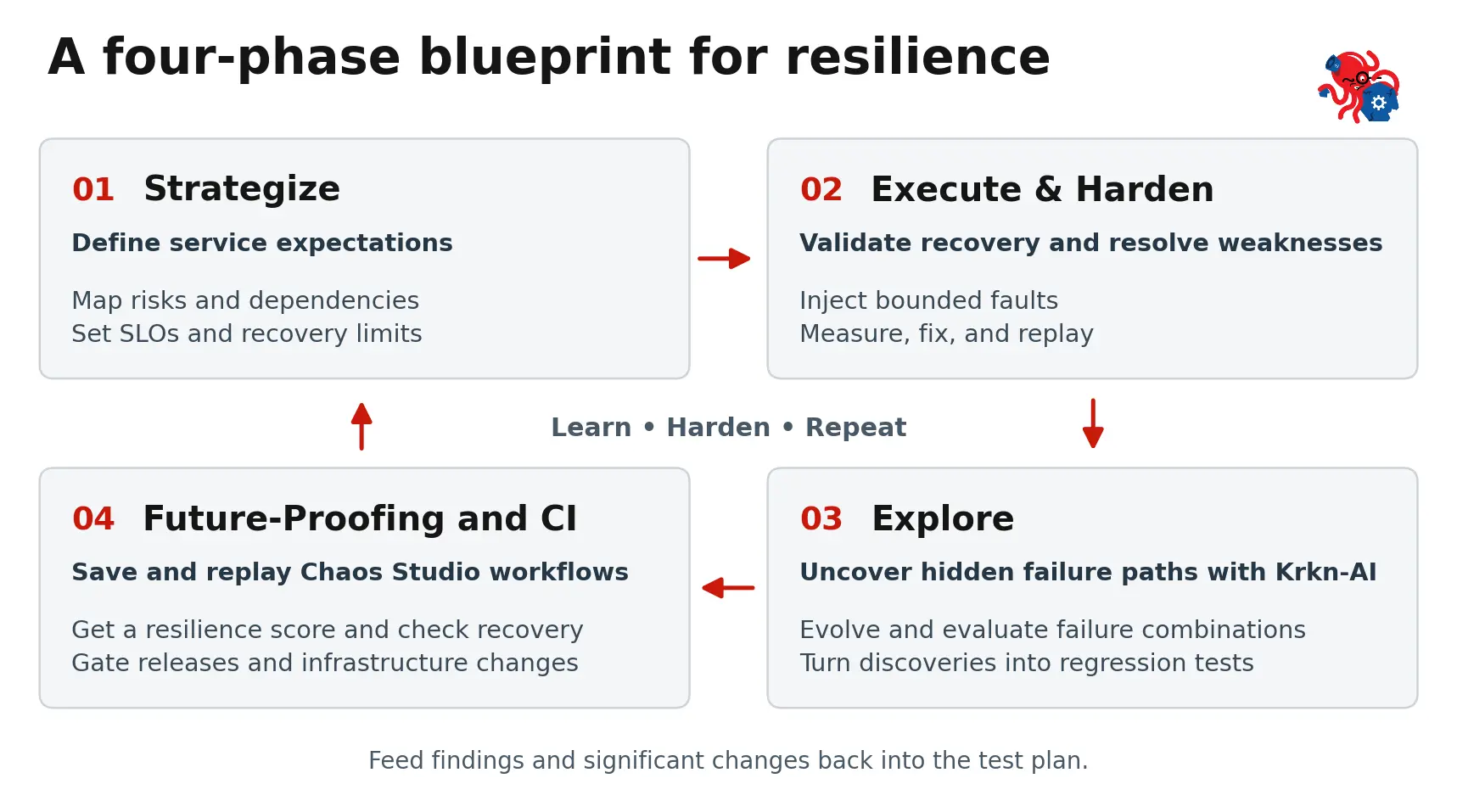
Start with a service, then expand coverage as your tests mature. Save validated experiments as repeatable workflows to check resilience before releases and infrastructure change.
Phase 1: Strategize
In this phase, you define the resilience baseline. Choose a critical user journey, such as completing a transaction. Bring developers, platform engineers, and operations teams together to map its compute, network, storage, and service dependencies. Use past incidents and planned changes to prioritize failures.
Measure normal behavior under representative load, then translate service-level objectives (SLOs) into test criteria. Set limits and measurement windows for request success, latency, throughput, data correctness, and recovery time.
Write a hypothesis linking the failure to expected behavior. For example:
If one API pod fails, transactions continue and the expected replica count recovers within 60 seconds.
You might require at least 99% successful requests and p99 latency below 500 milliseconds in each complete 60-second window, with no lost or duplicate acknowledged transactions. Choose limits that fit your service. A short test doesn't establish monthly availability compliance.
Choose a representative non-production environment with the workload and monitoring needed to measure these outcomes. Agree on targets, fault duration, stop conditions, and a recovery owner.
Use the Krkn Chaos Testing Guide to turn these decisions into a test plan with measurable acceptance criteria.
Phase 2: Execute and harden
In this phase, you validate recovery and resolve weaknesses. Start with a small, controlled disruption, such as losing one pod. Follow the Krkn installation documentation, then inspect scenarios and their parameters:
krknctl list available
krknctl describe pod-scenarios (for example)
Use a consistent sequence for each experiment:
1. Prepare: Configure the target namespace and resources, and establish a healthy baseline under load.
2. Disrupt and observe: Inject the fault, confirm it reached the target, and measure degradation and recovery against the agreed criteria.
3. Restore and verify: Remove remaining fault effects and confirm cleanup before the next run.
A pod may return while transactions still fail because connections to a dependency have not recovered. Investigate the cause, adjust retries or readiness checks as needed, and replay under comparable load to verify the fix. Other tests may reveal placement or capacity gaps.
Measure recovery through the service users depend on. A Ready pod does not prove that transactions succeed. For Red Hat OpenShift Virtualization, check the guest application alongside virtual machine (VM) and host health. Krkn SLO validation uses Prometheus checks to help determine run results; add application checks for transaction correctness.
Make repeatability part of the first test. Keep the test setup and success criteria in version control, and record each run's targets and results. Reset the environment and test data between runs, agree on how many runs must pass, and retain failures to spot intermittent issues.
Phase 3: Explore
Use Krkn-AI to uncover hidden failure paths. Its evolutionary algorithms explore experiments and evaluate their impact through SLOs and application health checks.
Discover cluster components, then customize the generated configuration with permitted targets, scenarios, SLOs, and time and recovery limits. Explore latency, packet loss, storage disruption, and resource pressure, including combinations such as worker loss under load.
Retain configurations, actual targets, parameters, and seeds where supported so you can reproduce findings. Verify each fix, then turn the discovery into a regression test in a saved Chaos Studio workflow. Keep exploration separate from release qualification so release comparisons use consistent scenarios.
Phase 4: Future-proof and CI
You want to continuously validate resilience before change. You do this by building workflows.
Build reusable workflows with Krkn Operator
Use Krkn Operator to save and replay workflows. Chaos Studio provides a visual editor for sequential or parallel scenarios, with target clusters, access controls, execution, and results in one console.
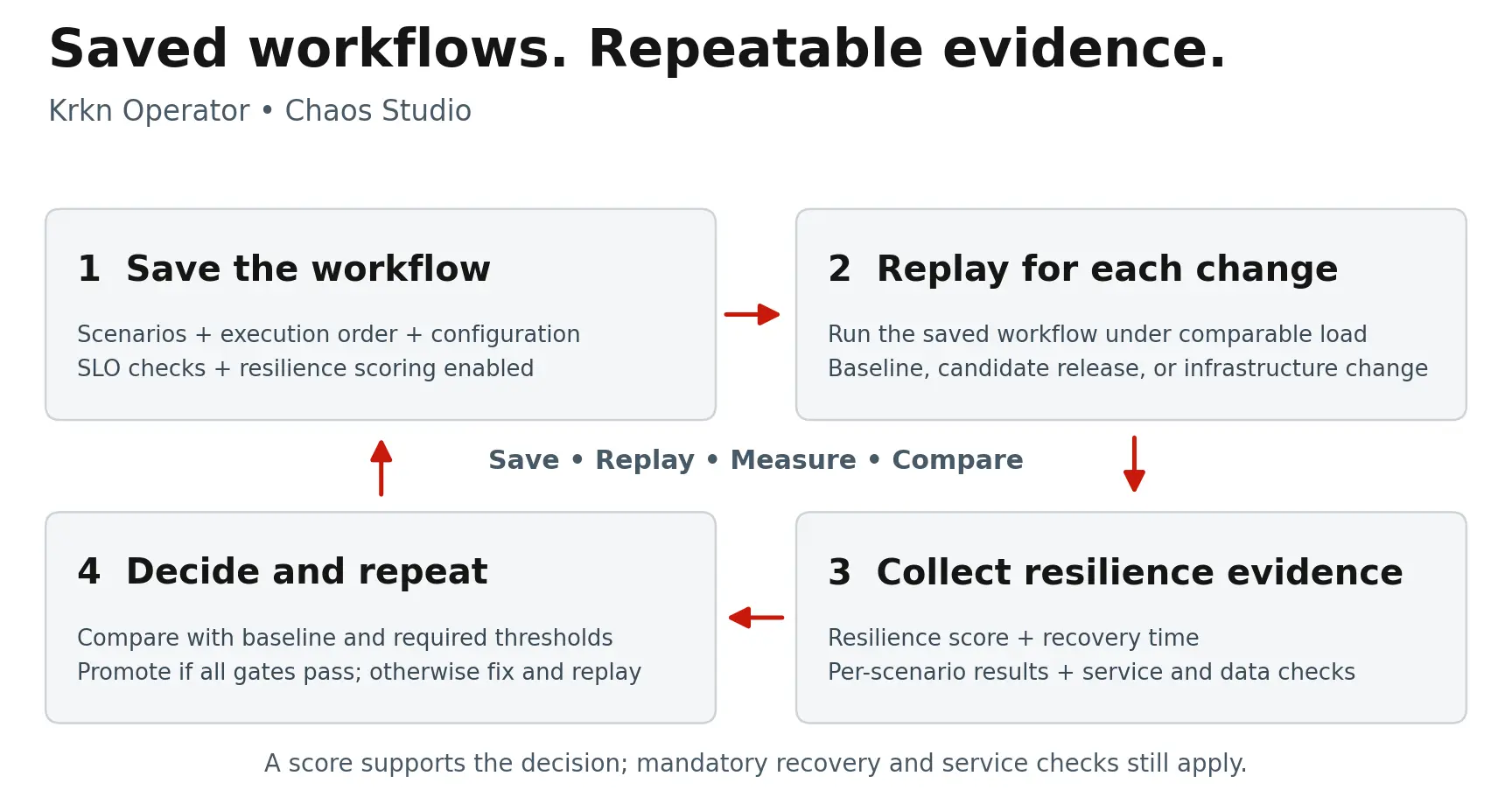
To turn validated experiments into a reusable workflow (see figure 2):
1. Define the sequence: Configure scenarios and supporting files, allowing recovery between independent tests. Use parallel faults for deliberate combinations.
2. Add service checks: Enable resilience scoring and attach PromQL checks for expected service behavior.
3. Save the workflow: Keep the exact configuration used for each qualification run so it can be replayed.
For Red Hat Advanced Cluster Management for Kubernetes, the integration can discover managed clusters. Follow the Krkn Operator Developer Preview article for setup.
Integrate stable workflows into CI/CD: Short checks with relevant builds, broader tests nightly, and the required suite before releases or infrastructure changes.
Use dedicated or reserved environments to prevent interference between jobs. Start checks in reporting mode, then make them blocking once reliable. Verify the gate with a known failure: Missed faults, missing measurements, and incomplete required scenarios must not count as passes.
Track resilience scores and recovery trends
Run the validated workflow on a known-good environment to establish a baseline. Krkn's resiliency scoring measures the percentage of weighted SLO checks passing during the chaos window. Default weights are 3 for critical checks and 1 for warnings, with custom weights supported. 5 critical and 5 warning checks total 20 points. 1 failed warning yields 95%. Scoring is beta, so pin the implementation and scoring profile.
Use the score alongside mandatory service and recovery checks. Set a minimum score and an acceptable regression threshold. Require data integrity and timely recovery, including checks beyond the scoring window.
Track scenario results, coverage, failed checks, and recovery times alongside the score. Keep workloads and scoring rules consistent. Establish a new baseline when coverage or scoring changes. The score describes tested conditions, not every possible outage.
Validate every significant change before rollout
Use resilience workflows as pre-flight checks. Test the current configuration, apply the candidate change in staging, and replay under comparable load. Compare results with the baseline and acceptance criteria before rollout, adding scenarios relevant to the change:
- OpenShift or platform upgrade: Service continuity, worker loss, dependency failures, recovery
- Application or dependency release: Replica loss, timeouts, retries, reconnection, transaction correctness
- Performance tuning: CPU, memory, I/O pressure, remaining capacity during failover
- Configuration change: Probes, limits, placement, timeouts, network policies
- New machines or VM migration: Host and guest health, storage and network behavior, service continuity during movement
- Infrastructure or topology change: Path failures, failure-domain loss, data integrity, recovery capacity
For upgrades and migrations, rehearse the transition itself where relevant. A fresh installation exercises a different path. Choose faults suited to the platform and available permissions.
Suppose CPU tuning passes the score threshold but increases recovery after worker loss from 38 to 78 seconds. With a 60-second recovery requirement, block promotion, address the cause, and rerun the workflow. Attach the before-and-after evidence to the change record.
After rollout, verify production service health and continue scheduled validation. Any disruptive production experiment needs its own agreed scope and recovery procedure.
Put the approach into practice
Choose 1 critical service and 1 failure to test. Agree on success criteria, fix what the experiment reveals, and save the validated test in Chaos Studio. Schedule repeat runs to build resilience into the way you make changes.
Join the Krkn community to discuss use cases, share what you learn, and collaborate on building more resilient systems.

