A customer opened a support case with a deceptively simple complaint: a Kafka topic was configured with a 12-hour retention (retention.ms), yet messages produced on July 24 were still readable 4 days later, on July 28. Nothing was broken. The broker logged no errors. The retention policy was working as designed, but the segment layout and continuous write pattern delayed when the old records could actually be removed.
Let's trace how this issue unfolded step by step. By examining how Apache Kafka manages storage on disk, you can diagnose retention delays in your own clusters before they consume storage budgets.
This guide is for SREs, Kafka developers, and platform engineers managing event streaming infrastructure. A basic understanding of Kafka topics, partitions, and producers is assumed. The examples in this article were validated on Red Hat's streams for Apache Kafka (operator amqstreams.v3.2.0-30) running an Apache Kafka 4.2.0 cluster on Red Hat OpenShift 4.22.8. Retention and segment mechanics have been stable across recent Kafka releases, but confirm the defaults on your own version, since they can change between major releases. Where paths and ports appear, they depend on your cluster's storage and listener configuration—adjust them to match your environment.
Kafka deletes segments, not messages
Kafka does not manage messages individually on disk. It never scans a partition looking for expired records to remove one by one. Instead, it organizes each partition's messages into a sequence of files called log segments, and the entire lifecycle of retention operates at the granularity of those files.
If you list the directory for a single partition, you'll see the segments directly:
$ ls -lh /var/lib/kafka/data-0/kafka-log0/orders-0/
-rw-r--r--. 1 kafka kafka  10M  00000000000000000000.index
-rw-r--r--. 1 kafka kafka 1.0G  00000000000000000000.log
-rw-r--r--. 1 kafka kafka  10M  00000000000000000000.timeindex
-rw-r--r--. 1 kafka kafka 10M   00000000000004871293.index
-rw-r--r--. 1 kafka kafka 412M  00000000000004871293.log
-rw-r--r--. 1 kafka kafka 10M   00000000000004871293.timeindex
Each .log file is a segment. The number in the file name is the base offset—the offset of the 1st message in that segment. The .index and .timeindex files let consumers jump to a specific offset or timestamp without scanning the whole segment.
At any moment, a partition has exactly 1 active segment: the file currently open for writes. In the previous listing, it's the one starting at offset 4871293—still growing at 412 MB. Every other segment is closed and read-only. Consumers can read from any segment; producers only ever append to the active one.
This design exists for performance. Deleting or compacting whole files is cheap and predictable; hunting through a log for individual expired records would not be. But it has a consequence that trips up nearly everyone: Kafka removes non-active log segments when retention limits are reached.
Segment rolling is commonly determined by segment.bytes or segment.ms, but these settings are not the only part of the picture. Kafka's retention.ms logic can also trigger a roll when its retention condition is satisfied.
When a segment closes: segment.bytes and segment.ms
A segment stays active (open for writes) until 1 of 2 thresholds forces Kafka to roll it: closing the current file as read-only and opening a fresh active segment.
- segment.bytes (default: 1 GiB) is the maximum size a single segment file can reach. When the active segment hits this size, Kafka rolls it.
- segment.ms (default: 7 days) is the maximum time a segment can remain active. When this much time has passed since the segment was created, Kafka rolls it even if the file is nowhere near
segment.bytes.
Whichever limit Kafka reaches first triggers the roll. This rule is central to understanding why retention delays happen.
When a segment expires: retention.ms and retention.bytes
Once a segment is closed, 2 settings decide when it becomes eligible for deletion:
- retention.ms (default: 7 days) is the maximum age of the data Kafka keeps. Crucially, Kafka evaluates this against the timestamp of the most recent message in the segment, not the oldest. A segment is eligible for deletion only when its newest record is older than
retention.ms. (This is timestamp-based; older Kafka versions used the file's last-modified time, which is a common source of outdated intuition.) - retention.bytes (default: -1, unlimited) is the maximum total size a partition can occupy before Kafka starts discarding its oldest closed segments.
When both are set, whichever limit is hit first triggers cleanup.
Crucially, segment eligibility is distinct from physical deletion. A background thread checks for eligible segments only every log.retention.check.interval.ms (default: 5 minutes), and once a segment is selected, a further file.delete.delay.ms (default: 1 minute) passes before the file is physically removed. So your real-world retention is always:
The effective lifetime of an individual record can therefore exceed retention.ms. How much longer depends on where that record falls within its segment, when the segment rolls, the timestamp of the segment's newest record, the retention check interval, and the file deletion delay.The check interval and delete delay add minutes. The segment roll time, as we're about to see, can add days.
The trap: Why 12 hours became 4 days
Now we can reconstruct the case exactly.
The topic carried a steady, continuous stream of messages—but "steady" is not the same as "high volume." Per partition, the ingestion rate was modest enough that a 1 GiB segment took days to fill. And here is where the 2 roll triggers both quietly failed to fire:
- segment.bytes (1 GiB) hadn't been reached. At the partition's actual throughput, the active segment was still accumulating toward 1 GiB days after the July 24 messages landed in it.
- segment.ms (7 days) hadn't elapsed. The active segment had been open for only 4 days—well short of a week.
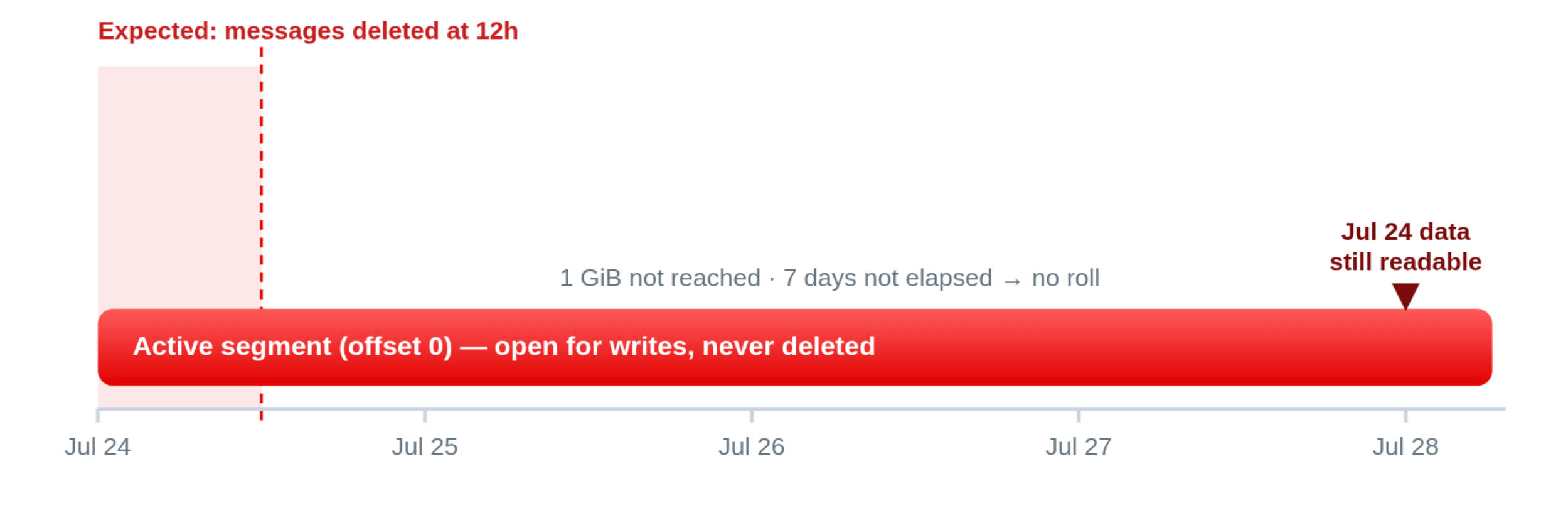
Neither trigger fired, so the segment holding the July 24 records never rolled. It was still the active segment on July 28. And because Kafka never deletes the active segment, regardless of how old the records inside it are, not a single one of those messages had become eligible for deletion, even though every one of them was already 3½ days past the 12-hour policy.
The retention policy was never the problem. retention.ms=43200000 was correct and enforced. It simply never received a closed segment to evaluate. Retention was starving, waiting on a roll that wouldn't happen for days.
Figure 1 shows the mismatch: the 12-hour window the customer expected versus the multi-day reality caused by the unrolled active segment.
This is the same failure mode that bites idle, low-traffic topics—where a segment sits open indefinitely because nothing arrives to fill it. The high-steady-traffic version is sneakier, because everything looks healthy: data is flowing, offsets are advancing, and yet nothing expires on schedule.
The fix: Make segments roll inside the retention window
The instinct is to lower retention.ms. That's the wrong lever—the retention value was already correct. The real problem is that segments weren't rolling anywhere near the 12-hour boundary, so the setting to adjust is segment.ms (and, optionally, segment.bytes).
Set segment.ms to a fraction of retention.ms so the active segment will roll well within the retention window, independent of how fast it fills. In our case, we reduced segment.ms to 1 hour for a topic with a 12-hour retention period. This provided much more predictable segment rotation and allowed old data to become eligible for deletion closer to the expected retention window. However, 1 hour should not be treated as a universal recommendation. The appropriate value depends on the topic's retention requirements, traffic pattern, throughput, segment size, and the retention granularity required by the application.
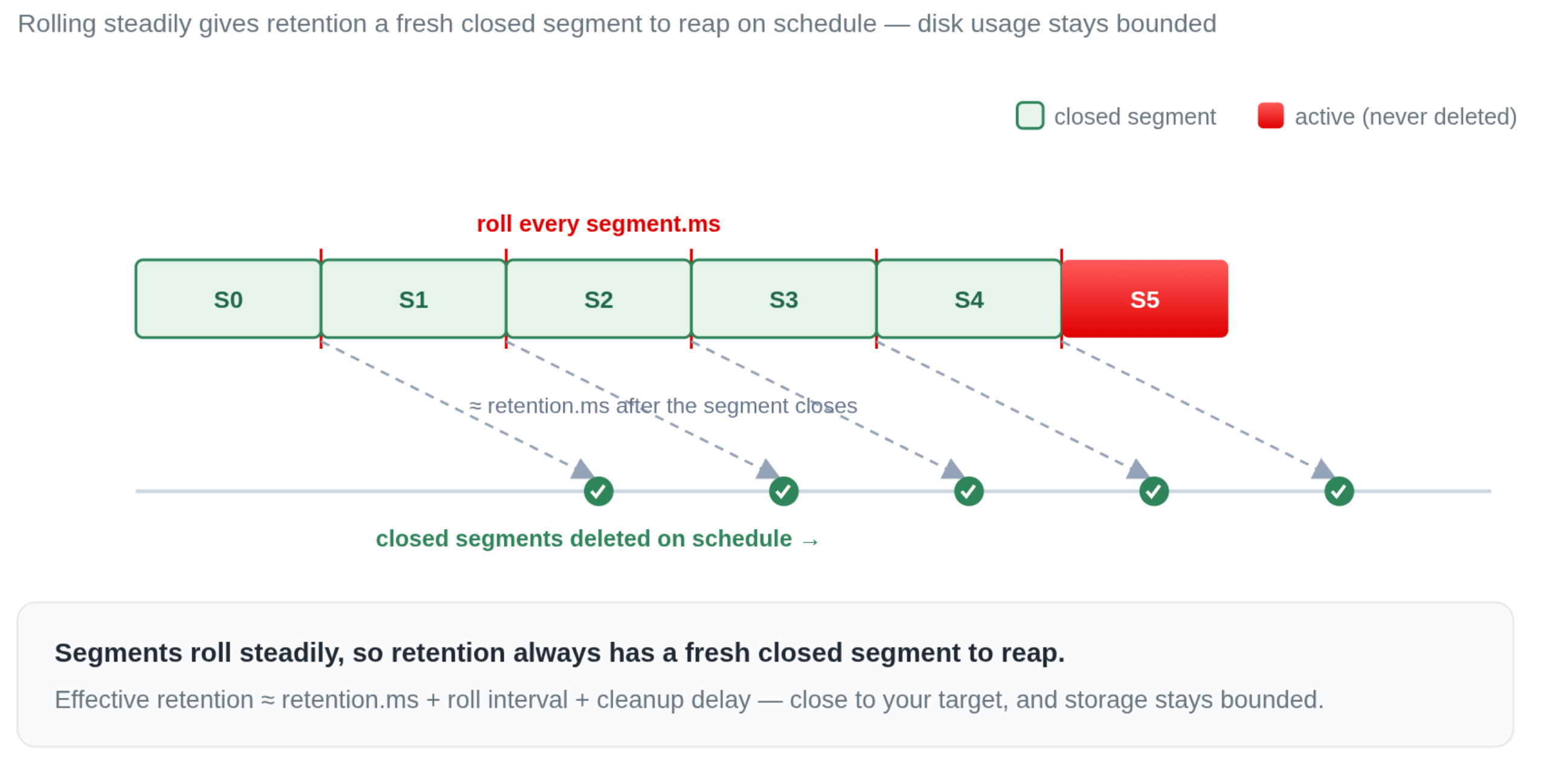
With this configuration, each segment is forced to roll at least once per hour if it has not already rolled for another reason. Once a rolled segment's newest record passes the 12-hour retention threshold, the segment becomes eligible for deletion. In this particular scenario, this keeps the effective retention much closer to the 12-hour target—typically within roughly another segment interval, plus the retention check interval and file deletion delay—instead of allowing old records to remain available for days.
If you can estimate the partition's throughput, you can also right-size segment.bytes so the size trigger lands near the same window; but time-based rolling via segment.ms is the reliable default, because it holds even when traffic drops off. The general rule that falls out of the case:
Align segment.ms with your retention target. Retention can only delete what rolling has closed—if segments don't roll inside the retention window, retention can't keep its promise.
Figure 2 shows the corrected timeline: hourly rolls produce a steady supply of closed segments, and retention trims each one shortly after its newest record turns 12 hours old.
Try it yourself: Reproduce the trap in Streams for Apache Kafka
These concepts are easier to trust once you've watched them happen. This section reproduces the trap end to end on a real cluster—Red Hat streams for Apache Kafka 3.2.0-30, Apache Kafka 4.2.0, on OpenShift 4.22.8—using a deliberately small topic so the whole cycle plays out in about 75 minutes instead of days.
Two pods keep the observation clean:
- A client pod running the Kafka tools image, for producing and consuming. It carries the
KAFKA_HOMEandKAFKA_BOOTSTRAPenvironment variables, so you never install anything locally. - The leader broker pod, for inspecting the segment files on disk. Segments live on the leader's storage, so file system checks have to happen there.
A minimal client Deployment does the trick:
kind: Deployment
apiVersion: apps/v1
metadata:
 name: kafka-tools
 namespace: kafka-lab
spec:
 replicas: 1
 selector:
   matchLabels:
     app: kafka-tools
 template:
   metadata:
     labels:
       app: kafka-tools
   spec:
     containers:
       - name: kafka-tools
         image: registry.redhat.io/amq-streams/kafka-42-rhel9@sha256:2e646a38e119d53490a5c5208c8710fff5640c9cf99631a8466c66e434b654a7
         command: ["/bin/bash", "-c"]
         args:
           - |
             echo "Kafka tools pod is ready."
             while true; do sleep 3600; done
         env:
           - name: KAFKA_BOOTSTRAP
             value: honey-badger-cluster-kafka-bootstrap.kafka-lab.svc.cluster.local:9092
         resources:
           requests: { cpu: 50m, memory: 128Mi }
           limits: { cpu: 500m, memory: 512Mi }
         securityContext:
           allowPrivilegeEscalation: false
           capabilities:
             drop: ["ALL"]
1. Create the topic
Deliberately misalign the segment and retention windows: a 10-minute retention with a 1-hour segment roll. This is the miniature version of the customer's topic.
apiVersion: kafka.strimzi.io/v1beta2
kind: KafkaTopic
metadata:
 name: payments-events
 namespace: kafka-lab
 labels:
   strimzi.io/cluster: honey-badger-cluster
spec:
 partitions: 1
 replicas: 1
 config:
   cleanup.policy: delete
   retention.ms: 600000       # 10 minutes
   retention.bytes: -1
   segment.bytes: 1073741824  # 1 GiB
   segment.ms: 3600000        # 1 hour
2. Confirm the config and inspect the empty topic
Describe the topic from the client pod. The output also tells you which broker holds the partition leader—you'll need that for the file system checks:
$ oc exec -it -n kafka-lab deployment/kafka-tools -- \
   ${KAFKA_HOME}/bin/kafka-topics.sh \
     --bootstrap-server ${KAFKA_BOOTSTRAP} \
     --topic payments-events --describe
Topic: payments-events  TopicId: IBPSsgqpSByZJ0htFRquPg  PartitionCount: 1  ReplicationFactor: 1  Configs: cleanup.policy=delete,segment.bytes=1073741824,retention.ms=600000,retention.bytes=-1,segment.ms=3600000
 Topic: payments-events  Partition: 0  Leader: 1  Replicas: 1  Isr: 1
The leader is broker 1, so that's the pod to inspect. Before you produce anything, the partition directory already contains exactly 1 segment—the active one—and its .log is empty:
$ oc exec -it -n kafka-lab pod/honey-badger-cluster-broker-1 -- /bin/bash
bash-5.1$ ls -lah --time-style=long-iso \
   /var/lib/kafka/data-0/kafka-log1/payments-events-0/
-rw-r--r--. 1 ... 10M 2026-08-07 12:37 00000000000000000000.index
-rw-r--r--. 1 ...   0 2026-08-07 12:37 00000000000000000000.log
-rw-r--r--. 1 ... 10M 2026-08-07 12:37 00000000000000000000.timeindex
Note the base offset 0 and the 0-byte .log: that's the active segment, waiting for its 1st write. (The exact path depends on your storage layout—this cluster uses a JBOD volume, hence data-0/kafka-log1.)
3. Produce 1 message per minute
From the client pod, produce a small timestamped message every 60 seconds. Embedding producedAt in each record lets you read the true age of surviving messages later:
$ oc exec -it -n kafka-lab deployment/kafka-tools -- /bin/bash
$ i=1
$ while true; do
   printf '{"orderId":%d,"status":"CREATED","producedAt":"%s"}\n' "$i" "$(date -Iseconds)"
   i=$((i+1))
   sleep 60
 done | ${KAFKA_HOME}/bin/kafka-console-producer.sh \
     --bootstrap-server ${KAFKA_BOOTSTRAP} \
     --topic payments-events
4. Watch retention pass with nothing deleted
Ten minutes in, the earliest messages are already older than the 10-minute retention.ms. Yet nothing has been removed—there is still just 1 segment, the active one, slowly growing:
bash-5.1$ ls -lah --time-style=long-iso \
   /var/lib/kafka/data-0/kafka-log1/payments-events-0/
-rw-r--r--. 1 ... 10M  2026-08-07 12:37 00000000000000000000.index
-rw-r--r--. 1 ... 2.3K 2026-08-07 13:17 00000000000000000000.log
-rw-r--r--. 1 ... 10M  2026-08-07 12:37 00000000000000000000.timeindex
Let it run to 30 messages (half an hour of data). The oldest record is now roughly 29 minutes old, nearly triple the retention, and still on disk:
bash-5.1$ ls -lah --time-style=long-iso \
   /var/lib/kafka/data-0/kafka-log1/payments-events-0/
-rw-r--r--. 1 ... 4.3K 2026-08-07 13:31 00000000000000000000.log
Consume from the beginning to confirm every record is still there, oldest 1st:
$ oc exec -it -n kafka-lab deployment/kafka-tools -- \
   ${KAFKA_HOME}/bin/kafka-console-consumer.sh \
     --bootstrap-server ${KAFKA_BOOTSTRAP} \
     --topic payments-events \
     --from-beginning \
     --formatter-property print.timestamp=true \
     --timeout-ms 5000
The CreateTime printed beside each record is the timestamp Kafka actually uses to evaluate retention. Every message you produced is still readable, because the only segment is the active one—and Kafka never deletes the active segment. (On Kafka 4.x, formatter options go through --formatter-property; the older --property still works but is deprecated. --timeout-ms makes the consumer exit after 5 idle seconds instead of waiting for new records.)
5. The roll at ~1 hour
The messages are tiny, so segment.bytes (1 GiB) is nowhere close. That leaves segment.ms (1 hour) as the only trigger. About an hour after the first message, the active segment finallybash-5.1$ ls -lah --time-style=long-iso \
   /var/lib/kafka/data-0/kafka-log1/payments-events-0/
-rw-r--r--. 1 ... 8.6K 2026-08-07 14:02 00000000000000000000.log        <-- closed
-rw-r--r--. 1 ...  16  2026-08-07 14:03 00000000000000000000.index
-rw-r--r--. 1 ...  144 2026-08-07 14:03 00000000000000000061.log        <-- new active
-rw-r--r--. 1 ...  56  2026-08-07 14:03 00000000000000000061.snapshot
-rw-r--r--. 1 ... 10M  2026-08-07 14:03 00000000000000000061.timeindex rolls: it closes at base offset 0, and a new active segment opens at the next offset. Here, 61 records had accumulated, so the new segment starts at offset 61:
Only now does the closed segment become a candidate for deletion.
6. Eligibility, then deletion
Although the segment rolled at 14:02, Kafka did not delete it immediately. Kafka evaluates retention against the newest record in the segment—produced around 14:02—so the whole file only becomes eligible once that record is older than 10 minutes, at about 14:12. A few minutes past the hour, the retention thread marks the closed files with a .deleted suffix:
bash-5.1$ ls -lah --time-style=long-iso \
   /var/lib/kafka/data-0/kafka-log1/payments-events-0/
-rw-r--r--. 1 ... 8.6K 2026-08-07 14:02 00000000000000000000.log.deleted
-rw-r--r--. 1 ...  16  2026-08-07 14:03 00000000000000000000.index.deleted
-rw-r--r--. 1 ...  36  2026-08-07 14:03 00000000000000000000.timeindex.deleted
-rw-r--r--. 1 ... 1.6K 2026-08-07 14:12 00000000000000000061.log        <-- still active
Shortly after, the files are gone. The closed segment is deleted, its messages are no longer consumable, and only the current active segment remains:
bash-5.1$ ls -lah --time-style=long-iso \
   /var/lib/kafka/data-0/kafka-log1/payments-events-0/
-rw-r--r--. 1 ... 10M  2026-08-07 14:03 00000000000000000061.index
-rw-r--r--. 1 ... 1.7K 2026-08-07 14:13 00000000000000000061.log
-rw-r--r--. 1 ...  56  2026-08-07 14:03 00000000000000000061.snapshot
-rw-r--r--. 1 ... 10M  2026-08-07 14:03 00000000000000000061.timeindex
Add it up. The 1st message was produced at 13:02 and vanished at about 14:13—it survived roughly 1 hour and 11 minutes under a 10-minute retention policy. That gap is the roll time (approximately 1 hour) plus the age the segment's newest record had to reach (10 minutes) plus the cleanup delay. It's the customer's 4-day mystery in miniature, and it's governed entirely by when the segment rolled, not by retention.ms only.
7. Apply the fix and watch it drain
Now align the rolling cadence with the retention window. With the producer still running, drop segment.ms to 2 minutes:
$ oc exec -it -n kafka-lab deployment/kafka-tools -- \
   ${KAFKA_HOME}/bin/kafka-configs.sh \
     --bootstrap-server ${KAFKA_BOOTSTRAP} \
     --alter --entity-type topics --entity-name payments-events \
     --add-config segment.ms=120000
Within a few minutes you'll see a series of small closed segments appear and then disappear, each deleted shortly after its newest record passes the 10-minute mark. The effective retention now tracks the configured 10 minutes (plus the check interval and delete delay) instead of stretching to 1 hour. Same topic, same producer—only the rolling cadence changed.
Key takeaways
This case highlights 5 core mechanics of Kafka storage and retention:
- Kafka deletes segments, not messages. Retention operates on whole files, never on individual records.
- The active segment is untouchable. No matter how old its records are, the active segment is never deleted. It must roll 1st.
- Rolling gates retention. A segment must be closed—by
segment.bytesorsegment.ms—beforeretention.msorretention.bytescan consider it. Oversized or long-lived segments silently stretch your effective retention. - retention.ms is measured from the newest record in a segment, and even then, deletion lags by the check interval plus the delete delay.
- Align segment.ms with your retention target. This one change turns a topic that "ignores" retention into one that honors it.
While these mechanics apply to any Apache Kafka cluster, managing configuration declaratively with Kubernetes Operators helps enforce predictable retention policies across all environments. Try adjusting segment.ms in your test environment to see how quickly topic storage reclaims disk space. To explore declarative cluster management, check out Red Hat Streams for Apache Kafka.

