Incident detection in Red Hat OpenShift is now integrated with OpenShift Lightspeed, the AI-powered virtual assistant for OpenShift. This brings incident analysis directly into the conversational interface, which changes how you explore and resolve cluster issues.
As part of the Cluster Observability Operator (COO), incident detection simplifies observability by grouping related alerts into incidents. This helps reduce alert fatigue and allows you to focus on the root cause of a problem.
With incident data available in Lightspeed, you can move beyond static views and interact with your cluster in natural language. You can ask whether problems are related, drill into symptoms, or request the event chains behind issues, as shown in Figure 1.

Integration with OpenShift Lightspeed is achieved via the Model Context Protocol (MCP), as the incident detection engine is exposed through an MCP server. MCP is an open source standard for connecting large language model (LLM) applications with external systems.
Installing the Incident Detection MCP server
Follow these steps to install the Incident Detection MCP server and configure OpenShift Lightspeed to use it.
Note
The feature is developer preview only. Consult the developer preview support statement to learn more.
Prerequisites:
- A cluster running OpenShift 4.19
- An OpenAI (or other LLM provider) API key
- The OpenShift CLI (
oc)
- Install Cluster Observability Operator 1.3.0+ from OperatorHub using the Red Hat OpenShift Container Platform web console.
Make sure to select Enable Operator recommended cluster monitoring on this Namespace during the Cluster Observability Operator installation (Figure 2), or incident detection won't work properly.
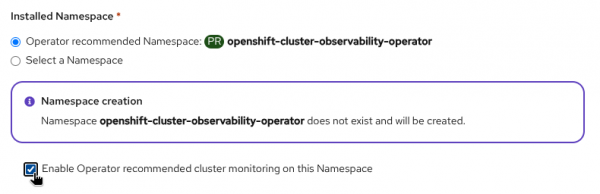
Figure 2: Select the option to enable Operator recommended cluster monitoring.
- Enable the incident detection feature by following the instructions in the previous blog post.
Install the developer preview of the Incident Detection MCP server:
oc apply -f https://raw.githubusercontent.com/openshift/cluster-health-analyzer/refs/heads/mcp-dev-preview/manifests/mcp/01_service_account.yaml oc apply -f https://raw.githubusercontent.com/openshift/cluster-health-analyzer/refs/heads/mcp-dev-preview/manifests/mcp/02_deployment.yaml oc apply -f https://raw.githubusercontent.com/openshift/cluster-health-analyzer/refs/heads/mcp-dev-preview/manifests/mcp/03_mcp_service.yaml- Install OpenShift Lightspeed 1.0.10+ from OperatorHub.
Store your OpenAI (or other LLM provider) API key in a secret:
oc create secret generic -n openshift-lightspeed credentials --from-literal=apitoken=<YOUR_API_KEY>An API token is required to interact with the LLM, and it must be available as a secret in the cluster.
Configure OpenShift Lightspeed with the LLM provider and add the Incident Detection MCP server. You can follow the official documentation or use the command and following YAML, preconfigured for the OpenAI provider:
oc apply -f - <<EOF
apiVersion: ols.openshift.io/v1alpha1
kind: OLSConfig
metadata:
  name: cluster
spec:
  featureGates:
  - MCPServer
  llm:
    providers:
    - name: myOpenai
      type: openai
      credentialsSecretRef:
        name: credentials
      url: https://api.openai.com/v1
      models:
      - name: gpt-4.1-mini
  mcpServers:
  - name: cluster-health
    headers:
    - name: kubernetes-authorization
      valueFrom:
        type: kubernetes
    url: 'http://cluster-health-mcp-server.openshift-cluster-observability-operator.svc.cluster.local:8085/mcp'
  ols:
    defaultModel: gpt-4.1-mini
    defaultProvider: myOpenai
EOF
Note we are using the OpenAI provider here, but you are free to choose others.
- The configuration takes a few minutes to apply. If you open the chat before it is complete, you will see the warning message Waiting for OpenShift Lightspeed service.

Incident analysis in the Lightspeed chat
Once the Incident Detection MCP server is installed, incident data will be included in your chat context whenever it's relevant to the conversation. The Incident Detection MCP tools are typically triggered by phrases semantically related to "cluster health," "alerts," "issues," and, of course, "incidents."
For instance, you could ask:
Are there incidents firing?Or variations of these questions. If any incidents are currently firing, the response will include a report (Figure 3).

Note that when the MCP tool is invoked, a get_incidents label appears below the response. If you don't see this label, it means the LLM decided not to call the tool for some reason. Remember that LLMs are not deterministic. They decide when to call MCP tool functions based on several factors, such as the model version, available MCP servers, the current context, and the conversation history. To ensure incident data is included, try to add the word "incident" in your question.
LLMs may also use incident data indirectly, even in prompts that don't explicitly ask for it. For example, the following prompt could use the incident data to generate a report:
I'm seeing KubeAPITerminatedRequests in the alerts. Analyze the incident and tell me what's happeningAnother use case is to start with a symptom and ask the LLM to find the root cause:
Why is [component/service/...] down?When an incident is mentioned in a conversation, you can request its details directly from the chat (for example, "explain incident X", as illustrated in Figure 4) or by consulting the Observe → Incidents page. A direct link to the incident page is sometimes embedded in the conversation, but it depends on the language model being used.

Security considerations
The Incident Detection MCP server is a read-only component and can only access data the currently logged-in user can see in the OpenShift web console. If the user lacks sufficient permissions to query the in-cluster Prometheus and Alertmanager, OpenShift Lightspeed will not be able to access incident data.
It's important to note that the Incident Detection MCP is designed for exclusive use with OpenShift Lightspeed. It cannot be used with generic MCP clients because it requires a custom authentication header. This might change in the future, as authentication standards for MCP servers are still evolving and aren't yet fully defined.
What's next
We are actively working to enhance the quality of AI-driven responses and plan to incorporate a wider range of signals to provide even richer incident analysis. As the standards for LLMs and MCPs continue to evolve, so will this tool.
As part of this developer preview release, you have the opportunity to get hands-on experience right away. We encourage you to explore its capabilities and see how it fits into your workflow. Your feedback is crucial to this process, and we invite you to share your ideas, questions, and recommendations through the Red Hat OpenShift feedback form.
Last updated: March 13, 2026
