Combining Quarkus with Red Hat OpenShift provides an ideal environment for creating scalable, fast, and lightweight applications. Quarkus significantly increases developer productivity with tooling, pre-built integrations, application services, and more. This article presents 10 reasons why you should develop your Quarkus applications on OpenShift.
Reason 1: One-step OpenShift deployment
You don’t have to be an OpenShift expert to deploy Quarkus applications. The Quarkus OpenShift extension automatically generates OpenShift resources, making it easy to get started. The extension provides multiple deployment options, including Jib, Docker, and Source-to-Image (S2i). It also creates a DeploymentConfig, which triggers an automatic redeployment whenever a change is detected in the ImageStream.
Here is a simple example of a Quarkus deployment on OpenShift:
//deploy JVM-based app on OpenShift
//add OpenShift extension
mvn quarkus:add-extension -Dextensions="openshift"

//application.properties
quarkus.s2i.base-jvm-image=
quarkus.openshift.expose=true

mvn clean package -Dquarkus.kubernetes.deploy=true
Learn more: Deploying Quarkus on OpenShift.
Reason 2: One-step serverless function deployment
Quarkus applications, especially those compiled to native code, are ideal for serverless applications due to their small size and fast boot times. The Quarkus OpenShift extension also makes it easy to deploy and scale Knative serverless services. As a developer, you don’t need to worry about server provisioning or maintaining the underlying infrastructure. You simply write your code and package it in a container for deployment.
Here is an example of a serverless function deployment:
//deploy serverless knative app on OpenShift
//add OpenShift extension
mvn quarkus:add-extension -Dextensions="openshift"

//application.propertiesquarkus.s2i.base-jvm-image=
quarkus.kubernetes.deployment-target=knative
mvn clean package -Dquarkus.kubernetes.deploy=true
Learn more: Using Knative via OpenShift Serverless.
Reason 3: Live coding
The traditional Java development workflow is a major drain on productivity. It can take minutes to complete each iteration in a cycle. The Quarkus live coding feature solves this problem. Figure 1 illustrates an example workflow when running in development mode.

Here's the command to run Quarkus in development mode:
mvn compile quarkus:dev
Given this command, Quarkus checks to see if any application source files have changed. If they have, Quarkus transparently compiles the changed files and redeploys the application.
Learn more: Live coding with Quarkus.
Reason 4: Remote development and debugging
You can also do live coding remotely, in development mode, in a clustered OpenShift or Kubernetes environment. Any changes you make locally will be immediately visible in the clustered environment. Remote development and debugging lets you create applications in the same environment where your applications will run. The key is building a mutable application:
//application.properties
quarkus.package.type=mutable-jar
quarkus.live-reload.password=abc123
quarkus.kubernetes.env.vars.QUARKUS_LAUNCH_DEVMODE=true

//Deploy
mvn clean install -Dquarkus.kubernetes.deploy=true

//Start
mvnw quarkus:remote-dev -Dquarkus.live-reload.url=
Learn more: Building Quarkus applications in remote development mode.
Reason 5: Access to OpenShift ConfigMaps and secrets
Quarkus includes a kubernetes-config extension that lets you use Kubernetes ConfigMaps and secrets as a configuration source. You never even have to mount them into the pod running your Quarkus application. Instead, your Quarkus application reads ConfigMaps and secrets directly from the Kubernetes API server using the Kubernetes client:
//application.properties
quarkus.kubernetes-config.enabled=true
quarkus.kubernetes-config.secrets.enabled=true
quarkus.kubernetes-config.config-maps=

mvn clean package -Dquarkus.kubernetes.deploy=true
Learn more: The Quarkus kubernetes-config extension.
Reason 6: Health endpoints
Quarkus uses the MicroProfile Health specification (via the SmallRye extension) to provide information about the application state, such as availability and status. This information is useful in cloud environments where automated processes must frequently determine whether to discard or restart an application. Most Quarkus client extensions have built-in health status enabled by default:
//add Kubernetes-config extension
mvn quarkus:add-extension -Dextensions="smallrye-health"

//validate health extension
mvnw compile quarkus:dev
curl http://localhost:8080/health/live

//org.acme.microprofile.health.SimpleHealthCheck class
package org.acme.microprofile.health;
import org.eclipse.microprofile.health.HealthCheck;
import org.eclipse.microprofile.health.HealthCheckResponse;
import org.eclipse.microprofile.health.Liveness;
import javax.enterprise.context.ApplicationScoped;

@Liveness
@ApplicationScoped

public class SimpleHealthCheck implements HealthCheck {

@Override
public HealthCheckResponse call() {
return HealthCheckResponse.up("Simple health check");
}
}
Learn more: Using the MicroProfile Health specification in Quarkus.
Reason 7: Application metrics support
Quarkus uses the Micrometer extension to support capturing runtime and application metrics. These metrics provide insight into what is happening inside the application. You can also format Micrometer extension metrics for processing with tools like Prometheus and Grafana, which support analysis and visualization:
//add Kubernetes-config extension
mvn quarkus:add-extension -Dextensions="micrometer"

//validate health extension
mvnw compile quarkus:dev

//Code snippet to discover, count, store, and record prime numbers
@Path("/")
public class PrimeNumberResource {

private final LongAccumulator highestPrime = new LongAccumulator(Long::max, 0);

private final MeterRegistry registry;

PrimeNumberResource(MeterRegistry registry) {
this.registry = registry;
// Create a gauge to obtain the highest observed prime number
registry.gauge("prime.number.max", this,PrimeNumberResource::highestObservedPrimeNumber);}

// Return the highest observed prime value
long highestObservedPrimeNumber() {
return highestPrime.get();}
}
Learn more: The MicroProfile Metrics API in Quarkus.
Reason 8: Tracing support
Quarkus uses the MicroProfile OpenTracing specification (via the SmallRye extension) to provide distributed tracing across services for interactive web applications. The SmallRye extension includes the default Jaeger tracer to monitor and troubleshoot transactions in a distributed system:
//add Kubernetes-config extension
mvn quarkus:add-extension -Dextensions="smallrye-opentracing"

//validate health extension
mvnw compile quarkus:dev

//REST endpoints are automatically traced. Here's how to trace additional methods
import javax.enterprise.context.ApplicationScoped;
import org.eclipse.microprofile.opentracing.Traced;

@Traced
@ApplicationScoped
public class FrancophoneService {
public String bonjour() {
return "bonjour";}
}
Learn more: Using OpenTracing in Quarkus applications.
Reason 9: Developer tooling
You might come for the performance, but you'll stay for the developer productivity. Developer tooling makes it even easier to develop and deploy Quarkus applications on OpenShift. Here are a few examples:
- IDE support: Quarkus utilizes the Quarkus Language Server to support your favorite IDE, including VSCode, Eclipse, IntelliJ, and more.
- Build tools: Quarkus also supports Maven and Gradle build tools.
- Codestarts: Extension codestarts include code examples and documentation to make it easier for developers new to Quarkus to create applications.
Reason 10: Compatibility with Spring APIs
Spring is a dominant Java framework for developers, but Spring applications were not designed for cloud-native environments like OpenShift. Quarkus, on the other hand, was created and optimized for the cloud. As a result, Quarkus can reduce cloud-resource efficiency by up to 64%.
If you need cloud-native efficiency but prefer to stick with the framework you know, Quarkus provides a Spring-compatibility layer. This means you can create applications using the Spring APIs you are familiar with, including data, web, config, security, dependency injection, and more. Here's an example of Spring web development in Quarkus:
//Spring Web example
import java.util.List;
import org.springframework.web.bind.annotation.*;

@RestController
@RequestMapping("/person")
public class PersonController {
@GetMapping(path = "/greet/{id}", produces = "text/plain")

public String greetPerson(@PathVariable(name = "id") long id) {
String name="";
return name;
}

@GetMapping(produces = "application/json")
public Iterable findAll() {
return personRepository.findAll();
}
Learn more: Quarkus for Spring developers.
Get started with Quarkus
I hope the availability of developer tooling, pre-built integrations, and application services inspires you to develop your first Quarkus application on OpenShift. These additional resources will help you get started:
- Interactive tutorials: The Quarkus homepage includes numerous interactive tutorials that walk you through building Quarkus applications in a pre-configured OpenShift environment.
- Generate a Quarkus project: Quarkus project initializers make it easy to select extensions and generate sample applications for both the community and Red Hat builds of Quarkus.
- OpenShift access: Red Hat provides several options for accessing an OpenShift environment, including the developer sandbox shown in Figure 2.
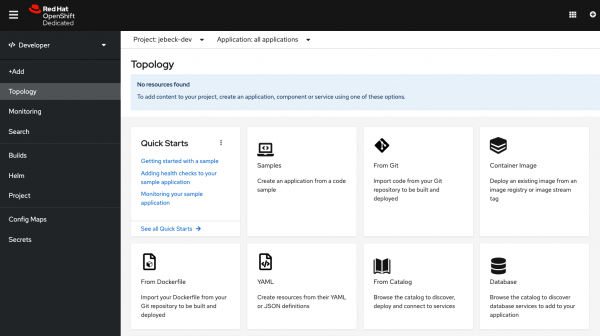
Figure 2: The OpenShift developer sandbox. Learn more about the possibilities of using a Red Hat OpenShift 4 cluster on your computer, in your datacenter, and more.

Last updated: January 2, 2024

