AI
  • Get started with AI

    • Red Hat AI

      Accelerate the development and deployment of enterprise AI solutions.

    • AI learning hub

      Explore learning materials and tools, organized by task.

    • AI interactive demos

      Click through scenarios with Red Hat AI, including training LLMs and more.

    • AI/ML learning paths

      Expand your Red Hat OpenShift AI knowledge using these learning resources.

    • AI quickstarts

      Focused AI use cases designed for fast deployment on Red Hat AI platforms.

    • No-cost AI training

      Foundational Red Hat AI training.

  • Featured resources

    • Red Hat OpenShift AI
    • Open source AI for developers
    • AI product application development
    • Open source-powered AI/ML for hybrid cloud
    • AI and Node.js cheat sheet

Red Hat AI Factory with NVIDIA

Red Hat AI Factory with NVIDIA is a co-engineered, enterprise-grade AI solution for building, deploying, and managing AI at scale across hybrid cloud environments.

Learn
  • Self-guided

    • Documentation

      Find answers, get step-by-step guidance, and learn how to use Red Hat products.

    • Learning paths

      Explore curated walkthroughs for common development tasks.

    • Guided learning

      Receive custom learning paths powered by our AI assistant.

    • See all learning
  • Hands-on

    • Developer Sandbox

      Spin up Red Hat's products and technologies without setup or configuration.

    • Interactive labs

      Learn by doing in these hands-on, browser-based experiences.

    • Interactive demos

      Click through product features in these guided tours.

  • Browse by topic

    • AI/ML
    • Automation
    • Java
    • Kubernetes
    • Linux
    • See all topics
  • Training & certifications

    • Courses and exams
    • Certifications
    • Skills assessments
    • Red Hat Academy
    • Learning subscription
    • Explore training
Build
  • Get started

    • Red Hat build of Podman Desktop

      A downloadable, local development hub to experiment with our products and builds.

    • Developer Sandbox

      Spin up Red Hat's products and technologies without setup or configuration.

  • Download products

    • Red Hat Enterprise Linux
    • Red Hat AI
    • Red Hat OpenShift
    • Red Hat Ansible Automation Platform
    • See all products
  • Featured

    • Red Hat build of OpenJDK
    • Red Hat JBoss Enterprise Application Platform
    • Red Hat OpenShift Dev Spaces
    • Red Hat Developer Toolset
  • References

    • E-books
    • Documentation
    • Cheat sheets
    • Architecture center
Community
  • Get involved

    • Events
    • Live AI events
    • Red Hat Summit
    • Red Hat Accelerators
    • Community discussions
  • Follow along

    • Articles & blogs
    • Developer newsletter
    • Videos
    • Github
  • Get help

    • Customer service
    • Customer support
    • Regional contacts
    • Find a partner

Join the Red Hat Developer program

Download Red Hat products and project builds, access support documentation, learning content, and more.

ConsoleDocsSupport Search
New For you

Recommended

We'll recommend resources you may like as you browse. Try these suggestions for now.

  • Product downloads
  • Cheat sheets
  • Red Hat Developer learning portal
  • Developer blog
  • E-books
  • Developer Sandbox
Log in

Get more with a Red Hat Developer account

  • Product downloads
  • Console access
  • Event registration
  • Training & trials
Explore more account benefitsLog in or register

A subscription may be required for some services.

Contact us

Six popular incident management tools for Red Hat Enterprise Linux

September 1, 2016
Zachary Flower
Related topics:
DevOpsLinux
Related products:
Red Hat Enterprise Linux

    From a developer’s perspective, “incident management” can be a pretty ambiguous term. While the first thing that comes to mind is receiving and responding to alerts, most IT professionals know it is so much more than that. Effective incident management starts with data collection and continues through alerting, escalation, collaboration, and resolution. At the server level, the most important pieces of incident management are infrastructure monitoring and log management, the vast majority of which are easily configurable on a Red Hat Enterprise Linux system.

    When it comes to incident management tools, they can be grouped into two separate categories depending on the security requirements of your organization: internal and external.

    Internal Tools

    Internal incident management tools are commercial or open source solutions that are installed and managed on your company’s internal infrastructure. Many organizations have strict security requirements that limit their ability to utilize external third-party SaaS tools, so solutions that can be managed in-house are crucial.

    Nagios
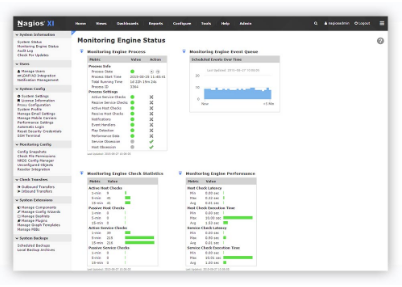
    Nagios is one of the most popular open source IT infrastructure monitoring tools on the market today. It is used by hundreds of thousands of users to identify issues in their IT infrastructure as they happen. Nagios provides everything from network analysis to server monitoring and log aggregation, making it one of the most powerful tools your organization can use.

    Download Nagios for RHEL

    Logstash

    Logstash is an open source log aggregation tool that, when paired with Elasticsearch and Kibana (known as the ELK stack), provides the ability to search and analyze log data from across your entire infrastructure. Beyond simply aggregating log data, Logstash normalizes log data into a common format before it’s inserted into your analytics datastore.

    Install ELK on RHELr

    Monit

    Monit is a popular open source tool for managing and monitoring Unix systems. The beauty of Monit is that it not only monitors your system and alerts you of issues, it can be configured to automatically respond and repair the system.

    Install Monit on RHEL

    External Tools

    External incident management tools are software-as-a-service (SaaS) solutions that are built and managed by a third-party provider. These tools are often far more cost-effective for smaller organizations. While external solutions aren’t always practical from a security standpoint, they can provide significantly more features and integrations than internal tools.

    PagerDuty

    PagerDuty is an incident management tool with an emphasis on incident resolution. Through integrations with almost every popular incident management tool available (including the three internal tools mentioned above), PagerDuty is an incredibly powerful alerting and escalation tool, and it’s used by some of the most popular tech companies in the world.

    Install PagerDuty Agent on RHEL

    Logentries

    Logentries is a third-party log management and analytics tool that provides much of the same functionality as Logstash, but without all of the configuration overhead. With the ability to search, visualize, and monitor your logs, your team can easily run down issues at any time, from anywhere.

    Install Logentries Agent on RHEL

    New Relic
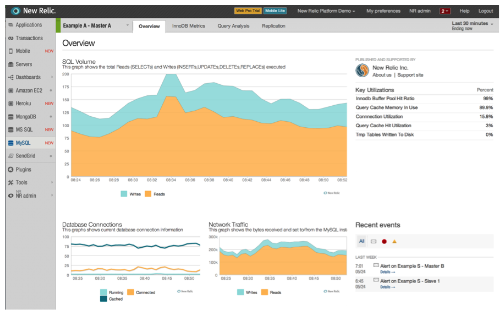
    As far as application monitoring goes, New Relic is the holy grail. New Relic is a tool that allows your team to analyze application performance along the entire stack. Combined with user monitoring, application monitoring, and availability monitoring, New Relic is an insanely powerful weapon to have in any organization’s arsenal.

    Install New Relic Agent on RHEL

    Effective incident management is about more than just the toolset you use, it is also about the process. However, no matter how refined your process is, the right tools can take things to the next level. Thanks to the hard work done on both open source and commercial solutions, you should have no problem finding the right tool for your application.

    About Zach

    Screen Shot 2016-08-12 at 11.56.29 AMZachary Flower (@zachflower) is a freelance web developer, writer, and polymath. He has an eye for simplicity and usability, and strives to build products with both the end user and business goals in mind. From building projects for the NSA to creating features for companies like Name.com and Buffer, Zach has always taken a strong stand against needlessly reinventing the wheel, often advocating for the use of well established third-party and open source services and solutions to improve the efficiency and reliability of a development project.

    Last updated: March 16, 2023

    Recent Posts

    • A day in the life of an NVIDIA H100 on Red Hat OpenShift 5

    • Migrate BuildConfigs to builds for Red Hat OpenShift with one plug-in install

    • Run Red Hat Enterprise Linux CoreOS on NVIDIA BlueField DPUs

    • Agent harness engineering: Separating model capabilities from enforcement

    • What's new for developers in Red Hat Enterprise Linux 10.3 and 9.9

    Red Hat Developers logo

    Platforms

    • Red Hat AI
    • Red Hat Enterprise Linux
    • Red Hat OpenShift
    • Red Hat Ansible Automation Platform
    • See all products

    Build

    • Developer Sandbox
    • Developer tools
    • Interactive tutorials
    • API catalog

    Quicklinks

    • Learning resources
    • E-books
    • Cheat sheets
    • Blog
    • Events
    • Newsletter

    Communicate

    • About us
    • Contact sales
    • Find a partner
    • Report a website issue
    • Site status dashboard
    • Report a security problem

    Red Hat Developer

    Build here. Go anywhere.

    We serve the builders. The problem solvers who create careers with code.

    Join us if you’re a developer, software engineer, web designer, front-end designer, UX designer, computer scientist, architect, tester, product manager, project manager or team lead.

    Sign me up

    Red Hat legal and privacy links

    • About Red Hat
    • Jobs
    • Events
    • Locations
    • Contact Red Hat
    • Red Hat Blog
    • Inclusion at Red Hat
    • Cool Stuff Store
    • Red Hat Summit
    © 2026 Red Hat

    Red Hat legal and privacy links

    • Privacy statement
    • Terms of use
    • All policies and guidelines
    • Digital accessibility
    Ask AI