In part 1, I introduced the EventFlow platform for developing, deploying, and managing event-driven microservices using Red Hat AMQ Streams. This post will demonstrate how to deploy the EventFlow platform on Red Hat OpenShift, install a set of sample processors, and build a flow.
Deploying the EventFlow platform
The EventFlow platform requires Red Hat OpenShift and these instructions have been tested on OpenShift 3.11 running on Minishift 1.2.5. This post will use the upstream Strimzi project in place of Red Hat AMQ Streams, but the instructions should be identical except the installation of the Cluster Operator.
Prerequisites — Minishift and Strimzi
Once you've installed Minishift, the first step is to start Minishift with slightly altered default configuration—increasing the amount of CPU and memory available:
minishift config set openshift-version v3.11.0
minishift config set memory 8GB
minishift config set cpus 4
minishift config set disk-size 50g
minishift config set image-caching true
minishift addons enable admin-user
minishift addons enable anyuid
minishift start
This may take a few minutes to start, but once it has, you can continue with the configuration:
eval $(minishift oc-env)
eval $(minishift docker-env)
This sets up the correct environment variables in your session. Because EventFlow uses Apache Kafka for its communication, the next step is to install a Strimzi Kafka cluster:
oc login -u system:admin
oc apply -f https://github.com/strimzi/strimzi-kafka-operator/releases/download/0.11.3/strimzi-cluster-operator-0.11.3.yaml -n myproject
This step sets up an Operator that can create clusters on demand, so the next step is to do just that and create a small Kafka cluster with a single broker instance:
oc apply -f https://raw.githubusercontent.com/strimzi/strimzi-kafka-operator/0.11.3/examples/kafka/kafka-persistent-single.yaml -n myproject
While this is being brought up, you can monitor the progress using:
oc get pods -w
or open the console using:
minishift console
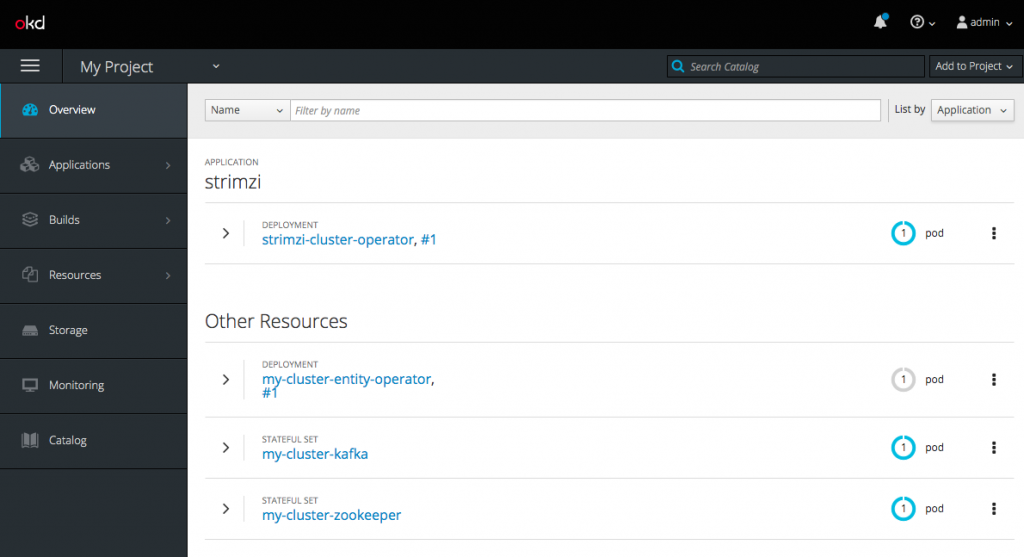
which should show a Strimzi installation running.
Installing EventFlow components
EventFlow comprises a number of components, which must be installed next. The first item is Custom Resource Definitions (CRDs), which are used to represent the flow structure, the individual processor elements and the representation of the targeted deployment clouds. This is done by installing the following three yaml definitions:
oc create -f https://raw.githubusercontent.com/rh-event-flow/eventflow/master/ui/src/main/resources/processor-crd.yml
oc create -f https://raw.githubusercontent.com/rh-event-flow/eventflow/master/ui/src/main/resources/flow-crd.yml
oc create -f https://raw.githubusercontent.com/rh-event-flow/eventflow/master/ui/src/main/resources/cloud-crd.yml
Once this is done, the next step in the installation is to give the EventFlow Operator permission to monitor Custom Resources:
oc adm policy add-cluster-role-to-user cluster-admin system:serviceaccount:myproject:default
Finally, the EventFlow Operator, User Interface, and the Environment Variable Operator need to be deployed and configured:
https://raw.githubusercontent.com/rh-event-flow/eventflow/master/yaml/00-deploy-components.yaml.txt
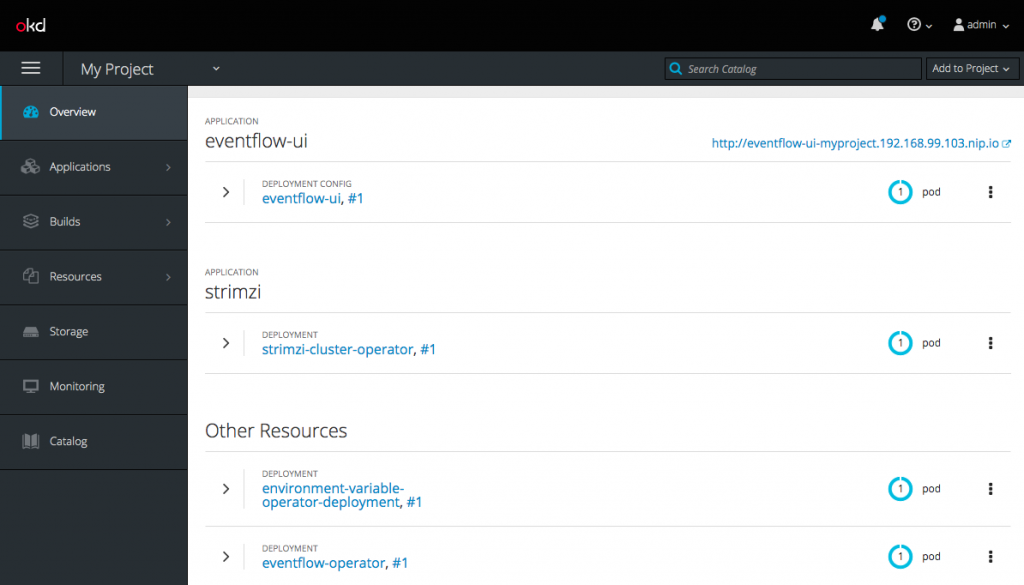
Deploying the sample microservices
Several sample processors are available for use in this proof-of-concept; these are available as containers in DockerHub and they can be registered by running the following commands:
oc create -f https://raw.githubusercontent.com/rh-event-flow/eventflow-processor-samples/master/data-source/src/main/resources/source-cr.yml
oc create -f https://raw.githubusercontent.com/rh-event-flow/eventflow-processor-samples/master/data-processor/src/main/resources/processor-cr.yml
oc create -f https://raw.githubusercontent.com/rh-event-flow/eventflow-processor-samples/master/data-sink/src/main/resources/sink-cr.yml
This will register a number of Custom Resources in Red Hat OpenShift describing the flow processors. The Processor Custom Resource is used to describe the interface that the service offers the flow. User editable parameters can be defined as well as the number of inputs and outputs the processor has. There are three types of processors (producers, consumers, and processors) that a flow can include, and the examples include one of each. The source of the samples can be downloaded from: https://github.com/rh-event-flow/eventflow-processor-samples.
Composing microservices
So far, we have shown how to install the necessary components and register a set of example microservices. With that complete, the EventFlow UI can be used to integrate the microservices into a flow.
The install script for the EventFlow will have exposed an OpenShift route for the manager UI. To determine the URL of the Flow Manager, check the HOST/PORT section of the OpenShift route:
oc get route eventflow-ui
From the flow manager UI, flows can be created and edited. The sample processors will include a source, which will generate random doubles and a sink that log the data to the console. Right-click on the canvas, add these two processors, and connect them together. Then, give the flow a unique name and click the Submit button. This will deploy your flow.
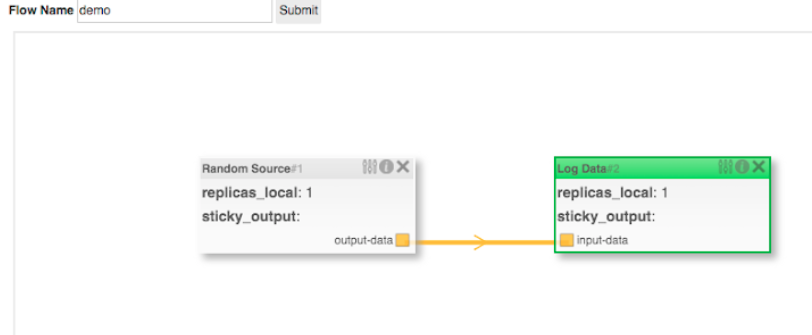
Revisit the Red Hat OpenShift console, and you will see the containers running. The flow doesn't really exist but a set of microservices has been deployed, Apache Kafka topics have been created, and the services will be configured to communicate over those topics. The logs of the -logdata-XXX container will show the messages being received.
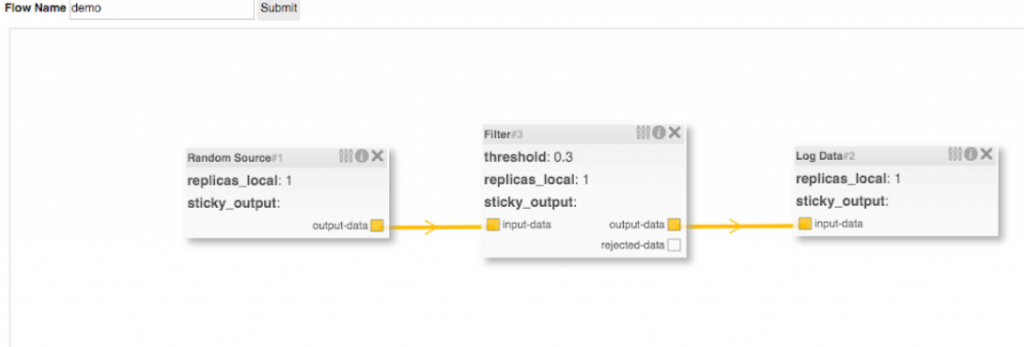
One of the EventFlow platform components—the FlowOperator—monitors flows and reacts when they are changed. If the flow is reconfigured (e.g., a filter processor is added to the flow between the data source and log data microservices), the FlowOperator will detect this change and respond accordingly. In this case, a new microservice for the filter will be instantiated, which will consume messages from the data source. The log-data microservice will be reconfigured to consume the output of the filter rather than the original data source. The FlowOperator only reconfigures the parts of the flow that have changed; therefore, the random-data microservice will remain unchanged.
Dynamic reconfiguration of event-driven microservices is a powerful tool. Not only can new microservices be introduced to a running flow but application settings can be edited (e.g., change the threshold on the filter and only this container will be redeployed), and non-functional properties can be modified (e.g., the number of replicas of each container).
Over time, more runtime settings will be exposed to the flow interface, including auto-scaling properties, monitoring, and metrics, and, because the communication is done via Apache Kafka, whether new processors should begin consuming from offset (the 'start' of the topic). This last point allows a flow to be reconfigured and then behave (once it has caught up) as if the new version had been deployed originally.
Because flows are represented as Kubernetes Custom Resources, they are integrated into the Red Hat OpenShift API. They can be created, listed, and deleted from the command line—to tear down the flow run $ oc delete flow demo. Processors can also be interacted with in this way, for example, $ oc get processors.
One advantage in creating an abstract representation of a flow and making use of an operator to deploy it within a container platform is the fact that it is possible to support the same flow structure on different middleware technologies. Part 3 of this series will explore exactly that and demonstrate a reimplementation of the EventFlow concept on top of Knative, a recently announced cloud-native serving and eventing project designed to work natively in Kubernetes and Red Hat Openshift.

