AI
  • Get started with AI

    • Red Hat AI

      Accelerate the development and deployment of enterprise AI solutions.

    • AI learning hub

      Explore learning materials and tools, organized by task.

    • AI interactive demos

      Click through scenarios with Red Hat AI, including training LLMs and more.

    • AI/ML learning paths

      Expand your Red Hat OpenShift AI knowledge using these learning resources.

    • AI quickstarts

      Focused AI use cases designed for fast deployment on Red Hat AI platforms.

    • No-cost AI training

      Foundational Red Hat AI training.

  • Featured resources

    • Red Hat OpenShift AI
    • Open source AI for developers
    • AI product application development
    • Open source-powered AI/ML for hybrid cloud
    • AI and Node.js cheat sheet

Red Hat AI Factory with NVIDIA

Red Hat AI Factory with NVIDIA is a co-engineered, enterprise-grade AI solution for building, deploying, and managing AI at scale across hybrid cloud environments.

Learn
  • Self-guided

    • Documentation

      Find answers, get step-by-step guidance, and learn how to use Red Hat products.

    • Learning paths

      Explore curated walkthroughs for common development tasks.

    • Guided learning

      Receive custom learning paths powered by our AI assistant.

    • See all learning
  • Hands-on

    • Developer Sandbox

      Spin up Red Hat's products and technologies without setup or configuration.

    • Interactive labs

      Learn by doing in these hands-on, browser-based experiences.

    • Interactive demos

      Click through product features in these guided tours.

  • Browse by topic

    • AI/ML
    • Automation
    • Java
    • Kubernetes
    • Linux
    • See all topics
  • Training & certifications

    • Courses and exams
    • Certifications
    • Skills assessments
    • Red Hat Academy
    • Learning subscription
    • Explore training
Build
  • Get started

    • Red Hat build of Podman Desktop

      A downloadable, local development hub to experiment with our products and builds.

    • Developer Sandbox

      Spin up Red Hat's products and technologies without setup or configuration.

  • Download products

    • Red Hat Enterprise Linux
    • Red Hat AI
    • Red Hat OpenShift
    • Red Hat Ansible Automation Platform
    • See all products
  • Featured

    • Red Hat build of OpenJDK
    • Red Hat JBoss Enterprise Application Platform
    • Red Hat OpenShift Dev Spaces
    • Red Hat Developer Toolset
  • References

    • E-books
    • Documentation
    • Cheat sheets
    • Architecture center
Community
  • Get involved

    • Events
    • Live AI events
    • Red Hat Summit
    • Red Hat Accelerators
    • Community discussions
  • Follow along

    • Articles & blogs
    • Developer newsletter
    • Videos
    • Github
  • Get help

    • Customer service
    • Customer support
    • Regional contacts
    • Find a partner

Join the Red Hat Developer program

Download Red Hat products and project builds, access support documentation, learning content, and more.

ConsoleDocsSupport Search
New For you

Recommended

We'll recommend resources you may like as you browse. Try these suggestions for now.

  • Product downloads
  • Cheat sheets
  • Red Hat Developer learning portal
  • Developer blog
  • E-books
  • Developer Sandbox
Log in

Get more with a Red Hat Developer account

  • Product downloads
  • Console access
  • Event registration
  • Training & trials
Explore more account benefitsLog in or register

A subscription may be required for some services.

Contact us

Why should I use Node.js: The Non-blocking Event I/O Framework?

August 16, 2016
Cesar Valdez
Related topics:
Node.js
Related products:
Red Hat build of Node.js

    Objective

    Some days ago, I was having an argument with a few Java developers about Node.js, they asked questions like  “why should I use that?” or “what’s the benefit?”, I told them by memory that Node.js is an event driven I/O, and thanks to that you will end up writing very efficient server-side applications. They come back saying that they can get the same effect using threads.

    Thing is I wasn't fully prepared to explain the difference, I had a notion of what the epoll system call in GNU/Linux is, but I didn’t have a full map in my mind. The goal of this document is to explain how Node.js Event Driven works and why this paradigm and non-blocking I/O is so important if you want to make a efficient use of your resources (Disk, Network, etc).

    Anatomy of a browser request

    When you are in your browser and you navigate to a site, your browser open a transaction sending a message to the server asking for some resource usually an html file, and the server execute some business logic and then respond sending this page back to the client.

    To make this happen using your favorite language you need a operative system with Socket API support in POSIX compliant OS or Winsock if you run in Windows, your server code no matter in what language will end up making system calls through this library.

    Blocking I/O

    You may had heard that almost everything in Unix is a file ( I/O stream), this apply to sockets as well, when you create one socket you get back an file descriptor representing an I/O capable resource.

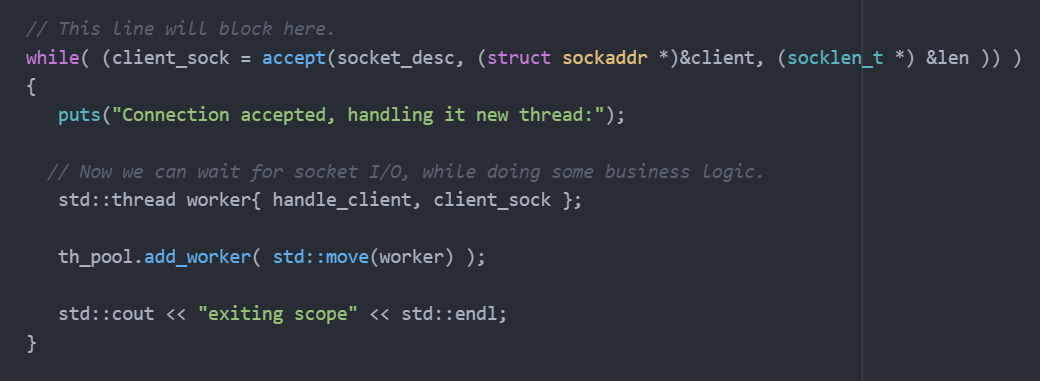
    The system call to do the handshake with the browser/client is called accept this call blocks by default, this means that your program will wait for data to come in, while your are waiting your program will be unable to handle business logic.

    This code below can only handle one client at time, and thats sad.

    blocking

    Multi-threading

    Your user base is growing and now you have a problem because your server is not fast enough due to the blocking nature of your implementation, so a common technique is to spawn a new thread or process to handle the I/O for each client.

    This is fantastic but lets examine some pitfalls:

    • The Linux kernel reserve 2 MB RAM per thread by default, this means that your memory grows linearly in proportion of sockets opened, without counting that each of them replicate the business logic cost in RAM, so consider that 2MB is the minimum per thread.
    • Need to deal with Thread-safety problems (see deadlock risks),  racing conditions, sharing resources, mutex (is a form of blocking but with threads).
    • Degrading CPU cache locality, when you are looking to max out the value of your CPU this should be a concern.
    • The time it takes to switch between worker threads (context switching)
    • Worker threads are I/O bound
    • The number of threads an OS can create per process.

    The thread exhaustion can be somewhat mitigated using Thread pools, a lot of enterprise grade Java web application use this technique, this technique is not as efficient as an non-blocking solution as we going to see in a moment.

    This a naive implementation of a multi-thread http-server:
    multi-thread

    This picture shows how a thread pool works, and its limitations.
    Thread-Pool


    Non-Blocking I/O

    This is a Kernel level feature that allows us to set a flag that tells the system to return  I/O operations (read, write, close,...) immediately even if data is not ready, this has a nice side effect, the caller thread never blocks, but it require us to change the way we code because we can’t rely in the blocking nature of the accept anymore.
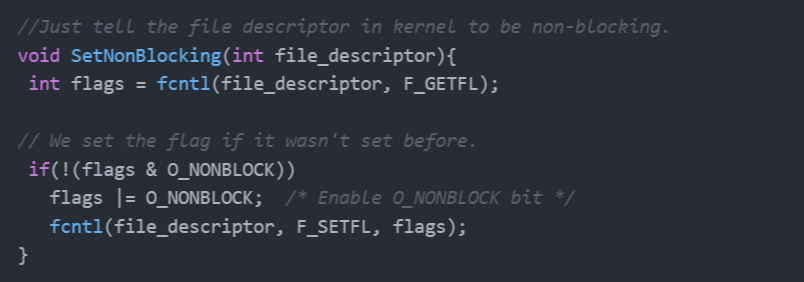
    set_non_blocking

    Evented I/O

    We want to know when data is ready, we can check the data readiness asking accept each cycle of the loop but that's sounds bad, The Linux kernel gives  us a more elegant way to deal with this dilemma. Since Kernel 2.5.44 we have an epoll API that allows us to monitor multiple file descriptors to see if they are ready for I/O.
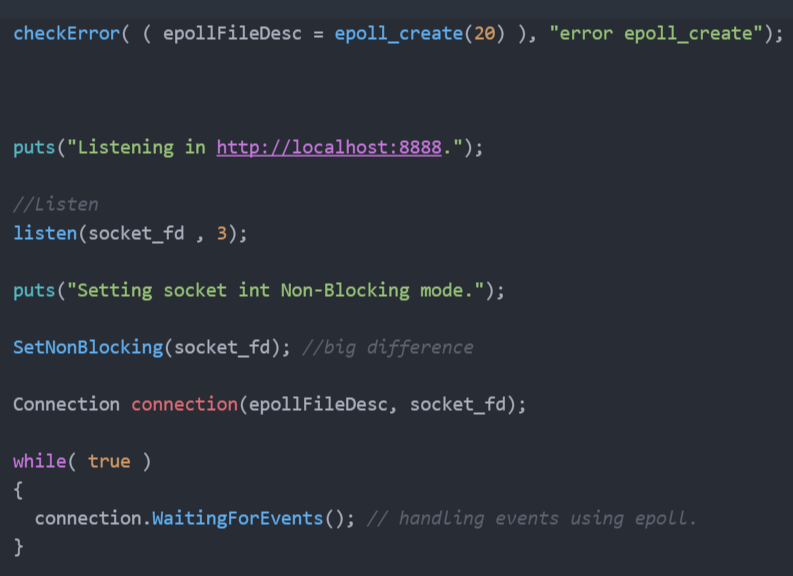
    evented-io

    Non-Blocking I/O + Event Driven

    Merging this two functionality allow us to overlap business operations with I/O, and doing it well give us low resources starvation. Other advantages include:

    • Efficiently lets the kernel manage context switching and I/O readiness.
    • Epoll API scale well monitoring large set of file descriptor, in other words you can handle more request at the same time.
    • Monitoring only cost 90 byte (160 bytes in 64bits systems), as per epoll documentation.
    • Efficiently overlap I/O with other tasks like business logic, etc.

    Non-Blocking I/O + Epoll (Event Driven) + V8 Engine  = Node.js

    So Javascript was created with user interface in mind,  one of the language features is function first class citizen that allows you to pass functions as parameters, so basically you can monitor for events (user interaction) and pass a function to handle this events.

    In the other hand handling I/O events with epoll can be a little bit complicate (handling calls with state for example), this require your server app to be react accordingly to all possible events emitted by the file descriptor, this is one of the many good excuse to use Javascript, the result is Node.js that glue v8 and LibUV (event I/O support across OS) to create a very good framework to develop critical I/O server applications.

    Conclusion

    We have described different way to handle I/O bound scalability showing various techniques used to solve this problems, as we can observe Node.js take advantage of the most efficient of those techniques and this maybe explain the excitement in the community and fast adoption of this platform to handle big concurrency problems.

    I left example code for testing the 3 ways to handle Socket I/O here, they are simple implementations just to showcase the different I/O approach.


    References:

    I/O Multiplexing & Scalable Socket Servers
    http://www.drdobbs.com/open-source/io-multiplexing-scalable-socket-servers/184405553
    The Linux Programming Interface: http://man7.org/tlpi/

    http://people.eecs.berkeley.edu/~sangjin/2012/12/21/epoll-vs-kqueue.html

    Last updated: October 31, 2023

    Related Posts

    • Why you should use io_uring for network I/O

    • Achieving high-performance, low-latency networking with XDP: Part I

    Recent Posts

    • A day in the life of an NVIDIA H100 on Red Hat OpenShift 5

    • Migrate BuildConfigs to builds for Red Hat OpenShift with one plug-in install

    • Run Red Hat Enterprise Linux CoreOS on NVIDIA BlueField DPUs

    • Agent harness engineering: Separating model capabilities from enforcement

    • What's new for developers in Red Hat Enterprise Linux 10.3 and 9.9

    What’s up next?

    Share Image

    This cheat sheet gets you started using Ansible to automate tasks on Cisco Meraki, an enterprise-cloud managed networking solution for managing access points, security appliances, L2 and L3 switches, and more.

    Get the cheat sheet
    Red Hat Developers logo

    Platforms

    • Red Hat AI
    • Red Hat Enterprise Linux
    • Red Hat OpenShift
    • Red Hat Ansible Automation Platform
    • See all products

    Build

    • Developer Sandbox
    • Developer tools
    • Interactive tutorials
    • API catalog

    Quicklinks

    • Learning resources
    • E-books
    • Cheat sheets
    • Blog
    • Events
    • Newsletter

    Communicate

    • About us
    • Contact sales
    • Find a partner
    • Report a website issue
    • Site status dashboard
    • Report a security problem

    Red Hat Developer

    Build here. Go anywhere.

    We serve the builders. The problem solvers who create careers with code.

    Join us if you’re a developer, software engineer, web designer, front-end designer, UX designer, computer scientist, architect, tester, product manager, project manager or team lead.

    Sign me up

    Red Hat legal and privacy links

    • About Red Hat
    • Jobs
    • Events
    • Locations
    • Contact Red Hat
    • Red Hat Blog
    • Inclusion at Red Hat
    • Cool Stuff Store
    • Red Hat Summit
    © 2026 Red Hat

    Red Hat legal and privacy links

    • Privacy statement
    • Terms of use
    • All policies and guidelines
    • Digital accessibility
    Ask AI