AI
  • Get started with AI

    • Red Hat AI

      Accelerate the development and deployment of enterprise AI solutions.

    • AI learning hub

      Explore learning materials and tools, organized by task.

    • AI interactive demos

      Click through scenarios with Red Hat AI, including training LLMs and more.

    • AI/ML learning paths

      Expand your Red Hat OpenShift AI knowledge using these learning resources.

    • AI quickstarts

      Focused AI use cases designed for fast deployment on Red Hat AI platforms.

    • No-cost AI training

      Foundational Red Hat AI training.

  • Featured resources

    • Red Hat OpenShift AI
    • Open source AI for developers
    • AI product application development
    • Open source-powered AI/ML for hybrid cloud
    • AI and Node.js cheat sheet

Red Hat AI Factory with NVIDIA

Red Hat AI Factory with NVIDIA is a co-engineered, enterprise-grade AI solution for building, deploying, and managing AI at scale across hybrid cloud environments.

Learn
  • Self-guided

    • Documentation

      Find answers, get step-by-step guidance, and learn how to use Red Hat products.

    • Learning paths

      Explore curated walkthroughs for common development tasks.

    • Guided learning

      Receive custom learning paths powered by our AI assistant.

    • See all learning
  • Hands-on

    • Developer Sandbox

      Spin up Red Hat's products and technologies without setup or configuration.

    • Interactive labs

      Learn by doing in these hands-on, browser-based experiences.

    • Interactive demos

      Click through product features in these guided tours.

  • Browse by topic

    • AI/ML
    • Automation
    • Java
    • Kubernetes
    • Linux
    • See all topics
  • Training & certifications

    • Courses and exams
    • Certifications
    • Skills assessments
    • Red Hat Academy
    • Learning subscription
    • Explore training
Build
  • Get started

    • Red Hat build of Podman Desktop

      A downloadable, local development hub to experiment with our products and builds.

    • Developer Sandbox

      Spin up Red Hat's products and technologies without setup or configuration.

  • Download products

    • Red Hat Enterprise Linux
    • Red Hat AI
    • Red Hat OpenShift
    • Red Hat Ansible Automation Platform
    • See all products
  • Featured

    • Red Hat build of OpenJDK
    • Red Hat JBoss Enterprise Application Platform
    • Red Hat OpenShift Dev Spaces
    • Red Hat Developer Toolset
  • References

    • E-books
    • Documentation
    • Cheat sheets
    • Architecture center
Community
  • Get involved

    • Events
    • Live AI events
    • Red Hat Summit
    • Red Hat Accelerators
    • Community discussions
  • Follow along

    • Articles & blogs
    • Developer newsletter
    • Videos
    • Github
  • Get help

    • Customer service
    • Customer support
    • Regional contacts
    • Find a partner

Join the Red Hat Developer program

Download Red Hat products and project builds, access support documentation, learning content, and more.

ConsoleDocsSupport Search
New For you

Recommended

We'll recommend resources you may like as you browse. Try these suggestions for now.

  • Product downloads
  • Cheat sheets
  • Red Hat Developer learning portal
  • Developer blog
  • E-books
  • Developer Sandbox
Log in

Get more with a Red Hat Developer account

  • Product downloads
  • Console access
  • Event registration
  • Training & trials
Explore more account benefitsLog in or register

A subscription may be required for some services.

Contact us

A step-by-step tutorial for continuous integration with Jenkins for a Red Hat Mobile Native iOS application-Part 2

November 18, 2016
Juana Nakfour
Related topics:
Developer tools
Related products:
Developer Toolset

    Part 2: How to Setup Jenkins to build iOS .ipa and run unit tests.

    A robust and agile mobile application development environment requires continuous integration and delivery. It also requires an integrated and automated unit testing process that helps bring applications to market successfully. This two-part series details my work done at Red Hat Open Innovation Labs and as a Mobile Technical Account Manager to capture these mobile innovations in a useful, repeatable way. In part one of this two-part series, I broke down the steps to create and unit test a native iOS application using Red Hat’s Mobile Application Platform. In part two, I’ll show how Jenkins can be used to automate continuous integration and unit testing of that Mobile app.

    Requirements

    1. Xcode 7.3
    2. Jenkins
    3. Mac OSX El Capitan

    // Fix Jenkins user

    After installing Jenkins we need to setup the Jenkins user

    1. In mac, go to system-preferences-Users and Groups-unlock-right click on the empty user you see. Specify Full name, and reset the password. Now we have a valid Jenkins user.

    1. Run these commands to give Jenkins admin rights and add to developer group

    sudo dseditgroup -o edit -a jenkins -t user admin

    sudo dscl . append /Groups/_developer GroupMembership jenkins

    Move your iPhone developer certificates to system.

    Since Jenkins will be running as a system process, not as a user application, we need to give it access to the developer certificates.

    1. Using Keychain application, find your iPhoneDeveloper certificate in login
    2. Make sure to expand it to see the iOS developer part
    3. Select both and copy
    4. Select system and paste those two items
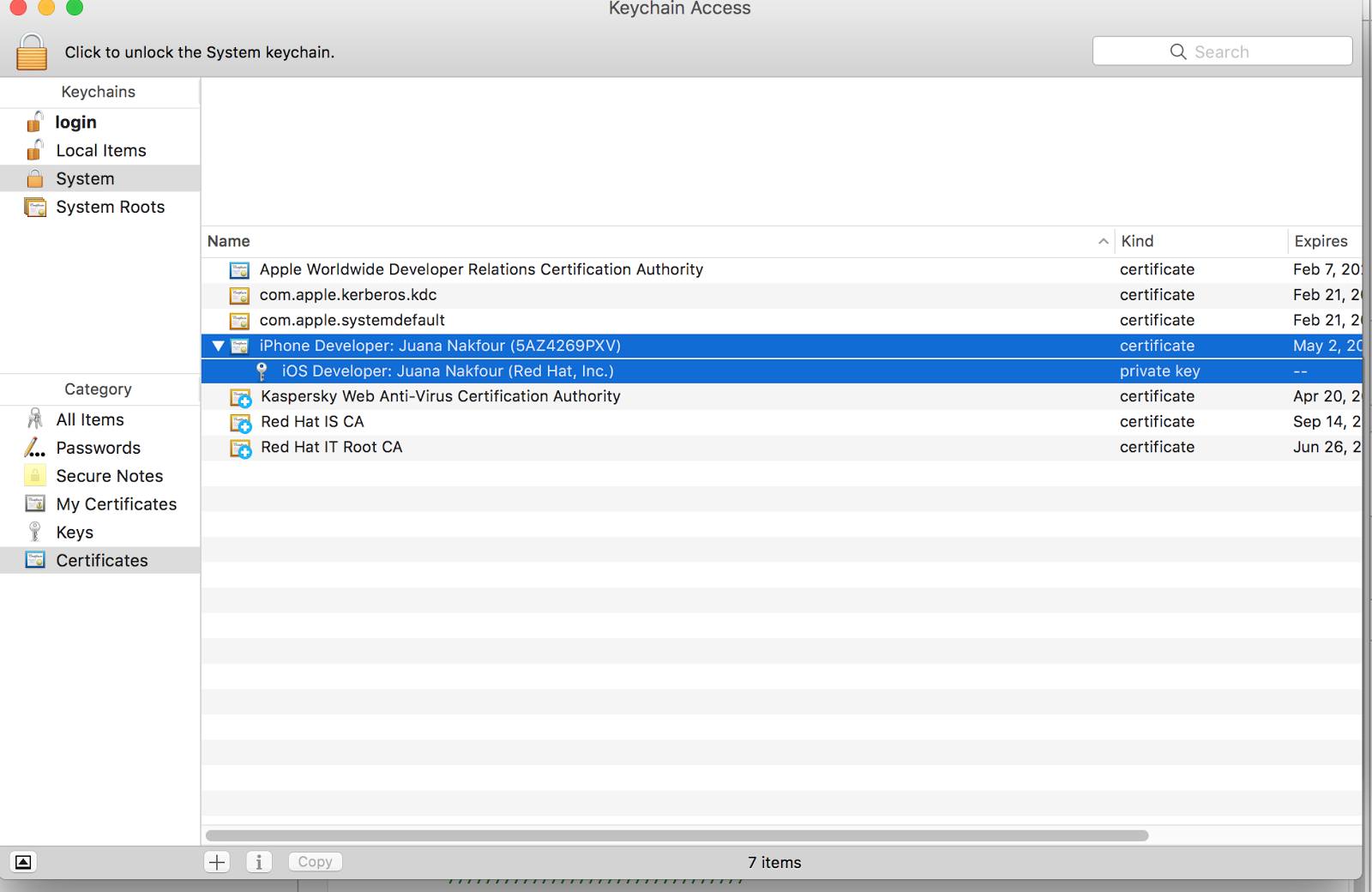
    Logout and Login into your mac machine as Jenkins user

    Add the following plugins to Jenkins

    1. Git
    2. Xcode Integration
    3. Junit Plugin

    Add SSH keys to jenkins

    Add Credentials needed to do git clone. Under Credentials create a new system credential. Specify the username (same as in Red Hat Mobile Application Platform portal) and you can either generate new ssh keys or copy paste a key directly. Keep passphrase empty.

    Change Xcode build folder

    The new Xcode places the builds in a common folder that the Xcode plugin has issues getting to, so we need to make it relative to the workspace.

    1. Go to Xcode--->Preferences---> Locations
    2. For Derived Data select as shown below


    Run Jenkins as Agent

    In order for Jenkins to launch the simulator, it needs to be running as an Agent and not as a daemon. Follow these steps:

    1. sudo cp /Library/LaunchDaemons/org.jenkins-ci.plist /Library/LaunchAgents/org.jenkins-ci.plist
    2. sudo launchctl unload /Library/LaunchDaemons/org.jenkins-ci.plist
    3. sudo launchctl load /Library/LaunchAgents/org.jenkins-ci.plist

    Setup a new Jenkins item

    Create a new Jenkins project using freestyle option and the following settings. We actually need two build steps as you will see one for *.ipa and one for running unit tests on simulator.

    1. Give your project a name.
    2. Select Git, paste the git url from Red Hat Mobile Application Platform and select the right credentials.
    3. Make sure the right branch is selected, here we have master

    1. We need three build steps:
    2. Execute shell for running pod install since our Red Hat Mobile Application Platform template uses pods

    1. First Xcode build step to build and archive *.ipa
    2. Select Clean before build
    3. Select Generate archive
    4. Set Configuration for Debug
    5. Select Pack application and build ipa
      1. ${BUILD_DATE} for ipa filename
      2. Output directory to artifacts

    1. Advanced Xcode build options
    2. Xcode Schema File to helloword-ios-app
    3. Xcode Workspace File to helloworld-ios-app
    4. Build output directory /Users/Shared/Jenkins/Home/workspace/iOSBuildAndTest/DerivedData

    4.Second build step for running unit tests

    1. Specify Target to limit it to testing: helloworld-ios-appTest
    2. Clean before build NO ← make sure this is NO or else it deletes the artifacts
    3. Configuration Debug

    Advanced Xcode build options

    1. Clean test reports = yes
    2. Xcode Schema file: helloworld-ios-app
    3. SDK = iphonesimulator
    4. Custom xcodebuild arguments=  test -destination 'platform=iOS Simulator,name=iPhone 6s,OS=9.3'
    5. Xcode Workspace file = helloworld-ios-app

    Post build steps

    1. Add Archive the artifacts and place the url to DerivedData/artifacts/*.ipa
    2. Add Publish JUnit test result report specify url to test-reports/*.xml


    Results should look like this

    This concludes part two of our tutorial for setting up Jenkins to build iOS native applications. In part one of our tutorial we added unit tests to our Red Hat Mobile Application Platform native iOS application.

    Juana Nakfour is a Senior Mobile Technical Account Manager with over 15 years advanced R&D experience in the telecommunications industry. Juana’s focus is broad and include wireless communication networks, embedded/mobile devices and microservices.


    A Red Hat Technical Account Manager (TAM) is a specialized product expert who works collaboratively with IT organizations to strategically plan for successful deployments and help realize optimal performance and growth. The TAM is part of Red Hat’s world class Customer Experience and Engagement organization and provides proactive advice and guidance to help you identify and address potential problems before they occur. Should a problem arise, your TAM will own the issue and engage the best resources to resolve it as quickly as possible with minimal disruption to your business.

    Last updated: May 31, 2024

    Recent Posts

    • A day in the life of an NVIDIA H100 on Red Hat OpenShift 5

    • Migrate BuildConfigs to builds for Red Hat OpenShift with one plug-in install

    • Run Red Hat Enterprise Linux CoreOS on NVIDIA BlueField DPUs

    • Agent harness engineering: Separating model capabilities from enforcement

    • What's new for developers in Red Hat Enterprise Linux 10.3 and 9.9

    Red Hat Developers logo

    Platforms

    • Red Hat AI
    • Red Hat Enterprise Linux
    • Red Hat OpenShift
    • Red Hat Ansible Automation Platform
    • See all products

    Build

    • Developer Sandbox
    • Developer tools
    • Interactive tutorials
    • API catalog

    Quicklinks

    • Learning resources
    • E-books
    • Cheat sheets
    • Blog
    • Events
    • Newsletter

    Communicate

    • About us
    • Contact sales
    • Find a partner
    • Report a website issue
    • Site status dashboard
    • Report a security problem

    Red Hat Developer

    Build here. Go anywhere.

    We serve the builders. The problem solvers who create careers with code.

    Join us if you’re a developer, software engineer, web designer, front-end designer, UX designer, computer scientist, architect, tester, product manager, project manager or team lead.

    Sign me up

    Red Hat legal and privacy links

    • About Red Hat
    • Jobs
    • Events
    • Locations
    • Contact Red Hat
    • Red Hat Blog
    • Inclusion at Red Hat
    • Cool Stuff Store
    • Red Hat Summit
    © 2026 Red Hat

    Red Hat legal and privacy links

    • Privacy statement
    • Terms of use
    • All policies and guidelines
    • Digital accessibility
    Ask AI