
Redhat Developers  Logo
  • AI

    Get started with AI

    • Red Hat AI
      Accelerate the development and deployment of enterprise AI solutions.
    • AI learning hub
      Explore learning materials and tools, organized by task.
    • AI interactive demos
      Click through scenarios with Red Hat AI, including training LLMs and more.
    • AI/ML learning paths
      Expand your OpenShift AI knowledge using these learning resources.
    • AI quickstarts
      Focused AI use cases designed for fast deployment on Red Hat AI platforms.
    • No-cost AI training
      Foundational Red Hat AI training.

    Featured resources

    • OpenShift AI learning
    • Open source AI for developers
    • AI product application development
    • Open source-powered AI/ML for hybrid cloud
    • AI and Node.js cheat sheet

    Red Hat AI Factory with NVIDIA

    • Red Hat AI Factory with NVIDIA is a co-engineered, enterprise-grade AI solution for building, deploying, and managing AI at scale across hybrid cloud environments.
    • Explore the solution
  • Learn

    Self-guided

    • Documentation
      Find answers, get step-by-step guidance, and learn how to use Red Hat products.
    • Learning paths
      Explore curated walkthroughs for common development tasks.
    • Guided learning
      Receive custom learning paths powered by our AI assistant.
    • See all learning

    Hands-on

    • Developer Sandbox
      Spin up Red Hat's products and technologies without setup or configuration.
    • Interactive labs
      Learn by doing in these hands-on, browser-based experiences.
    • Interactive demos
      Click through product features in these guided tours.

    Browse by topic

    • AI/ML
    • Automation
    • Java
    • Kubernetes
    • Linux
    • See all topics

    Training & certifications

    • Courses and exams
    • Certifications
    • Skills assessments
    • Red Hat Academy
    • Learning subscription
    • Explore training
  • Build

    Get started

    • Red Hat build of Podman Desktop
      A downloadable, local development hub to experiment with our products and builds.
    • Developer Sandbox
      Spin up Red Hat's products and technologies without setup or configuration.

    Download products

    • Access product downloads to start building and testing right away.
    • Red Hat Enterprise Linux
    • Red Hat AI
    • Red Hat OpenShift
    • Red Hat Ansible Automation Platform
    • See all products

    Featured

    • Red Hat build of OpenJDK
    • Red Hat JBoss Enterprise Application Platform
    • Red Hat OpenShift Dev Spaces
    • Red Hat Developer Toolset

    References

    • E-books
    • Documentation
    • Cheat sheets
    • Architecture center
  • Community

    Get involved

    • Events
    • Live AI events
    • Red Hat Summit
    • Red Hat Accelerators
    • Community discussions

    Follow along

    • Articles & blogs
    • Developer newsletter
    • Videos
    • Github

    Get help

    • Customer service
    • Customer support
    • Regional contacts
    • Find a partner

    Join the Red Hat Developer program

    • Download Red Hat products and project builds, access support documentation, learning content, and more.
    • Explore the benefits

Installing JBoss EAP 7 on RHEL using RPMs

July 11, 2016
James Falkner
Related topics:
Linux
Related products:
Red Hat JBoss Enterprise Application PlatformRed Hat Enterprise Linux

    JBoss EAP 7 was recently released, and brings with it a whole host of new features and support, such as support for Java EE 7, Undertow (a highly scalable web server), reduced port usage, graceful shutdown, improved GUI and CLI management, and much more.

    Go ahead and download it, unzip, and run bin/standalone.sh and check out all these great features. What's that? It didn't work? Did you check that your JRE is compatible? Are there outstanding incompatibility or security issues that may be resolved in an available patch? Perhaps you've already installed it elsewhere on your system and you are trying to install a conflicting version. You're not running it as root are you?

    ZIP files are awesome for getting bits up and running quickly (as a developer I use them myself quite a bit), but its simplicity hides many issues related to production software management, such as those I just mentioned. It's perfect for cross-platform developers or those non-RHEL CI/CD setups but for production RHEL systems it's the tl;dr of enterprise software deployment. This is where Red Hat and RPM can help. You can be sure of what you're installing, that it'll work securely, that you'll know it's there when asked, and that it'll be manageable using your other investments (think RHEV+RHEL+Satellite+JBoss).

    Registering your RHEL system

    It's assumed your RHEL server has already been linked with a valid subscription, but if you're not sure, run subscription-manager status. You should see something like:

    +-------------------------------------------+
     System Status Details
     +-------------------------------------------+
     Overall Status: Current

    If it's not properly linked, you'll get:

    +-------------------------------------------+
     System Status Details
     +-------------------------------------------+
     Overall Status: Unknown

    At which point, you need to register the system:

    # subscription-manager register
     Registering to: subscription.rhn.redhat.com:443/subscription
     Username: xx@yy.com
     Password:
     The system has been registered with ID: xxxxxxxxxxxxxxxxx

    And then attach your subscription:

    # subscription-manager attach --auto
    
    Installed Product Current Status:
     Product Name: JBoss Enterprise Application Platform
     Status: Subscribed
    
    Product Name: Red Hat Enterprise Linux Server
     Status: Subscribed
    
    Product Name: Red Hat Enterprise Linux Server - Extended Update Support
     Status: Subscribed

    If you have multiple subscription pools that match your product(s) you may need to specify a specific pool with --pool. More details about Subscription Manager can be found in its official docs.

    Installing EAP 7 with RPMs

    EAP 7 is available as a set of RPMs that can be installed using yum. Assuming your RHEL 7 system is properly attached to your subscription, installing EAP 7 is a straightforward affair:

    Using the CLI

    # subscription-manager repos --enable=jb-eap-7-for-rhel-7-server-rpms # for RHEL 7

    or

    # subscription-manager repos --enable=jb-eap-7-for-rhel-6-server-rpms # for RHEL 6

    Using the Subscription Manager GUI

    Navigate to System -> Repositories and ensure that the jb-eap-7-for-rhel-7-server-rpms repository is Enabled (or jb-eap-7-for-rhel-6-server-rpms for RHEL 6), and click Apply:
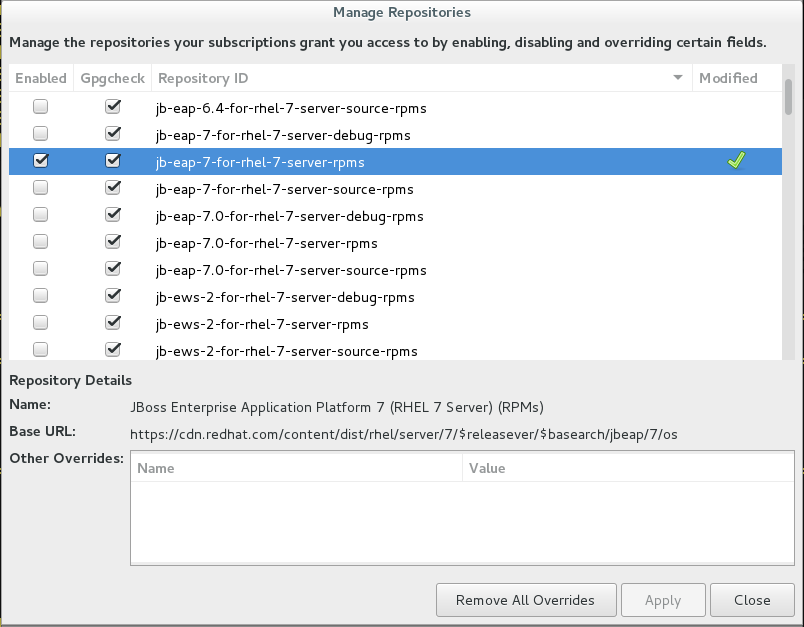
    Once the right repository is enabled, you can install EAP with the following command:

    # yum groupinstall jboss-eap7

    It'll take a few minutes to download all of the bits, but once it completes successfully, you will have EAP 7 installed in /opt/rh/eap7/root/usr/share/wildfly. And you can run bin/standalone.sh to start it up.

    Setting up EAP 7 as a service

    An RPM installation of JBoss EAP 7 installs everything that is required to run JBoss EAP as a service. Use the following command to activate the JBoss EAP service to start automatically at system boot.

    $ systemctl enable eap7-standalone.service # for RHEL 7

    or

    $ chkconfig eap7-standalone on # for RHEL 6

    More information about the various installation options for EAP 7 can be found in its official documentation.

    Last updated: January 2, 2024

    Recent Posts

    • Kafka Monthly Digest: May 2026

    • UBI 9 and 10 builders on Paketo Buildpacks with multi-arch support

    • Deploy Hermes Agent on OpenShift AI with vLLM model serving

    • Evaluation-driven development with EvalHub

    • Improve vLLM Semantic Router accuracy with fine-tuning

    Red Hat Developers logo LinkedIn YouTube Twitter Facebook

    Platforms

    • Red Hat AI
    • Red Hat Enterprise Linux
    • Red Hat OpenShift
    • Red Hat Ansible Automation Platform
    • See all products

    Build

    • Developer Sandbox
    • Developer tools
    • Interactive tutorials
    • API catalog

    Quicklinks

    • Learning resources
    • E-books
    • Cheat sheets
    • Blog
    • Events
    • Newsletter

    Communicate

    • About us
    • Contact sales
    • Find a partner
    • Report a website issue
    • Site status dashboard
    • Report a security problem

    RED HAT DEVELOPER

    Build here. Go anywhere.

    We serve the builders. The problem solvers who create careers with code.

    Join us if you’re a developer, software engineer, web designer, front-end designer, UX designer, computer scientist, architect, tester, product manager, project manager or team lead.

    Sign me up

    Red Hat legal and privacy links

    • About Red Hat
    • Jobs
    • Events
    • Locations
    • Contact Red Hat
    • Red Hat Blog
    • Inclusion at Red Hat
    • Cool Stuff Store
    • Red Hat Summit
    © 2026 Red Hat

    Red Hat legal and privacy links

    • Privacy statement
    • Terms of use
    • All policies and guidelines
    • Digital accessibility

    Chat Support

    Please log in with your Red Hat account to access chat support.